In this guide (6 sections)
- Why your CRM files so many leads under "Direct traffic"
- Every CRM needs three lead source fields
- How to capture UTM parameters in your CRM without breaking them
- Small businesses should use first-touch attribution, not multi-touch
- How to set up lead source tracking in GoHighLevel and HubSpot
- Cost per closed deal by source is the number that matters
CRM lead source tracking records where every contact came from and carries that answer through to the closed deal. Without it, you can't tell whether last month's $1,500 in ads or a podcast guest spot brought in your clients. Below you'll set up three source fields, UTM capture, a simple attribution model and one monthly report that turns it into a budget decision.
Why your CRM files so many leads under "Direct traffic"
"Direct traffic" usually means your CRM couldn't tell where a lead came from. Sort your contacts by source, and if a big chunk says "Direct traffic," "Offline sources," or nothing at all, that's a shrug, not a source.
Bigger companies struggle with this too. Nielsen's Marketing ROI Blueprint found that 85% of marketers feel confident measuring ROI, but only 32% measure it across all their channels.
The causes are boring and fixable. HubSpot's traffic source rules file a visit under "Direct traffic" when there's no referring domain and no tracking URL, and clicks from a mail domain land there too. In HighLevel, contacts you add by hand get the source "CRM UI" instead of a real channel.
Privacy features chip away at the trail as well. Apple's Link Tracking Protection strips some click IDs (like Facebook's fbclid and Google's gclid) from links shared in Messages and Mail or opened in Safari Private Browsing.
Bad source data spreads. Lead scoring, follow-up sequences, and sales forecasts all lean on knowing where a lead came from. Without it, you can't tell which marketing works, so you keep paying for all of it.
Every CRM needs three lead source fields
One lead source field isn't enough, because each method misses something. Automatic tracking misses word of mouth. Self-reported answers miss the ad someone saw three weeks ago. You need both, plus a record of what finally made them act.
This setup works in GoHighLevel, HubSpot, Pipedrive, or any CRM that supports custom fields.
Name the dropdown options after channels you actually pay for or work on: Google search, Instagram, Facebook ads, podcast, client referral, partner referral, event, and other. If you can't act on an answer, leave it off the list.
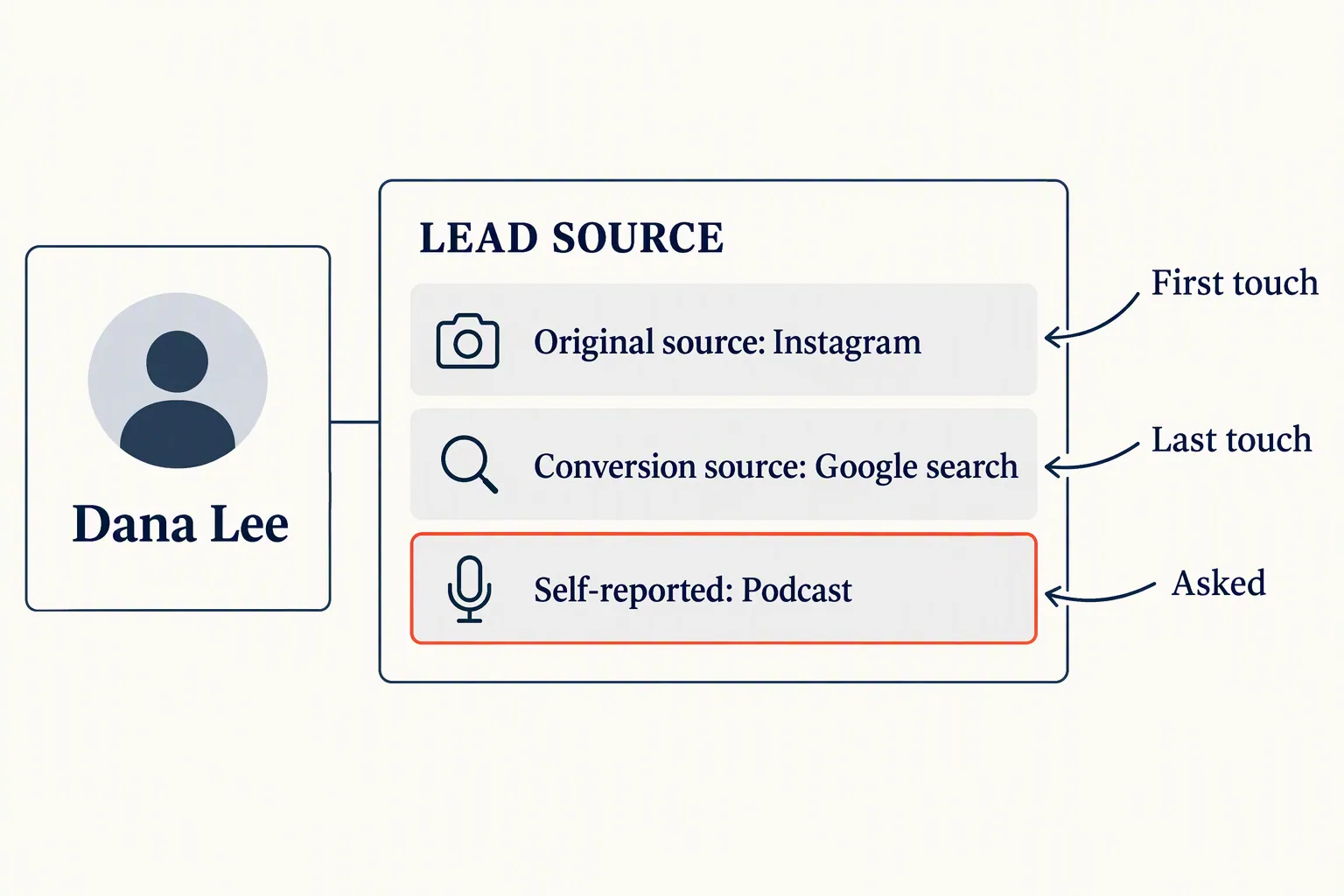
- Original source (automatic): the first channel that brought this person to you, from UTM tags or the referring site. Set it once and never overwrite it. This is your first-touch answer.
- Conversion source (automatic): the channel behind the visit where they filled out the form or booked the call. HighLevel calls this "Latest Attribution." It's your last-touch answer.
- Self-reported source (asked): a required "How did you hear about us?" dropdown on every form. Keep it to six to eight options plus "Other." Free-text boxes turn into 40 spellings of "Instagram."
- The tiebreaker: when the fields disagree, trust the self-reported answer for word of mouth, podcasts, and events. A lead tagged "Organic search" who says "My accountant told me" is a referral who Googled your name. Credit the accountant.
How to capture UTM parameters in your CRM without breaking them
UTM parameters only work if every link uses the same naming and the tags actually reach the contact record. They're the tags on the end of a link, like ?utm_source=facebook&utm_medium=paid&utm_campaign=fall-offer, and every major CRM can read them for free.
Every report you build later inherits whatever mess you create here. These four mistakes are the usual culprits.
- Messy naming: "Facebook," "facebook," and "fb" can show up as three different sources. HighLevel's attribution guide says its UTM matching is case-sensitive. Pick lowercase, write the rules down, and treat them like your CRM tag naming convention.
- No hidden fields: if your form lives on WordPress, Webflow, or Squarespace, the UTMs sit in the URL but never reach the contact record. Add hidden fields for utm_source, utm_medium, and utm_campaign, and map them to CRM properties. Install your CRM's tracking script so the tags survive when a visitor clicks around before filling out the form.
- Redirects that drop the tags: link shorteners, booking-page hops, and thank-you redirects can strip everything after the question mark. Click your own ad link, submit a test form, and check the contact record before you spend a dollar.
- Tags only on ads: tag your newsletter links, Instagram bio link, podcast show notes, and email signature too. Untagged links are how your best free channels end up filed under "Direct traffic."
Small businesses should use first-touch attribution, not multi-touch
If you close fewer than 50 deals a month, judge channels by first touch and skip multi-touch attribution. You don't have enough data for multi-touch models to mean much. Use first touch to see which channels find new people, then use the self-reported field to catch what tracking misses.
An attribution model decides who gets credit when a lead touched several channels before buying. HubSpot's attribution reports offer first touch, last touch, linear, time decay, and an "Empirical" model that gives more weight to rarer interactions.
Those reports cost a lot. Deal create and deal revenue attribution need Marketing Hub Enterprise. Professional, which HubSpot's Marketing Hub pricing page lists from $800 a month billed annually (prices checked October 2026), stops at contact create attribution. That's a lot of software to answer one question.
Last touch still has a job. It shows which page or offer gets people to act, which helps you fix forms and landing pages. It's a poor guide for budget, though, because it hands all the credit to whatever came last, often a branded search or an email reminder.
So write the rule down: "We judge channels by original source, checked against self-reported source." Then stop debating it every Monday.
How to set up lead source tracking in GoHighLevel and HubSpot
Both platforms track source out of the box, but both need about an hour of setup before you can trust the data. Still choosing? Our Systeme.io vs GoHighLevel comparison covers which one fits your business model.
Start this week, even if it feels early. Source data gets useful once you have about 90 days of clean records, so every week you wait is another week of guessing.
- GoHighLevel: every contact already stores First Attribution and Latest Attribution, shown under the Activity tab on the contact record. Use HighLevel forms, surveys, calendars, and order forms where you can, because they capture attribution natively. Add a required "How did you hear about us?" dropdown as a custom field, then add a workflow step that copies that answer to the opportunity so pipeline reports can filter by it.
- HubSpot: the original source property fills in automatically when the tracking code is on your site and leads come through HubSpot forms. Create a custom dropdown property for self-reported source and add it to every form. Make sure deals show the original source from the associated contact, then build a closed-won deal view filtered by it.
- Any other CRM: create three custom fields for original, conversion, and self-reported source. Add hidden UTM fields to every form, and copy the values to the deal when it's created. If your CRM can't do that without a paid Zapier plan, that tells you something about your CRM.
- Your first test: submit a form from your phone using a tagged link, then from a laptop with no tags. Both contact records should show a clear, different source. If either says "Unknown," fix that before anything else.
Cost per closed deal by source is the number that matters
Judge each channel by what it costs you per closed deal, not by how many leads it sends. A channel that sends 120 leads and closes four is worse than one that sends nine and closes five. You only see that when source data rides all the way to closed-won.
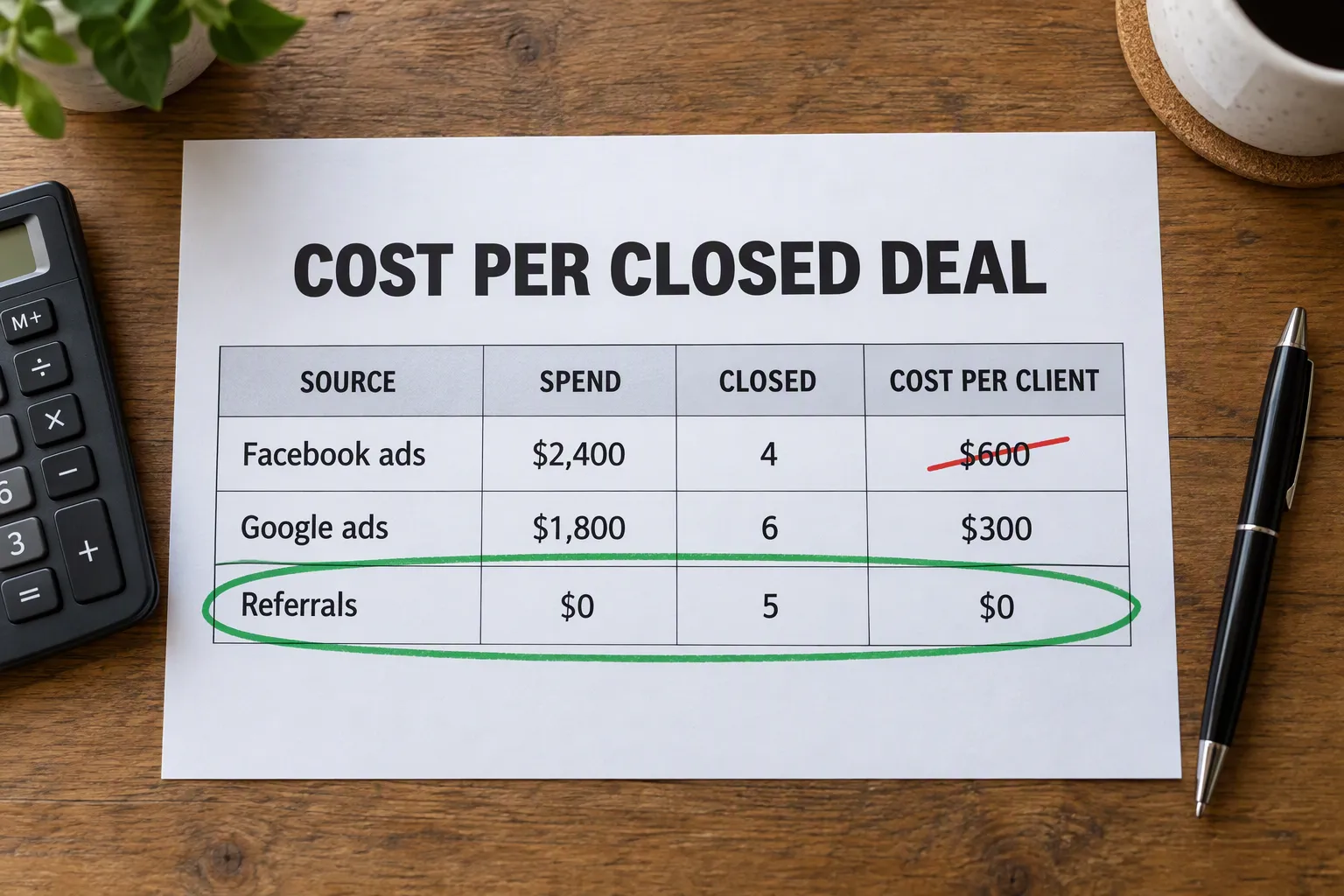
Once a month, pull closed-won deals from the last 90 days and group them by original source. Next to each source, add what you spent on it: ad spend, sponsorships, tools, and a rough value for your own time. Divide spend by closed deals.
Here's a made-up example. Facebook ads cost $2,400, brought 120 leads, and closed 4, so each client cost $600. Google search ads cost $1,800, brought 40 leads, and closed 6, so each client cost $300. Referrals cost nothing in ad spend, brought 9 leads, and closed 5.
Judged by lead volume, you'd double the Facebook budget. Judged by closed deals, you'd build a referral pipeline instead. Same data, opposite decision.
Count your time, too. LinkedIn posting looks free until you add up five hours a week. At $75 an hour, that's about $1,600 a month, more than the Facebook budget in the example.
- Review monthly, using a rolling 90-day window. It smooths out one lucky or awful week.
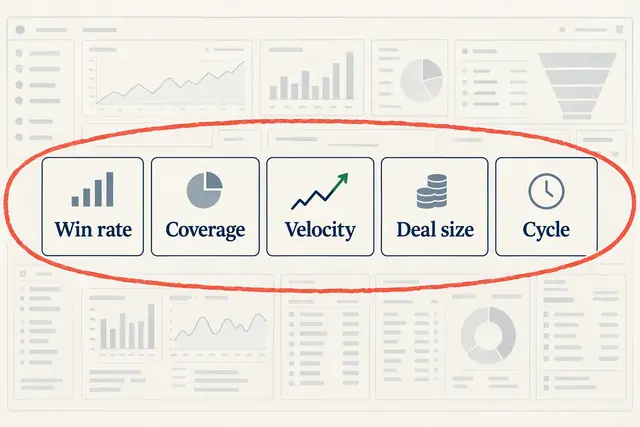
- Add it next to the five numbers in our CRM reporting metrics guide. Source is the missing column that explains why those numbers move.
- Run one experiment per quarter. Cut your weakest channel in half and watch closed deals. If they don't drop, you just freed up budget. If they do, your tracking caught something your gut missed.
How we write these: we set up and use these tools for real small businesses, check vendor pricing pages and documentation, and link our sources. We earn affiliate commissions from Systeme.io and GoHighLevel; that never decides what goes in a guide.