CRM sales forecasting: stop guessing next month's revenue
You close the month, open your spreadsheet, and guess what next month looks like. Maybe you bump last month's number by 10%. Maybe you ask each rep what they think they'll close and add it up. Either way, you're not forecasting — you're hoping. Manual forecasts typically miss by 25–35%, according to Prospeo's 2026 CRM forecasting benchmarks. That's not a rounding error. It's the difference between hiring at the right time and scrambling to cover payroll. CRM sales forecasting fixes this by attaching real probabilities to every deal in your pipeline. You don't need a data team. You need the CRM you're already paying for and about 30 minutes.
Your spreadsheet forecast is probably off by 30%
Here's how most small teams forecast revenue. Someone opens a spreadsheet, types in every deal they're "pretty sure" about, and adds up the total. That number becomes the forecast. It feels reasonable because you built it yourself.
The problem is it's not weighted. A $10,000 deal you just pitched gets the same value as a $10,000 deal where the client already said yes and is waiting on the contract. Your spreadsheet treats both as $10,000. Reality treats them very differently.
Manual forecasts using spreadsheets or rep roll-ups typically miss by 25–35%. Weighted pipeline forecasting in a CRM cuts that to ±15–25%. Add historical data and disciplined stage management, and you can get within ±8–15%, according to Prospeo's CRM forecasting analysis.
That accuracy gap isn't academic. If your forecast says you'll close $50,000 this month but you actually close $35,000, you've got $15,000 worth of commitments — payroll, ad spend, vendor contracts — built on revenue that didn't show up.
The fix isn't a better spreadsheet template. It's a forecasting method that weighs each deal by how likely it is to close, updates as deals move, and gives you a number you can plan around.
How CRM sales forecasting actually works
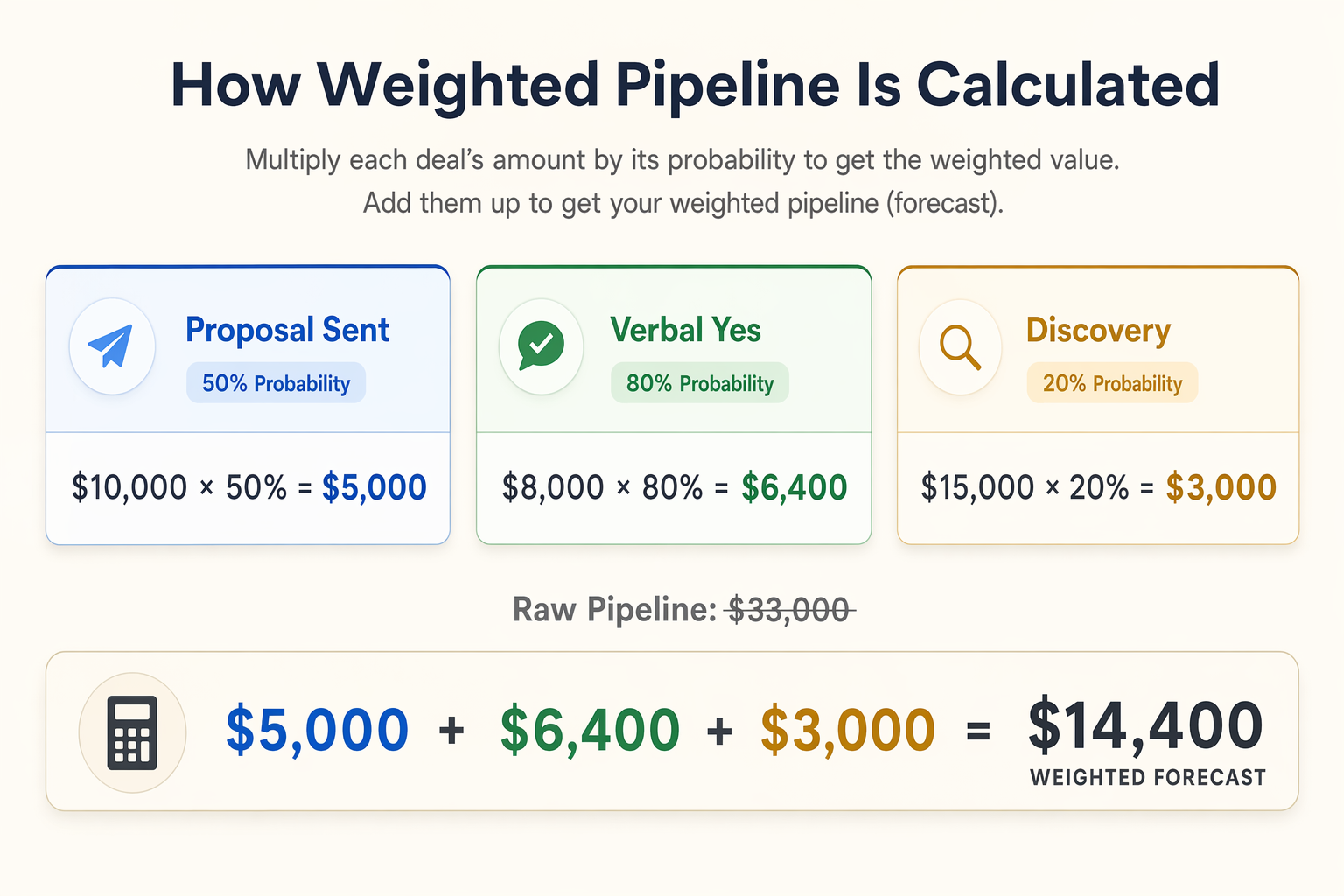
Weighted pipeline forecasting is simple math your CRM handles for you. Every deal sits at a stage in your pipeline. Each stage gets a close probability. The forecast multiplies each deal's value by its probability and adds them up.
Say you've got three deals. Deal A is at "proposal sent" ($10,000, 50% probability). Deal B is at "verbal yes" ($8,000, 80% probability). Deal C is at "discovery call" ($15,000, 20% probability). Your weighted forecast isn't $33,000 — it's $14,400. That's ($10,000 × 0.5) + ($8,000 × 0.8) + ($15,000 × 0.2).
The raw pipeline total ($33,000) is what your spreadsheet would show. The weighted total ($14,400) is what you'll probably collect. That $18,600 gap is the distance between optimism and planning.
The key is getting stage probabilities right. Don't guess. Look at your last 6–12 months of closed deals and calculate how many deals at each stage actually closed. If 40 out of 100 deals that reached "proposal sent" eventually closed, that stage's probability is 40%. This historical close rate is the single most important number in your forecast.
Companies with accurate sales forecasts are 7.3% more likely to hit their quotas consistently, according to SaleSso's forecast accuracy research. That sounds small until you compound it every quarter.
Set up CRM sales forecasting in 30 minutes
You don't need to build anything custom. Most CRMs already have the pieces — you just need to connect them.
Start with your pipeline stages. If you don't have clear stages yet, define them first. A simple five-stage pipeline works for most small businesses: New Lead → Discovery → Proposal → Negotiation → Closed Won. Add a "Closed Lost" stage to track what didn't work.
Next, assign a probability to each stage. Use your historical data if you have it. If you're starting fresh, use conservative estimates: New Lead at 10%, Discovery at 25%, Proposal at 50%, Negotiation at 75%, Closed Won at 100%. You'll refine these after 90 days of real data.
Then set expected close dates on every deal. Not "sometime next quarter" — an actual date. Deals without close dates are invisible to your forecast. They exist in your pipeline but contribute nothing to your revenue prediction.
Finally, build one dashboard or report that shows weighted forecast by month. Most CRMs do this out of the box. You want a single number that answers: based on what's in our pipeline right now and where each deal sits, how much should we expect this month?
- Name every deal clearly. "Smith Co. — Website Redesign $12K" beats "New Deal 47." Your future self will thank you when reviewing the forecast.
- Update deal stages the same day something changes. A proposal sent on Monday should move to "Proposal" on Monday, not Friday when you remember.
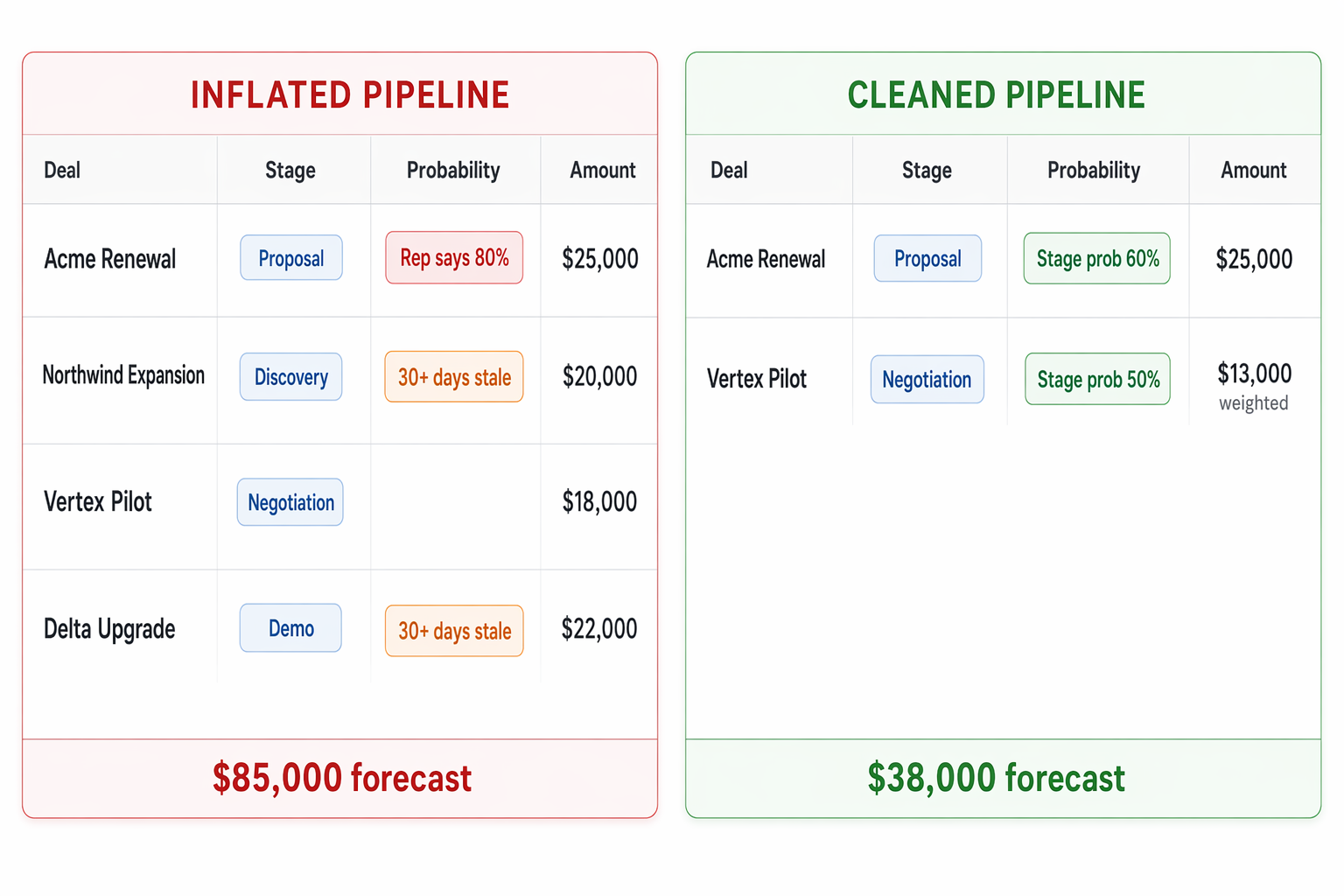
- Review stale deals weekly. Any deal sitting in the same stage for more than twice your average sales cycle is probably dead. Move it to Closed Lost or it'll inflate your forecast.
- Set a minimum deal value threshold. Tracking $200 deals alongside $20,000 deals adds noise without improving accuracy.
Where to find forecasting in HubSpot, GoHighLevel, and ActiveCampaign
The setup is the same everywhere, but the clicks are different. Here's where to find CRM sales forecasting in the three platforms we see most.
Whichever platform you're on, the first step is identical: define your stages, assign probabilities, and make sure every deal has a value and expected close date.
- HubSpot: Forecasting lives under Sales → Forecasts. You can create custom forecast categories and weighted views. The catch: meaningful forecasting requires HubSpot's Professional tier at $890/month. Free and Starter give you a pipeline but not the forecast reports that make it useful for revenue planning.
- GoHighLevel: Build your forecast through the Opportunities pipeline. Set custom stages with probability percentages, then use the reporting dashboard to see weighted totals. Every plan starting at $97/month includes full pipeline and reporting — no feature gates. The forecast won't be as granular as HubSpot's, but for most small teams a weighted pipeline view is all you need.
- ActiveCampaign: Head to Deals → Pipelines to set up stages with win probabilities. Their Plus plan at $49/month includes CRM pipeline features. Reporting is lighter than the other two, but you can pull deal data to build weighted forecasts. If your needs are basic, this gets the job done at the lowest price point.
Three mistakes that turn sales forecasts into fiction
CRM sales forecasting fails for predictable reasons. Fix these three and your forecast gets useful fast.
Letting reps set their own probabilities. When a rep says a deal is "80% likely," that's not data — it's optimism. Rep-reported probabilities produce forecasts with ±25–35% variance, according to Prospeo's CRM forecasting benchmarks. Stage-based probabilities from historical close rates cut that to ±15–25%. Remove the guesswork. Tie probability to the stage, not the rep's gut feeling.
Ignoring dead deals in the pipeline. Every pipeline has zombie deals — opportunities that stopped responding months ago but never got moved to Closed Lost. They sit there, contributing their weighted value to your forecast, making next month look $20,000 better than it is. Set a rule: if a deal hasn't had activity in 30 days, it gets a next step or it gets closed out.
Never calibrating your stage probabilities. The probabilities you set on day one won't be right. That's fine — they're estimates. But if you never update them with real close rates, your forecast drifts further from reality every month. Pull your closed deals quarterly, check what percentage closed at each stage, and adjust. According to SchedulingKit's 2026 CRM statistics, 42% of small businesses report improved forecast accuracy after CRM adoption — but only the ones who maintain their data see that improvement stick.
Check your forecast accuracy every month
At the end of each month, compare what your forecast predicted against what you actually closed. This takes 10 minutes and it's the single most valuable habit for forecast accuracy.
The formula is simple: (Actual Revenue ÷ Forecasted Revenue) × 100. If you forecasted $40,000 and closed $36,000, your accuracy was 90%. That's solid. If you forecasted $40,000 and closed $22,000, something in your pipeline data is off — probably stale deals or mis-staged opportunities.
Track this number monthly. You're looking for a trend, not a single data point. If accuracy climbs from 65% to 80% over three months, your stage probabilities and deal hygiene are working. If it bounces between 50% and 90%, your data entry is inconsistent.
Good forecasting feeds everything else in your business. It tells you when to hire, when to spend on ads, when to hold back. It connects directly to the metrics that actually predict revenue and the pipeline stages that drive them.
The businesses we work with that forecast well share one trait: they treat their CRM pipeline as the source of truth, not a backup system. If a deal isn't in the CRM with the right stage, value, and close date, it doesn't count. That discipline is worth more than any AI upgrade.