In this guide (5 sections)
Your best source of new business is already in your CRM. It's the clients who left a five-star review, renewed without a second thought, or mentioned they "told a friend about you". Most businesses have no system to capture that. Shno's referral statistics report that 83% of consumers say they'd refer a brand they trust, but only 29% do without being prompted. The gap is mostly that nobody asked at the right time. CRM referral tracking gives every introduction a place to live, a next step and a follow-up that doesn't depend on your memory.
Referrals close better, but most businesses never track them
A referred lead already trusts you, because someone they trust vouched for you. That changes the whole sales conversation.
The numbers back this up. In Shno's roundup, referred customers convert 3 to 5 times more often than leads from other channels. They also churn 18% less and are worth at least 16% more over their lifetime.
Yet most small businesses treat referrals as luck. A client mentions you to a colleague, and you hear about it weeks later in a passing email. There's no pipeline stage and no task, so the follow-up slips.
Meanwhile, you might be paying for ads that bring in cold leads, while your happiest clients would send warm introductions for free if something prompted them.
CRM referral tracking isn't a points-based loyalty scheme. It's a pipeline, a trigger and a few automations that make sure you always ask and always follow up.
Build a referral pipeline with four stages and five fields
You don't need referral software. You need one pipeline and five custom fields in the CRM you already pay for.
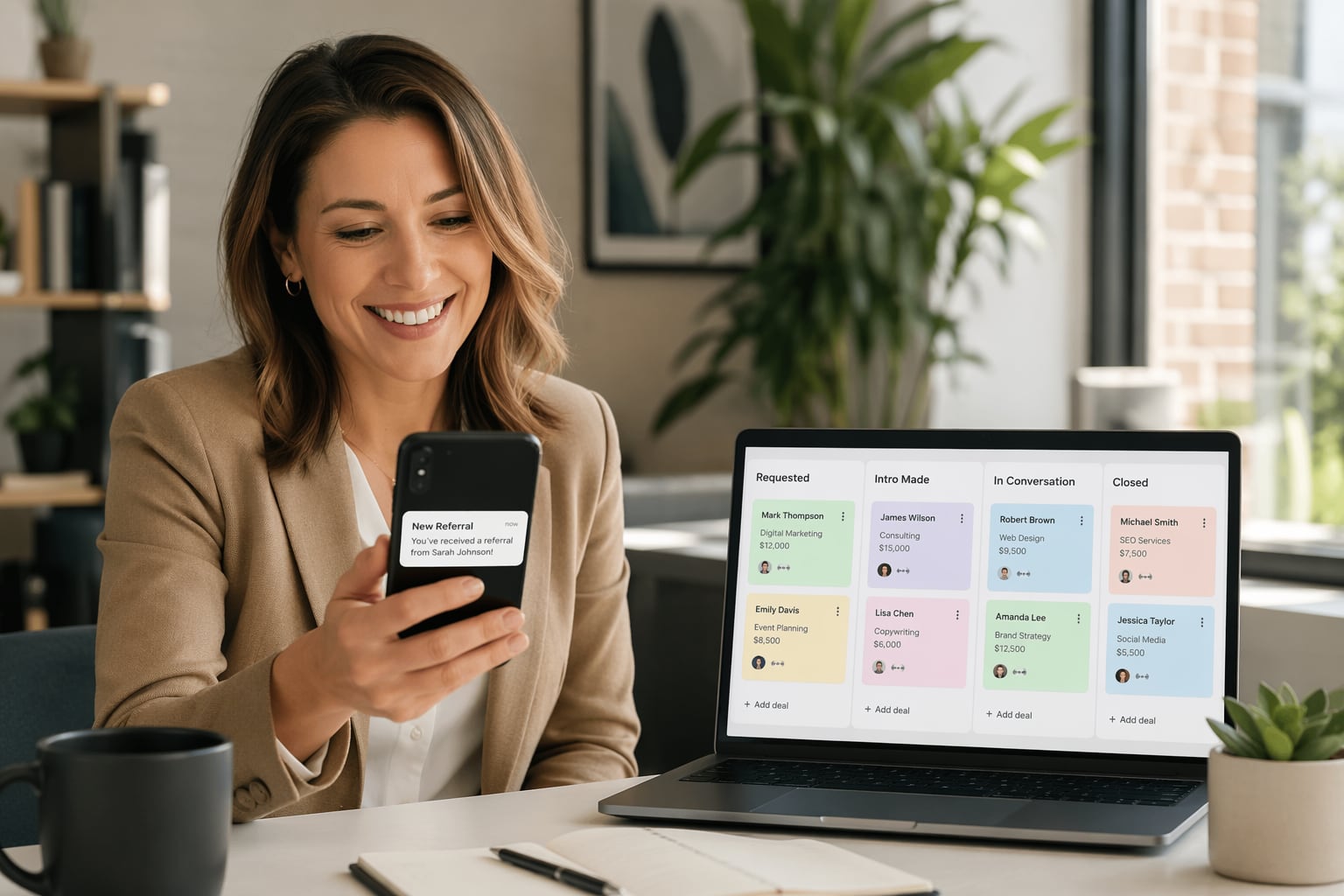
Create a pipeline called "Referrals" with four stages: Requested, Intro made, In conversation and Closed. Referrals move through it just like sales deals. Now you can see how many are active, where they stall and which clients send the most.
Then add these five fields to your contact records:
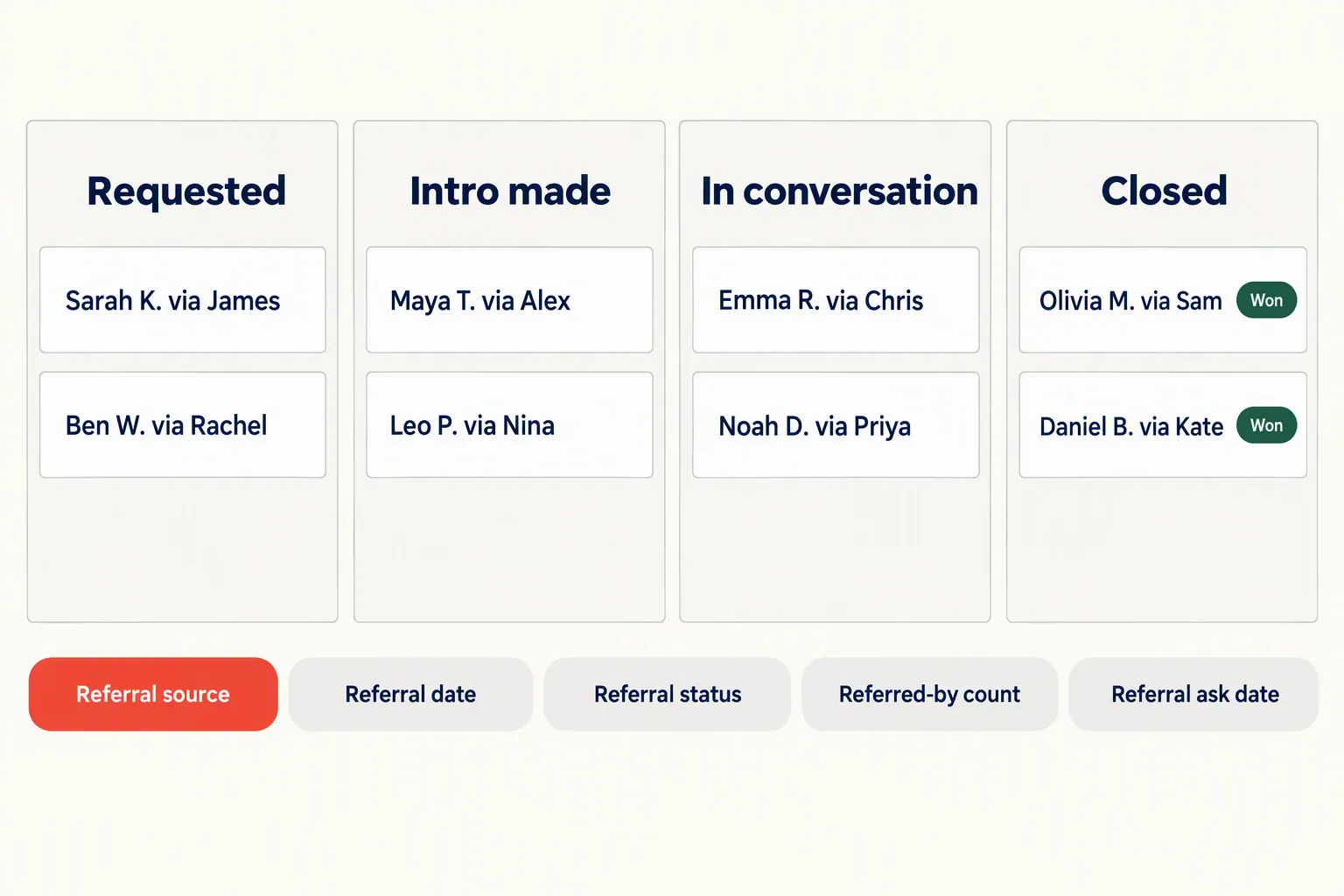
- Referral source: the client who made the introduction. This is your most important field.
- Referral date: when the introduction happened, so you can compare time to close for referred and non-referred deals.
- Referral status: Pending, Contacted, Won or Lost. Keep it simple.
- Referred-by count: a running total on the referring client's record, which shows your top advocates.
- Referral ask date: the last time you asked this client, so you don't ask too often or too rarely.
Automate the referral ask so it happens every time
Referral programs usually fail because nobody asks, not because the reward is wrong. Impact.com's research found that 60% of people who don't take part in referral programs had never even received a referral code or link. Nobody had asked them.
One automation fixes this: send a referral request after a real client win. Coaches can trigger it 7 days after a client hits their first goal. Agencies can trigger it after the first monthly report with good results. Service businesses can trigger it 3 days after a job closes with a satisfaction score above 4.
Make the message short and specific. Skip "know anyone who could use our services?" Try "You mentioned your friend Sarah runs a coaching practice. Would it help if I sent her the same audit we did for you?" A name, a reason and an easy yes.
Keep the ask easy to act on. A reply to an email or one link to share works better than a formal form.
Cap it at one ask per client per quarter. Update the "Referral ask date" field each time the automation fires, so you never pester your best clients.
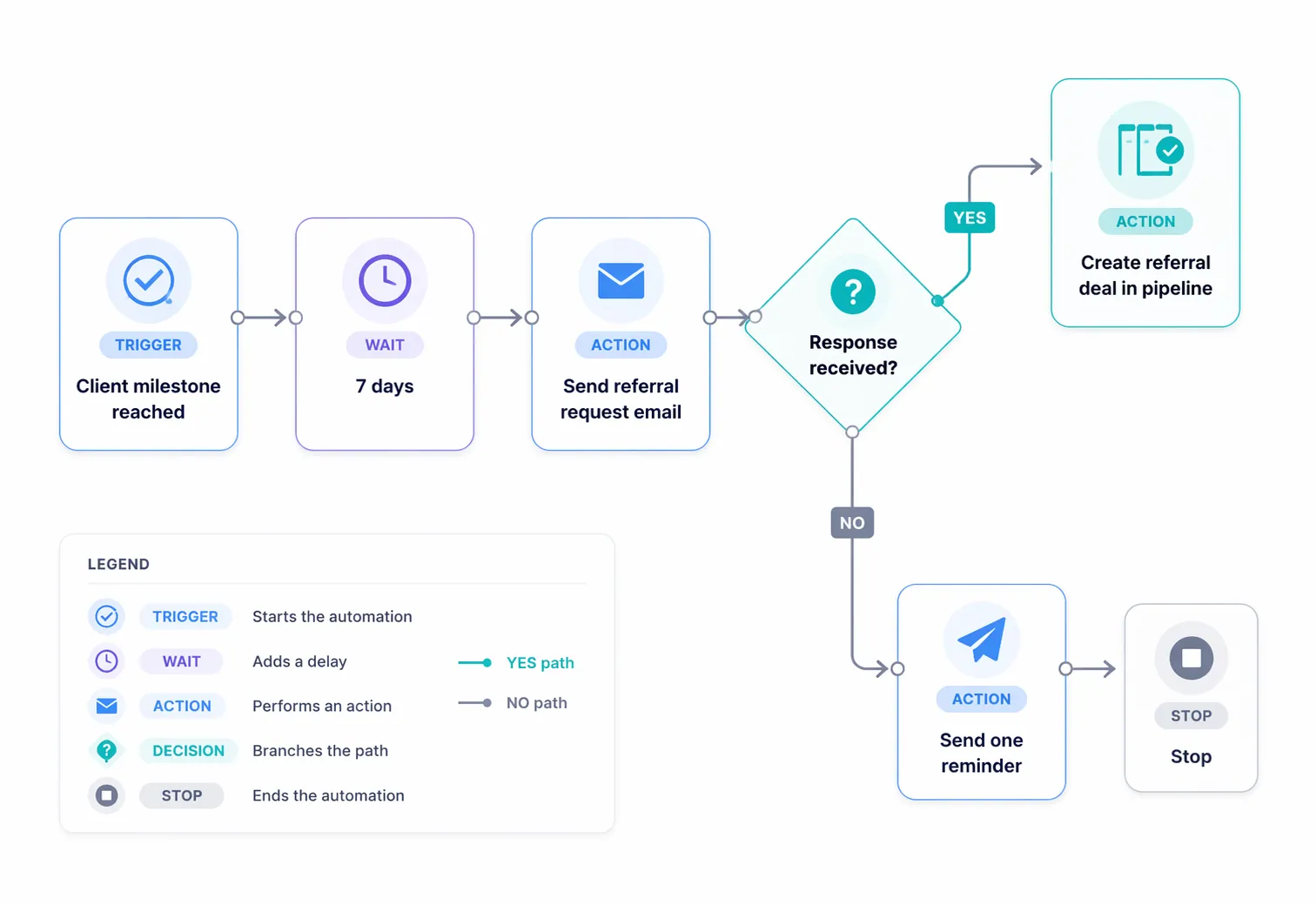
- Timing: coaches 7 days after a milestone, agencies after the first good report, service businesses 3 days after a high-scoring job, software 30 days after signup if still active.
- Message: name a person or situation, give a reason, make yes a single click.
- Cadence: once a quarter at most, logged in "Referral ask date".
- Follow-up: if there's no reply in 7 days, send one gentle reminder, then stop.
GoHighLevel does referral tracking for much less than HubSpot
The setup works in any CRM. Here's where to click in two common CRMs.
In GoHighLevel, the $97-a-month Starter plan (prices checked October 2026) includes the automation you need. Create the referral pipeline under Opportunities, add custom fields in Settings, and build the ask in Workflows with a trigger like "Pipeline stage changed" or "Tag applied". GoHighLevel also has an affiliate manager that can give each client a unique referral link, if you want self-serve sharing. Check your plan includes it.
In HubSpot, full workflows need Marketing Hub Professional, which starts at $800 a month billed annually ($890 billed monthly) plus a required $3,000 onboarding fee. Build the pipeline under Deals, add custom properties for the referral fields, and set up a workflow triggered by deal stage or survey score. It works well, but the price gap is huge for a small team.
For most businesses under 20 people, GoHighLevel does the same job for a fraction of the cost. If you already pay for HubSpot Professional, use it. Just don't upgrade to it only for referral tracking.
Still choosing a platform? Our guide to choosing a CRM without overbuying compares features against price in more detail.
Track three referral numbers each month
Once the pipeline runs, put three numbers on a monthly dashboard.
First, referral speed: days from "Intro made" to "Closed". Compare it with your other deals. Referred deals should close faster because the trust is already there. If they don't, something in your follow-up is slowing them down.
Second, ask-to-intro rate: the share of requests that lead to an actual introduction. Below 10%, rewrite the message or change the timing. Above 25%, it's working, so leave it alone.
Third, top-referrer concentration. If most of your referrals come from two clients, you're exposed. If they leave or get busy, referrals dry up overnight. Use this number to find other clients worth asking.
Ignore the total referral count on its own. Five referrals that close beat a hundred that don't. Read your pipeline stages the way you'd diagnose a leaky sales pipeline. Asking for reviews on autopilot uses the same trigger, so build both at once.
How we write these: we set up and use these tools for real small businesses, check vendor pricing pages and documentation, and link our sources. We earn affiliate commissions from Systeme.io and GoHighLevel; that never decides what goes in a guide.