CRM lead scoring: stop guessing who to call first
Your team treats every lead the same. Someone who visited your pricing page three times and opened your last five emails gets the same follow-up priority as someone who grabbed a free PDF and disappeared. That's not a strategy — it's a queue. CRM lead scoring fixes the queue. It assigns each contact a number based on what they've done and who they are. Higher score means more likely to buy. According to Landbase's lead scoring research, companies with lead scoring see a 77% higher lead generation ROI than those without it. You don't need a data team or a fancy AI budget to start. Five rules, one afternoon, and the tools already built into your CRM.
Why treating every lead the same costs you deals
About 80% of marketing leads never convert. That's normal — most people who download a PDF or attend a webinar are curious, not ready to buy. The problem isn't the ratio. It's that without scoring, your team treats every one of those leads as equally important.
That means the consultant who visited your pricing page twice, opened your case study email, and replied "what's the next step?" sits in the same queue as someone who typed a fake email to grab your template. Your rep calls them in the order they arrived. First in, first out — like a deli counter.
According to SPOTIO's sales data, 35–50% of sales go to the vendor that responds first. When your hottest lead is buried under 30 lukewarm ones, someone else gets there before you do.
The math gets worse at scale. Say you generate 100 leads a month and your team can follow up with 40. Without scoring, those 40 are random. With scoring, they're the 40 most likely to buy. Same leads, same team, completely different close rate.
You're already paying for every one of those leads — ad spend, content, landing page tools. Scoring makes sure that investment pays off by routing effort toward contacts who've shown they're ready.
CRM lead scoring doesn't create more leads. It makes the ones you already have worth more by putting the right contacts in front of your team first.
What a lead score actually tells you
A lead score is a number attached to a contact in your CRM. It goes up when the contact does things that suggest they're getting closer to buying. It stays flat — or drops — when they don't.
Most scoring models track two things. Engagement is what the contact does: opening emails, clicking links, visiting your pricing page, booking a call. Fit is who the contact is: job title, company size, industry, budget range. A CEO at a 50-person company who opened three emails is a stronger lead than a student who clicked one link. Scoring makes that obvious at a glance.
This isn't predictive AI or machine learning. It's a set of rules you write — "add 10 points when someone visits the pricing page, subtract 5 when they unsubscribe" — and your CRM applies them automatically.
Think of it as a priority filter. You're not predicting the future. You're sorting contacts by how much buying behavior they've already shown. That means you can start today with rules that are simple, obvious, and immediately useful.
Five CRM lead scoring rules that work for any small business
You don't need a complicated model. Start with these five rules and adjust after 30 days of real data.
These five rules aren't the final version — they're the starting version. Get scoring running with rules that are obviously correct. Refine them once you see which behaviors actually predict a sale in your business.
Once scores are live, set a threshold. Contacts above 50 points go to sales immediately. Between 20 and 50, they stay in your nurture sequence. Below 20, standard marketing until they engage more. The exact numbers don't matter yet. What matters is having a line that separates "call now" from "keep warming."
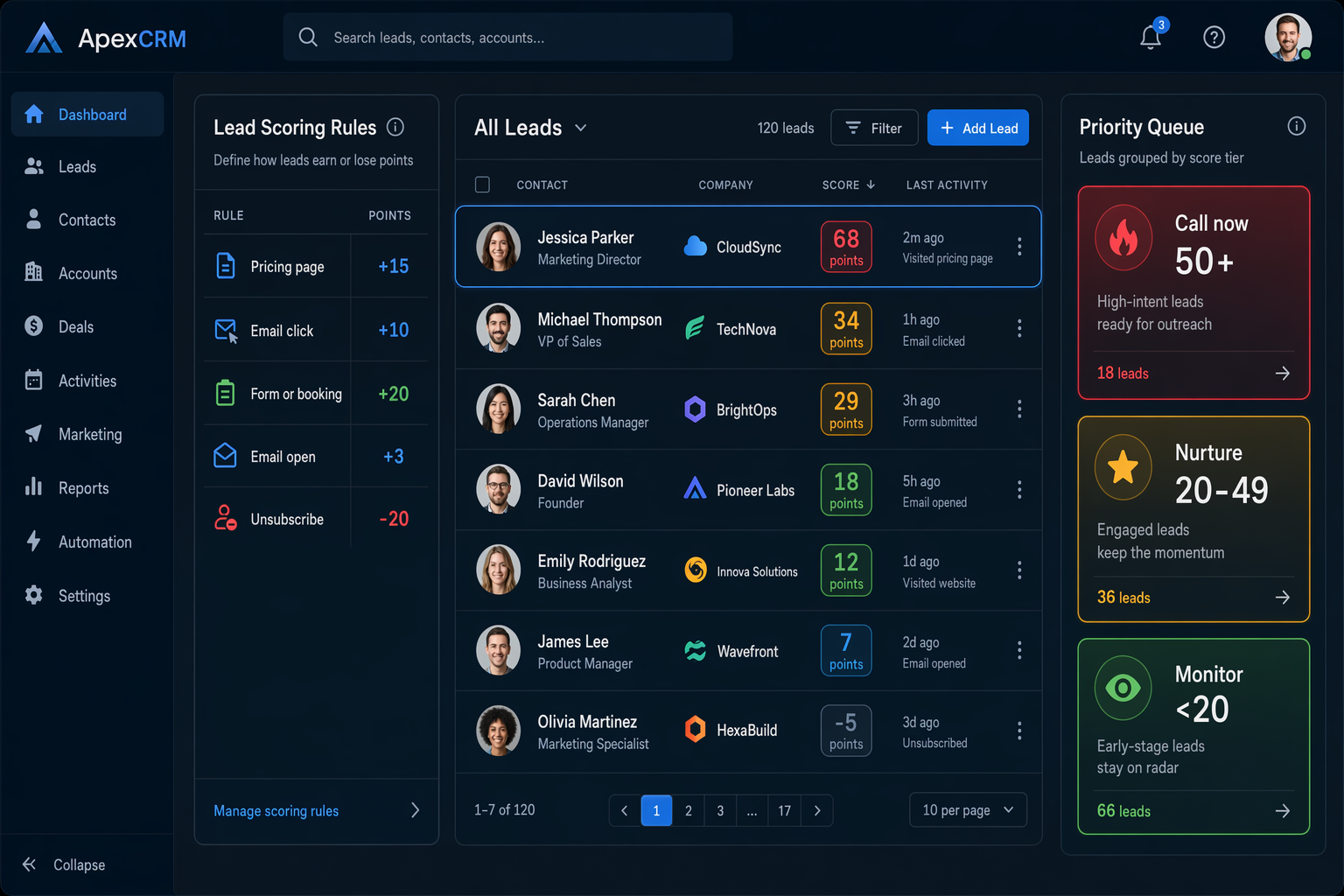
- Pricing or services page visit: +15 points. This is the highest-intent action most small businesses can track. Someone reading your pricing page is comparing options right now. If your CRM tracks page visits — and most do — make this your first rule.
- Email link click: +10 points. Opens are noisy. Some email clients auto-open everything, and preview panes trigger false positives. A click means someone read the email and wanted more. Weight clicks higher than opens every time.
- Form submission or appointment booking: +20 points. This is a hand-raise. They filled out a form, requested a call, or booked a demo. Pair this rule with an internal notification so your team knows the moment it happens.
- Email open without a click: +3 points. Opens still signal mild interest — they're just weaker than clicks. A contact who opens ten emails without clicking is curious, not committed. Three points per open lets that interest accumulate without inflating the score.
- Unsubscribe or hard bounce: -20 points. Negative scoring is where most beginners skip and shouldn't. Someone who unsubscribed isn't a lead anymore. Someone whose email bounced isn't reachable. Subtract aggressively so these contacts don't pollute your hot list.
How to set up CRM lead scoring in HubSpot, GoHighLevel, or ActiveCampaign
The framework above works in any CRM. But "where do I click?" is the question we hear most. Here's the platform-specific version.
Whichever CRM you're on, setup takes about 30 minutes. Define your rules, set your threshold, and push a test contact through to verify the score updates correctly. If your automations are already working, scoring plugs right into your existing workflows.
- HubSpot: Lead scoring lives under Settings → Properties → HubSpot Score. Set positive and negative criteria based on contact properties, email behavior, page views, and form fills. The catch: lead scoring requires HubSpot's Professional tier at $890/month. Starter and Free don't include it. That pricing gate alone is worth knowing before you pick HubSpot as your platform.
- GoHighLevel: Scoring works through the Workflows engine. Create a workflow triggered by contact actions — form fill, email click, page visit — and add an "Adjust Lead Score" step to change the number. Every plan starting at $97/month includes full workflow automation, so there's no feature lock. Trigger pipeline moves or internal alerts when a score crosses your threshold.
- ActiveCampaign: Head to Contacts → Manage Scoring. Contact scoring is available on the Plus plan starting at $49/month for 1,000 contacts — the most affordable dedicated scoring of the three. Score based on email engagement, site tracking, tags, and custom fields. Their automation builder lets you fire pipeline moves or rep assignments when scores reach certain levels.
Three mistakes that turn lead scoring into noise
Lead scoring fails for three reasons, and none of them are technical.
Too many rules too soon. You start with 25 criteria covering every possible action. Within a month, contacts sit at 300 points even though they've never talked to a salesperson. The scores are so inflated they're meaningless. Start with five rules. Add more only when you have data showing what actually predicts a closed deal.
Never updating the model. Your business changes. You launch a new landing page, stop sending that weekly email, or switch your booking tool. But the scoring rules still reference the old page, the old email, the old form. Stale rules produce stale scores. According to Landbase's lead scoring research, only about 44% of companies using lead scoring actively maintain their models. The rest set it up and stopped checking.
Skipping negative scoring. Without negative scores, a contact on your list for two years who opens every email but never clicks slowly racks up enough points to look hot. They're not — they're a newsletter reader. Negative scoring for inactivity, unsubscribes, and bounces keeps your scores honest.
Check your lead scores quarterly or they'll go stale
Scoring rules that matched your business in January won't match it in July. New offers, new pages, new team members — all change which actions signal buying intent.
Set a 90-day reminder. Pull up your scored contacts, sort by score, and ask: do the top 20 look like real buyers? If your highest-scored contacts haven't responded to outreach in months, the model needs work.
The review takes about 20 minutes. Export your top 50 scored contacts, compare them against last month's closed deals, and check whether high scores matched actual revenue. If they didn't, adjust your point values. If they did, just verify the rules still match your current pages, forms, and email campaigns.
If you're still choosing a CRM, factor lead scoring into the decision. Some platforms include scoring at every tier. Others lock it behind a $890/month paywall. Knowing that upfront saves you a migration later.
The best scoring system is the one your team actually checks. Keep it simple, keep it current, and it'll do more for your close rate than any AI upgrade you're being pitched.