CRM AI features worth paying for (and 4 that aren't)
Every CRM vendor slapped an AI badge on their product page this year. HubSpot calls theirs Breeze. GoHighLevel launched an "AI Employee." ActiveCampaign has predictive sending. The marketing sounds incredible. The reality? About half of these CRM AI features are genuinely useful, and the other half are last decade's drip sequences wearing a sparkle icon. If you're a small business owner wondering whether to upgrade your plan for AI, you need a filter — not a feature list. We've tested these tools with real client accounts, and here's what actually moves the needle versus what just moves your subscription price.
Why most "AI" in your CRM isn't actually AI
Here's the uncomfortable pattern: vendors rename existing automation as "AI-powered" and charge more for it. A drip email sequence that sends based on open behavior? That's been around since 2015. Conditional branching in a workflow? Also not new. When a vendor puts "AI" on these features, they're betting you won't notice.
The distinction matters because it affects what you pay. According to SchedulingKit's 2026 CRM statistics, small businesses use only 22% of their CRM features on average. Adding more AI features you don't understand — or that don't do what you think — just makes that number worse.
Real CRM AI does something a rules-based system can't: it makes decisions based on patterns you didn't explicitly program. Predictive lead scoring that learns from your closed deals. Follow-up timing that adapts to each contact's behavior. Content suggestions based on what's actually converting in your pipeline. These require machine learning, not just if/then logic.
The test is simple: could you build this with a basic automation builder and enough patience? If yes, it's not AI — it's marketing. If the feature genuinely learns and improves without you touching it, that's where the real value lives.
Three CRM AI features that actually save you time
After testing AI features across HubSpot, GoHighLevel, and ActiveCampaign with small business clients, three categories consistently delivered measurable time savings.
First: predictive lead scoring. Instead of manually assigning points to behaviors ("opened email = +5, visited pricing = +10"), AI scoring analyzes your actual closed-won deals and finds the patterns you'd miss. A coach with 200 contacts doesn't have time to build a scoring matrix. AI does it in the background and surfaces who to call today. According to GigaCatalyst's 2026 CRM AI report, predictive scoring improves conversion rates by 15–25% compared to manual methods.
Second: call transcription and CRM logging. GoHighLevel's voice AI and HubSpot's call recording both transcribe conversations and attach summaries to the contact record automatically. For a three-person sales team making 20 calls a day, that's 20 fewer minutes spent on notes — per person. The summary lands on the contact record before the rep finishes their coffee.
Third: context-aware follow-up sequences. This goes beyond "send email 3 if they didn't open email 2." AI-driven follow-ups adapt the message, the timing, and sometimes the channel based on each contact's engagement pattern. If a lead always opens emails at 9pm, the system learns that. If they respond to SMS but ignore email, the AI shifts. ActiveCampaign's predictive sending and GoHighLevel's Conversation AI both do versions of this — and both actually work.
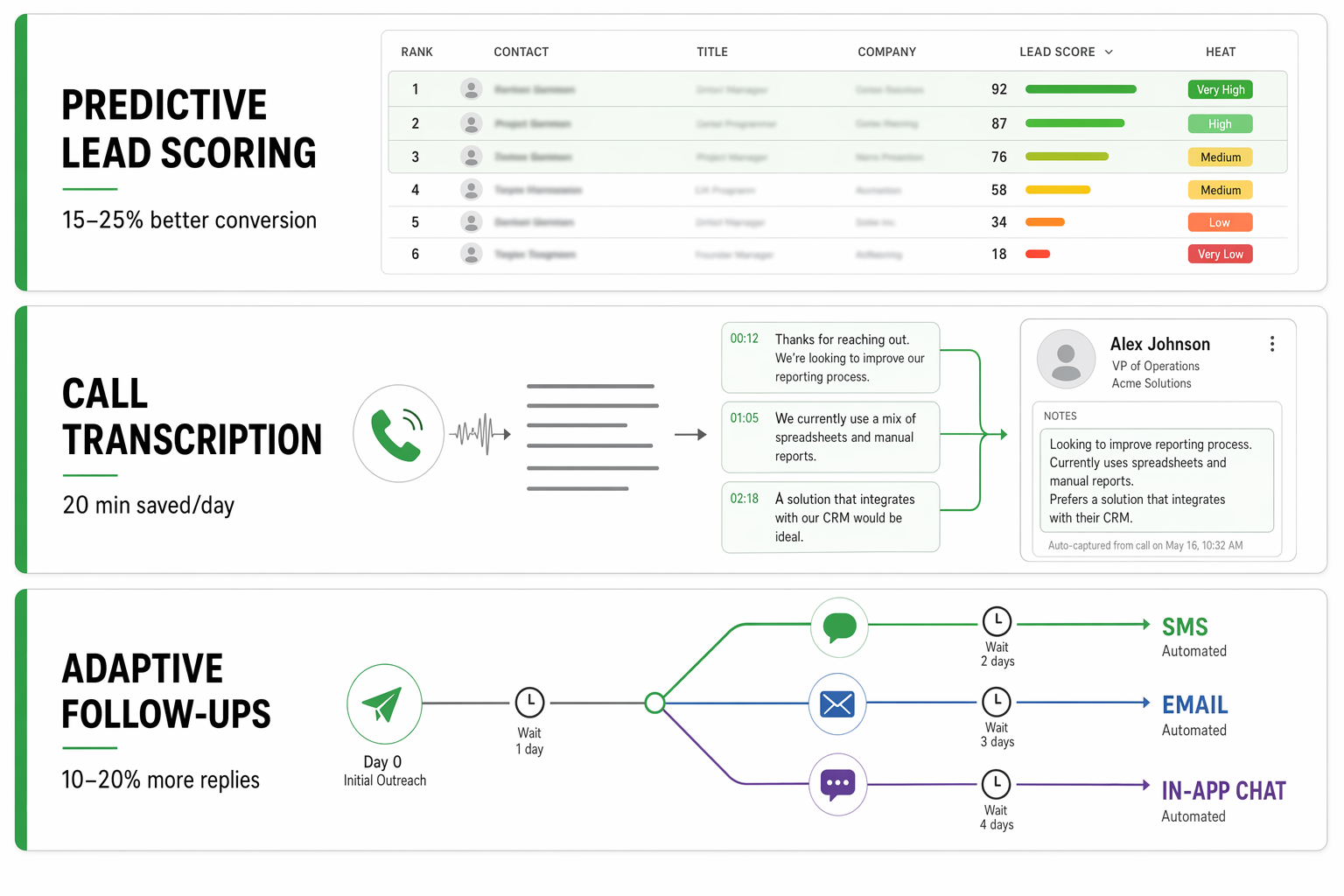
- Predictive lead scoring: saves 2–4 hours per week on manual prioritization for small sales teams.
- Call transcription + auto-logging: eliminates daily note-taking and keeps CRM records accurate without rep effort.
- Context-aware follow-ups: lifts reply rates 10–20% by sending the right message at the right time on the right channel.
Four CRM AI features you can safely ignore
Not every AI label deserves your attention — or your budget. These four show up on nearly every vendor's feature page but rarely justify the upgrade for small businesses.
AI content generation inside your CRM. Yes, HubSpot and GoHighLevel both let you generate blog posts and landing pages with AI. But you can do the exact same thing with ChatGPT or Claude for free. Paying an extra $800/month to generate mediocre copy inside your CRM instead of in a browser tab is not a good trade. The output quality is comparable — the price difference isn't.
Chatbots labeled as "AI." A decision-tree bot that routes visitors based on button clicks isn't intelligence. It's a form with extra steps. Unless the chatbot can hold a real conversation, update CRM records autonomously, and handle unexpected questions without falling back to "let me connect you with a human," it's not worth the AI premium. Most small business chatbots fall into this category.
AI dashboards that just filter data. Some CRMs now sell "AI-powered reporting" that's really just a natural language search bar over your existing data. If you can find the same answer by clicking two filters in your pipeline view, the AI overlay is a convenience — not a capability worth upgrading tiers for.
Generative email subject lines. These tools suggest 3–5 subject line options for your campaigns. Helpful? Mildly. Worth a tier upgrade? No. You can A/B test subject lines manually in two minutes, and most small teams send few enough campaigns that the AI prediction lacks enough data to outperform common sense.
- AI content generation: use a standalone tool instead — same quality, no CRM upgrade required.
- Decision-tree chatbots: not AI, just a dressed-up form. Skip unless it truly converses.
- AI reporting overlays: faster, maybe. Worth $700/month more? Rarely.
- Subject line generators: nice-to-have, not a reason to switch plans.
What CRM AI features actually cost in 2026
The price gap between "CRM with AI" and "CRM without AI" is often larger than the AI itself is worth. Let's look at real numbers.
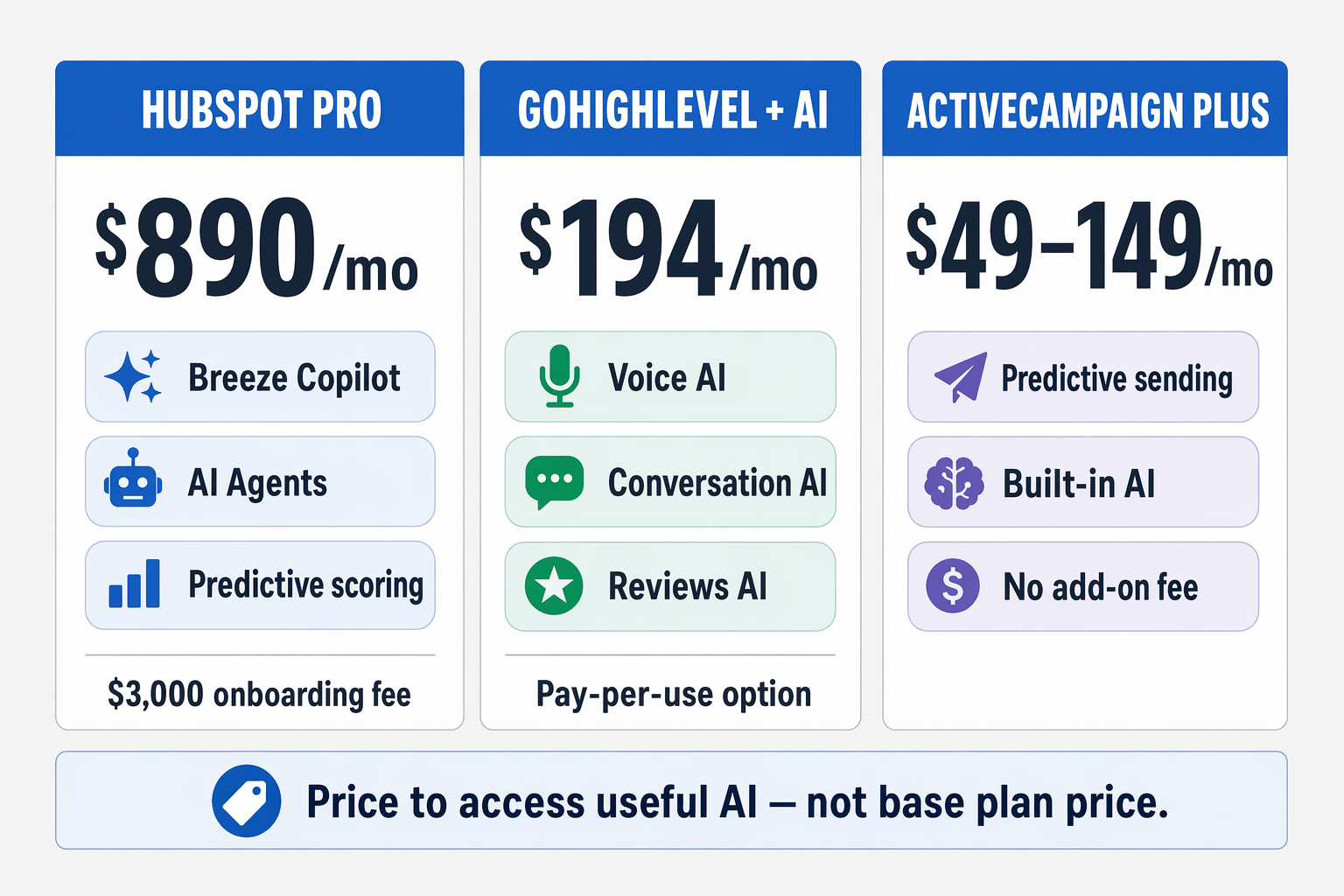
HubSpot locks most meaningful AI features — Breeze Copilot, predictive scoring, AI agents — behind the Professional tier. According to HubSpot's pricing page, that's $890/month for Marketing Hub Professional, plus a mandatory $3,000 onboarding fee. The Starter tier at $20/month per seat gives you basic content generation, but nothing that qualifies as intelligent automation.
GoHighLevel takes a different approach. Their AI Employee add-on costs $97/month per sub-account on top of the base $97/month platform fee. That gets you unlimited inbound voice AI, conversation AI across SMS and chat, and reviews AI. Pay-per-use pricing runs $0.02–0.05 per message and $0.07–0.13 per minute for voice. For a small business handling 500 AI interactions monthly, that works out to roughly $194/month total — about a fifth of HubSpot's Professional tier.
ActiveCampaign includes predictive sending and basic AI features in their Plus plan at $49/month for 1,000 contacts. Their Professional plan at $149/month adds deeper analytics and automation intelligence. No separate AI add-on required.
The question isn't "does this CRM have AI?" anymore. They all do. The question is whether the specific AI features you'd actually use are locked behind a tier jump that costs more than the time they save.
How to decide if a CRM AI upgrade is worth it for your business
Here's a simple framework we use with clients. Grab a calculator and answer three questions.
First: how many hours per week does your team spend on the task this AI feature replaces? If predictive lead scoring saves your rep 3 hours of manual prioritization, and that rep costs $35/hour, the feature is worth $105/week — or about $420/month in recovered time.
Second: what's the cost difference between your current plan and the plan that includes the AI feature? If the jump is $800/month for one useful feature, the math only works if that feature saves more than $800 in time or generates more than $800 in revenue.
Third: does the feature work with your current data? AI lead scoring needs at least 100–200 closed deals to learn patterns. Predictive sending needs months of engagement history. If your CRM has 50 contacts and you closed 8 deals last quarter, most AI features won't have enough data to outperform your gut instinct.
When we run this math with small businesses, GoHighLevel's AI add-on usually breaks even within the first month for teams doing 10+ calls daily. HubSpot's AI tier rarely pencils out unless you have 5+ sales reps and thousands of contacts with rich engagement data. ActiveCampaign's approach — baking lighter AI into the core product — works best for solopreneurs and small teams who want "a little smarter" without a big price jump.
If you've already set up your pipeline stages properly and your lead scoring basics are working, you're in a strong position to evaluate whether AI adds value on top. If those foundations aren't solid yet, no AI feature will fix a broken process.
The bottom line on CRM AI for small teams
AI in CRMs isn't a scam — but it's heavily over-marketed. The features that genuinely help small businesses (predictive scoring, call transcription, adaptive follow-ups) tend to pay for themselves within weeks. The features that don't (rebranded automation, decision-tree chatbots, generic content generators) just make your monthly bill bigger.
According to Wave Connect's 2026 CRM data, companies with well-maintained CRM automations see up to a 300% increase in conversion rates. The key word is "well-maintained." AI doesn't fix a messy CRM — it amplifies whatever state your data is in. Clean data and clear processes get better with AI. Dirty data and broken workflows get worse faster.
Before you upgrade any plan for AI, do three things. First, confirm you're actually using what you already have — remember, the average small business uses only 22% of CRM features. Second, identify the specific task you want AI to handle and calculate whether the time savings justify the cost. Third, make sure you have enough data for the AI to learn from.
If you pass all three checks, go for it. Start with one feature, measure the impact for 30 days, and expand from there. If you don't pass, spend that budget on cleaning your existing data and fixing your automations first. A $97 AI add-on on top of a broken CRM is just a faster way to make bad decisions.