Your CRM costs twice what you think — here's the math
You picked a CRM. The pricing page said $20 per user per month. Affordable, right? Six months later, you're paying $180/month and you're not sure how you got there. Contact overages, seat upgrades, add-on modules, integration fees — they compound quietly. According to SelectHub's 2026 CRM pricing comparison, small businesses should expect to spend 1.5 to 3 times the listed subscription price once implementation, training, and hidden fees are included. That's not a rounding error. That's the difference between a tool that fits your budget and one that eats it. Here's how to calculate the real CRM cost before you sign anything — and where the biggest surprises hide.
The pricing page is a starting point, not a final answer
Every CRM vendor shows you the cheapest possible number. That's marketing, not lying — but it means the price you see assumes the smallest team, the fewest contacts, and the most basic feature set.
The moment you need automation, reporting, or more than a handful of users, you jump tiers. And tier jumps aren't small. HubSpot's pricing page shows a Starter tier at $20/month. Their Professional tier — where you actually get workflow automation — starts at $800/month for five users. That's a 40x increase for features most businesses need within their first quarter.
GoHighLevel takes the opposite approach: $97/month with unlimited users and full automation at every tier, according to their pricing page. ActiveCampaign lands in the middle at $149/month for five users on their Professional plan.
The point isn't that one is better. It's that "starting at $20/month" and "you'll pay $800/month" are both true statements about the same product. You need to know which number applies to your business.
Contact limits are the upgrade trap nobody warns you about
Most CRM pricing is built around two axes: users and contacts. You'll hit the contact ceiling before the user ceiling almost every time.
HubSpot's free CRM stores up to 1 million contacts, but you can only market to 2,500 of them without paying. Cross that line and you're buying marketing contact tiers — roughly €225 per additional 5,000 contacts on the Professional plan, according to Avidly's HubSpot pricing breakdown. A business with 10,000 active marketing contacts is already looking at a significant monthly add-on just for the right to email their own list.
ActiveCampaign charges by total contact count regardless of whether you email them. Their Starter tier begins at $59/month for 1,000 contacts. If your list grows to 5,000, your bill grows with it — automatically.
GoHighLevel doesn't meter contacts at all. You pay your flat fee and store as many contacts as you want. The catch: email and SMS sending is usage-based through Twilio and Mailgun, so high-volume senders still see variable costs.
The lesson: ask "what happens when my list hits 5,000?" before you sign up. That's the number where most small businesses get their first surprise invoice.
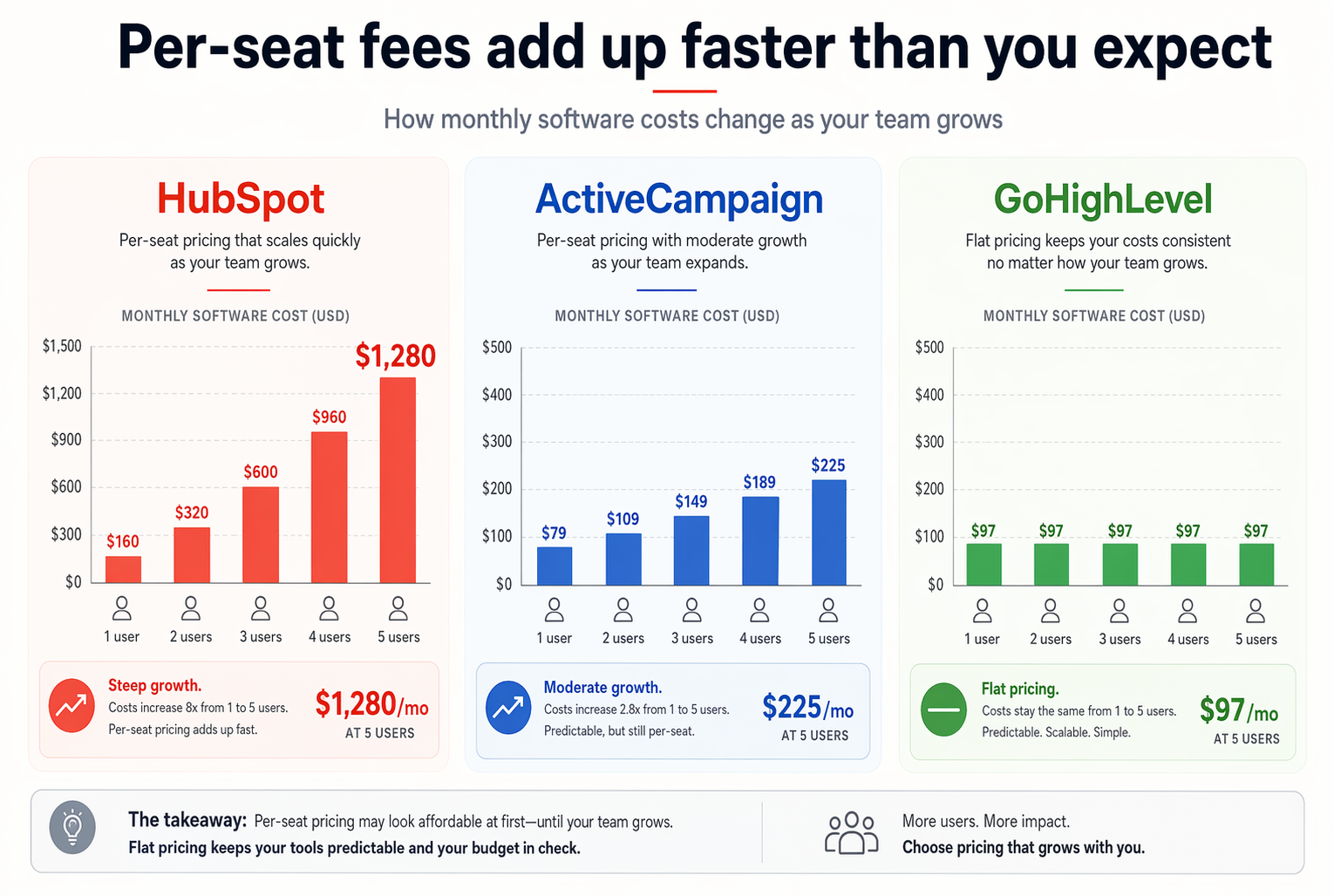
Per-seat fees add up faster than you expect
You start solo. You hire a VA. Then a salesperson. Then an admin. Suddenly you're at four users and your "cheap" CRM costs four times what you budgeted.
HubSpot charges $90 to $120 per additional user on Professional and Enterprise tiers, per Expert Market's 2026 CRM pricing guide. Adding three team members to a Professional plan adds $270 to $360/month — more than many businesses pay for the base subscription itself.
ActiveCampaign is gentler at roughly $19 per additional user. GoHighLevel charges nothing for extra seats — unlimited users come standard on every plan.
This matters because CRM adoption correlates directly with how many people can access it. Teamgate's research found that only 37% of sales reps actively use their CRM. If seat costs force you to limit access, you're guaranteeing low adoption from day one.
When you budget for a CRM, budget for every person who'll touch it. If that makes the tool too expensive, you've picked the wrong tool — not the wrong team size.
What five users and 5,000 contacts actually costs in year one
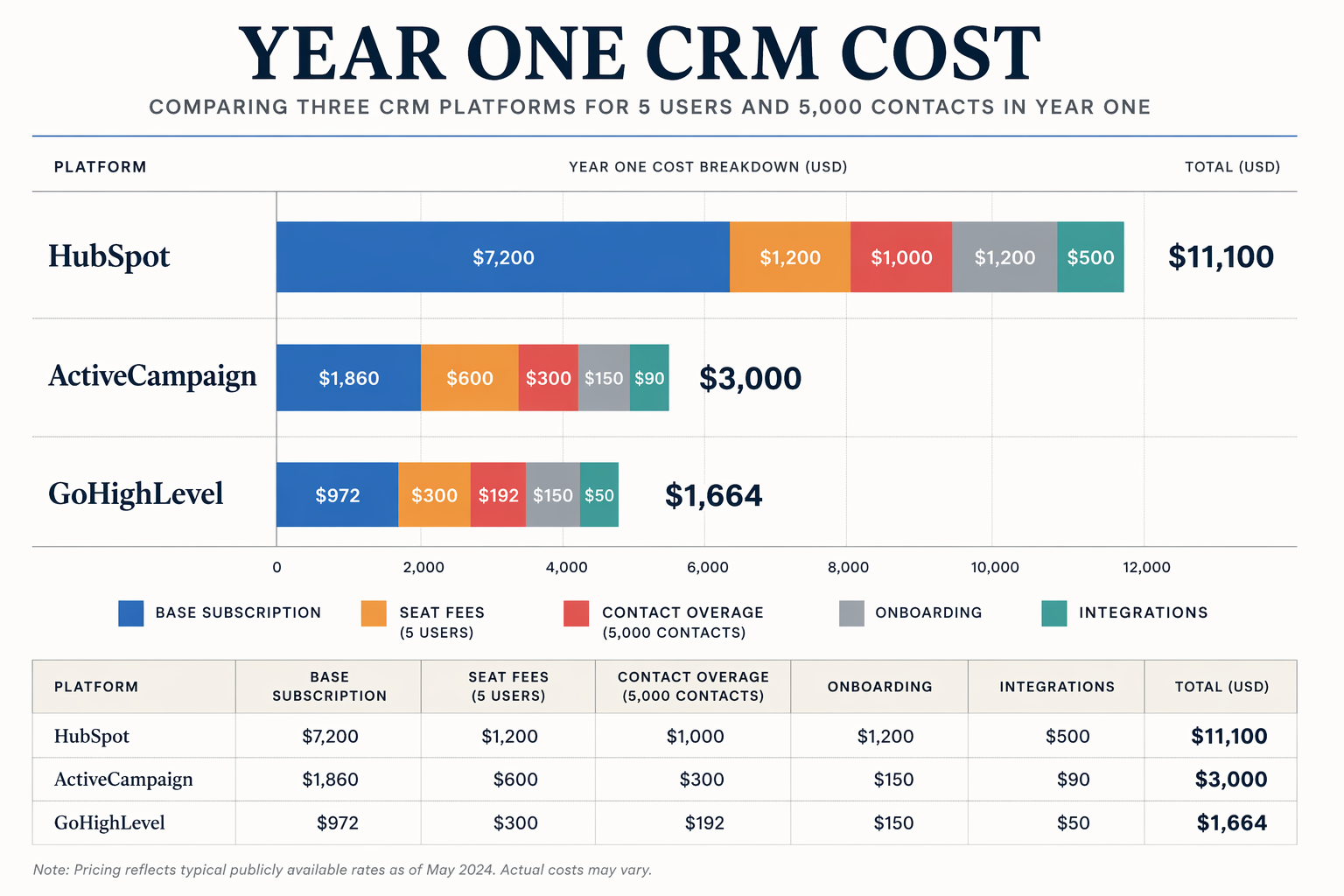
Let's stop talking in abstractions and run real numbers. Here's a typical small business scenario: five team members, 5,000 contacts, needing automation, email marketing, and pipeline management.
On HubSpot Professional: $800/month base (includes five seats) plus contact overage fees as your marketing list grows past 2,000. Add onboarding ($1,500 one-time, required for Professional). Year-one total: roughly $11,100 before any integrations or add-ons.
On ActiveCampaign Professional: $149/month for five users and 1,000 contacts. Bump to the 5,000-contact tier and you're closer to $209/month. Add a $500 implementation budget. Year-one total: roughly $3,000.
On GoHighLevel Starter: $97/month flat, unlimited users and contacts. Budget $200 for Twilio/Mailgun credits and $300 for setup time. Year-one total: roughly $1,664.
Same team. Same contact list. Same core needs. The spread is $1,664 to $11,100. That's not a minor difference — it's the difference between hiring a part-time VA and not.
According to Conduyt's 2026 CRM pricing comparison, the average small business spends $3,000 to $12,000 per year on CRM when all costs are included. Most land closer to the high end because they don't model these numbers before buying.
The costs that don't show up until month three
Beyond seats and contacts, there's a third layer of costs that only appear once you're already committed.
Integration fees: connecting your CRM to your calendar, payment processor, and accounting tool. If native integrations exist, they're often limited to higher tiers. If you need Zapier, that's $19 to $69/month on top of your CRM bill.
Training time: SparrowCRM's onboarding research found that typical small business CRM onboarding takes 30 to 90 days. That's not just calendar time — it's hours your team spends learning the tool instead of selling. At even $30/hour, a 20-hour onboarding process costs $600 in lost productivity per person.
Migration costs: if you're moving from another CRM or a spreadsheet, data cleanup and import take time. Budget 5 to 15 hours for a typical small business migration — more if your data is messy. Our CRM data cleanup guide covers what that process actually looks like.
Premium support: most CRMs reserve fast or dedicated support for higher tiers. If you're on a Starter plan and hit a technical issue at 2 PM on a Tuesday, you might wait 48 hours for a reply.
None of these show up on the pricing page. All of them show up on your P&L.
How to calculate your real CRM cost before you buy
Here's the formula we use with every client. It takes five minutes and saves thousands.
Start with the monthly subscription for the tier that includes the features you need — not the entry tier, the one you'll actually use. Multiply by 12. Add per-seat costs for everyone who'll need access. Add the contact-tier cost for where your list will be in six months, not where it is today. Add one-time costs: onboarding fees, migration time, and initial training.
Finally, add a 20% buffer for the integrations, add-ons, and usage fees you haven't thought of yet. That 20% isn't pessimism — it's what EngageBay's pricing analysis calls the "invisible CRM tax" that hits nearly every small business in year one.
If the final number still fits your budget with room to breathe, you've found the right tool. If it makes you uncomfortable, step down a tier or look at a flat-rate platform. There's no shame in picking the CRM that matches your revenue, not your ambition.
If you haven't chosen a CRM yet, start there first — but come back here before you enter your credit card.