How to audit your CRM automations and stop losing leads
You spent a weekend setting up your CRM automations. Welcome emails, lead tags, follow-up sequences — the whole stack looked bulletproof. That was six months ago. Since then, you've renamed a form field, updated your pricing, and brought on a new team member. Odds are, at least one of those automations is now quietly losing you leads. A CRM automation audit catches those broken pieces before your pipeline notices — or worse, before your revenue does.
Most CRM automations break within six months
Automations aren't "set it and forget it." They're more like a garden hose left out over winter — everything looks connected until you turn the water on and find three cracks.
Here's what actually breaks them. You rename a tag or custom field, and the trigger that depended on the old value stops firing. A team member leaves, and their assigned tasks start piling up in a mailbox nobody checks. You update your pricing page, but three follow-up emails still quote last quarter's rates. An integration pushes an API update, and your Zapier connection silently stops syncing contacts.
None of these changes feel like a big deal when they happen. That's the problem. Nobody sends a Slack message saying "hey, I just broke the new-lead automation." The break is silent, and it stays that way until someone notices the pipeline is thinner than it should be.
This isn't rare. According to Wave Connect's 2026 CRM report, over 50% of CRM implementations fail to meet their goals — and broken automations are a leading cause. Teamgate's research found that only 37% of sales reps actively use their CRM, often because they've been burned by workflows that don't do what they're supposed to.
CRM usage data from SaleSso puts it even more bluntly: 79% of opportunity-related data gathered by sales reps never makes it into the CRM at all. When the automations that do handle data are also broken, the problem compounds fast.
The fix isn't rebuilding from scratch. It's running a focused audit to find what's broken, stale, or missing — and it takes less time than you'd think.
Start your CRM automation audit with the triggers
Triggers are the front door of every automation. If they're broken, nothing else matters — the entire sequence just sits there doing nothing while leads pile up in your CRM, uncontacted.
Pull up every active automation and check the entry trigger. Is the form it depends on still live? Does the tag still exist? Is the custom field value still spelled exactly right? One typo in a renamed dropdown option, and you've got a dead automation that looks perfectly healthy from the dashboard.
This step takes about 30 minutes for most small businesses. Open each automation, verify the trigger condition against your current forms and fields, and push a test contact through. If the test contact doesn't enter the workflow, you found your first break.
- Form-based triggers: confirm the form is still published and the field names haven't changed.
- Tag-based triggers: verify the tag is still applied by whatever upstream action or integration creates it.
- Date-based triggers: check that the date field is still populated on new contacts — empty dates mean the automation never fires.
- Integration triggers: make sure the connected app is still authorized and sending data. OAuth tokens expire more often than you'd expect.
Walk every sequence for dead ends and stale content
Once you've confirmed your triggers work, trace each automation step by step. You're looking for three problems: dead ends, stale content, and orphan branches.
Dead ends happen when a conditional branch has no action after it. You set up an if/else for "purchased" vs. "didn't purchase," but you only built out one side. Every contact who takes the other path hits a wall and sits there forever.
Stale content is subtler. Emails that reference old pricing, links that point to pages you've since deleted, or mentions of a team member who left last quarter. These won't crash your automation — they'll just make your business look like nobody's minding the store.
Orphan branches show up after you edit a workflow. You removed a step but didn't clean up the branch that connected to it. Contacts entering that path get stuck with no next action.
Here's a shortcut that works in most CRMs: look at the contact count at each step. If step one shows 500 contacts and step three shows 12, something between them is filtering out almost everyone. That gap is either intentional or it's your biggest leak.

- Click through every conditional branch — not just the happy path.
- Test every link in every email. A 404 in a follow-up sequence kills trust instantly.
- Verify task assignments still point to active team members.
- Look for wait steps longer than your typical sales cycle — they're usually leftovers from an earlier version.
What broken CRM automations actually cost you
This isn't a theoretical problem. Let's do some real math.
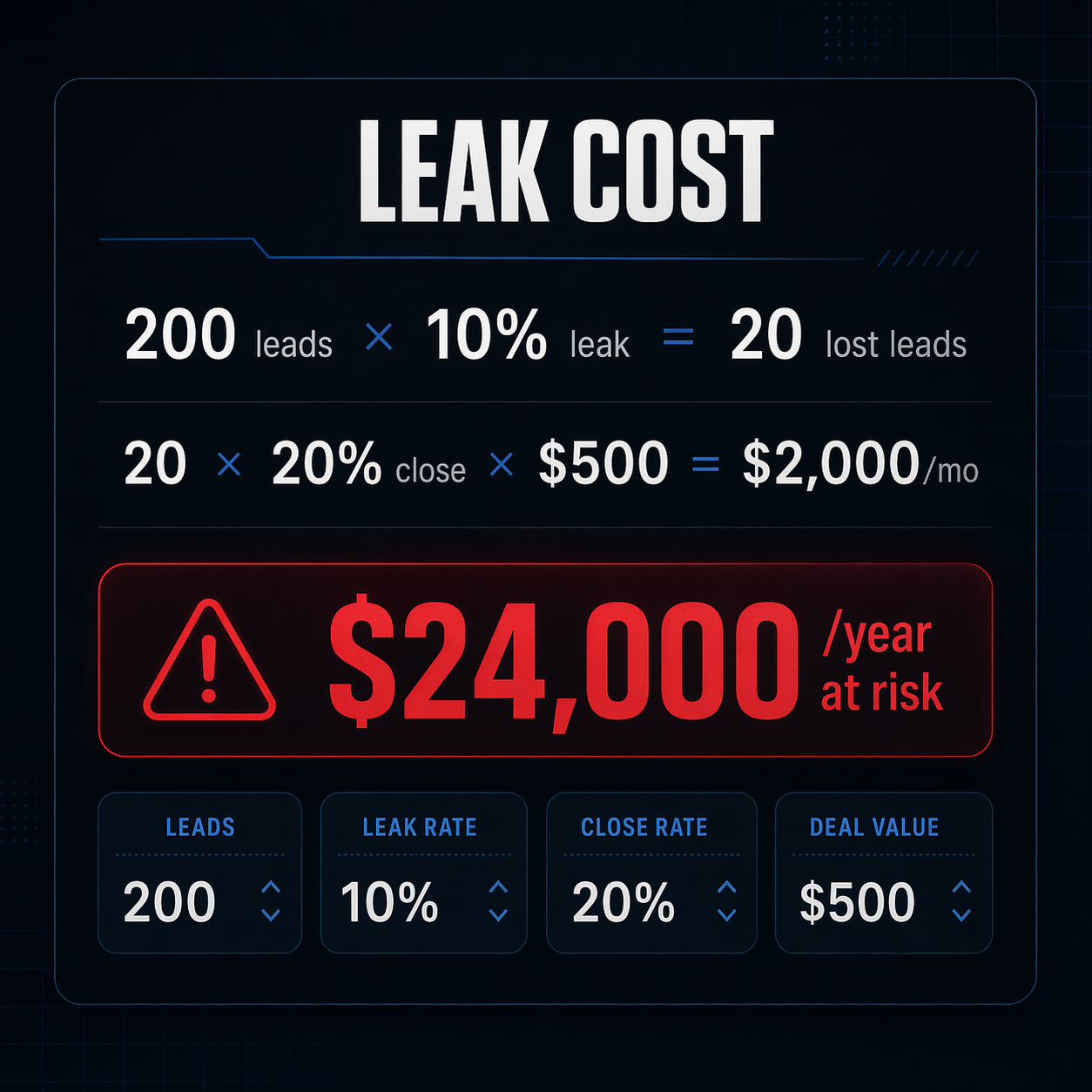
Say you generate 200 leads per month. If just 10% fall through broken automations — no follow-up email, no task created, no tag applied — that's 20 leads per month your team never touches. At a $500 average deal value with a 20% close rate, you're leaving $2,000 on the table every month. Over a year, that's $24,000 from a single broken workflow.
The data backs this up. CRM usage research from SaleSso found that companies lose up to 27% of their revenue due to inaccurate or incomplete CRM data. That includes leads that entered your system but never got routed to the right sequence or salesperson.
On the flip side, businesses with well-maintained CRM automations see up to a 300% increase in conversion rates compared to teams running on manual follow-up. The gap between "has automations" and "has working automations" is where most of that value hides.
The worst part? These leads often look like they "just weren't interested." Your team assumes the lead went cold. In reality, the lead never got the follow-up that was supposed to fire three minutes after they filled out your form. They moved on to a competitor who actually responded.
You're already paying for the software. Whether it's GoHighLevel at $97/month or HubSpot's Professional tier at $800/month, the subscription hits your card whether the automations work or not. The audit is free. Skipping it isn't.
How to run this audit in HubSpot, GoHighLevel, or ActiveCampaign
The audit framework is the same regardless of platform. But since "where do I even click?" is the most common question we hear, here's where to start in the three CRMs we see most often.
Whichever CRM you're in, the principle is identical: check enrollment dates, trace the contact path, and verify every link, assignment, and conditional still matches your current business setup.
- HubSpot: Go to Automation → Workflows and sort by last enrolled date. Any workflow that hasn't enrolled a contact in 30+ days needs investigation. Click into each one and check the error log for failed actions. Keep in mind that meaningful workflow automation requires HubSpot's Professional tier at $800/month — at that price point, leaving broken workflows running is an expensive oversight.
- GoHighLevel: Open your Workflows section and review execution history on each automation. GoHighLevel ships full automation at every plan tier starting at $97/month, so there are no feature gates slowing you down. Focus on verifying trigger events match your current form and tag setup.
- ActiveCampaign: Head to Automations and sort by last run date. ActiveCampaign's visual workflow builder makes dead branches easy to spot — look for paths where the contact count drops to zero. Their Professional plan at $149/month for 1,000 contacts includes the deepest automation analytics, so use the reporting to find low-performing sequences.
Build a quarterly review so this doesn't happen again
A one-time audit is great. But if you stop there, you'll be doing the same cleanup in six months. The real fix is a lightweight quarterly review — about 90 minutes, four times a year.
Keep an inventory. A simple spreadsheet with each automation's name, trigger type, owner, and last verified date gives you a single source of truth. When someone changes a form, updates pricing, or leaves the team, you know exactly which automations to check.
Every quarter, push a test contact through each active automation. Create a contact with test data, trigger the workflow, and verify every step fires correctly. This catches silent failures that don't show up in dashboards or error logs.
Don't forget the integrations. If you use Zapier, Make, or native connections between your CRM and other tools, those need the same quarterly check. A broken Zap can cut off your lead flow just as effectively as a broken workflow inside the CRM itself.
If you're still choosing a CRM or about to migrate, build this review into your setup plan from day one. It's much easier to maintain clean automations than to untangle months of drift after the fact.
The businesses we work with that do this consistently don't just avoid broken automations — they catch opportunities. A quarterly review often surfaces automations that should be updated for new products, new offers, or better timing. The audit becomes a growth exercise, not just maintenance.