How to build a CRM renewal pipeline that stops silent churn
Your coaching clients' contracts expire in 30 days. Do you know which ones? Most small businesses track renewals the same way they track birthdays — they remember some, forget others, and hope nothing important slips through. The problem with hope is that it doesn't send reminder emails. According to Focus Digital's 2026 agency churn report, small agencies lose an average of 32% of their clients each year. Not because the work was bad — because nobody had a system that flagged the renewal before the client moved on. A CRM renewal pipeline fixes that. It's a separate pipeline — not your sales pipeline — dedicated to tracking every client approaching a renewal date. Five stages, a handful of automations, and you'll stop discovering lost clients after they're already gone.
Silent churn costs more than the deals you're chasing
Silent churn is what happens when a client's contract expires, nobody follows up, and the client quietly signs with someone else. No complaint. No dramatic exit. Just silence — and then a missing payment.
For service businesses — coaches, consultants, agencies — this is the default failure mode. You're so focused on filling the front of your pipeline that the back end leaks without anyone noticing.
The math is ugly. Say you run a consulting practice with 40 active clients at $1,500/month each. That's $60,000 in monthly recurring revenue. If you're losing clients at the 32% annual rate that Focus Digital reports for small agencies, about 13 clients will walk away this year. That's $234,000 in annual revenue gone.
Tracking Contracts' 2026 research puts a finer point on it: businesses lose an average of 9.2% of annual revenue to poor contract management. Missed deadlines, expirations nobody caught, auto-renewals on terms nobody reviewed. For a business doing $500,000 a year, that's $46,000 leaking through a hole you didn't know existed.
Replacing those clients costs 5 to 25 times more than keeping them would have. You're paying for ads, content, sales time, and onboarding — all to replace revenue you already had. A CRM renewal pipeline doesn't add revenue. It stops the revenue you've earned from disappearing.
Your sales pipeline can't double as a renewal tracker
Your sales pipeline tracks new deals from first touch to closed-won. That's what it's built for. Cramming renewals into the same pipeline creates two problems.
First, it wrecks your reporting. When renewals sit alongside new deals, your pipeline value and close rate lose meaning. You can't tell whether revenue came from new business or retained business — and those require completely different strategies.
Second, the stages are wrong. A new deal moves through qualification, proposal, negotiation, closed. A renewal moves through upcoming, contacted, confirmed, renewed. Different timeline, different actions, different urgency. Forcing a renewal through new-deal stages means your team either skips steps or invents workarounds that nobody else understands.
Think of it this way: your sales pipeline is a front door. Your CRM renewal pipeline is the back door. They serve the same building, but people enter for different reasons. Managing both through one doorway creates a bottleneck where both types of revenue get stuck.
Build a second pipeline. Most CRMs — HubSpot, GoHighLevel, ActiveCampaign, Pipedrive — support multiple pipelines. If you've already set up your pipeline stages for sales, adding a renewal pipeline follows the same logic: fewer stages, clearer actions, and every stage tied to a real decision.
Five CRM renewal pipeline stages that actually work
You don't need a complicated renewal workflow. Five stages cover every scenario we've seen across coaching practices, consulting firms, and marketing agencies.
Keep each deal card simple: client name, contract value, renewal date, account owner. Don't overload it with fields nobody will fill out. A CRM renewal pipeline only works if your team actually updates it.
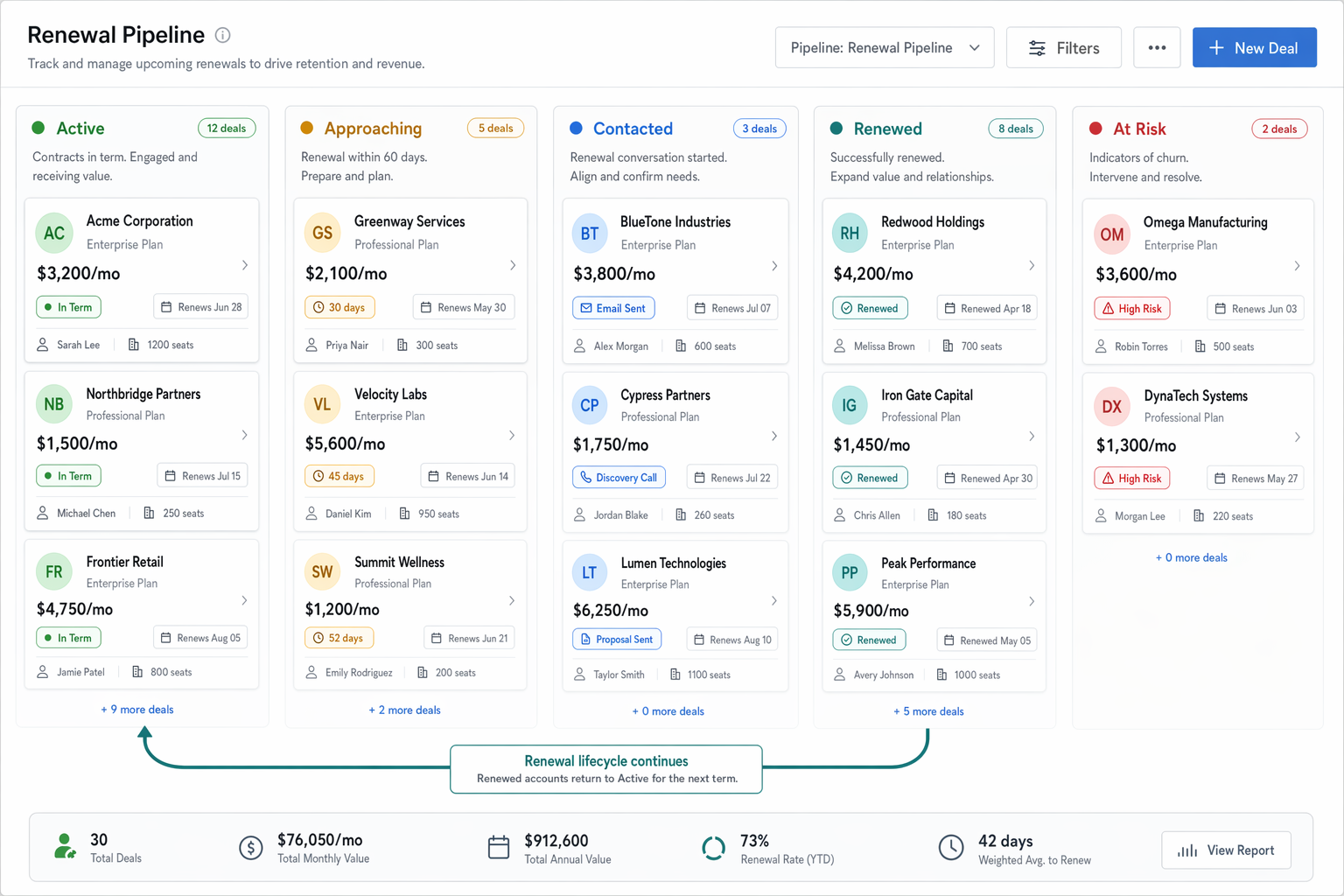
- Active (not due): The client has a running contract with more than 60 days left. No action needed. This stage is your baseline — it shows how many clients are in good standing right now.
- Renewal approaching (60 days out): The clock is ticking. A task fires to the account owner: review the account, check engagement, and prep for the renewal conversation. This is where you catch problems early. If the client hasn't been active, you've got time to re-engage before the ask.
- Renewal contacted: Your team has reached out. The email's sent, the call's booked, or the proposal is in front of the client. This stage tracks who's been touched so nothing falls through.
- Renewed: Done. The client signed on for another term. Update the next renewal date and move them back to "Active." Log the renewal value so your reporting captures retained revenue separately from new revenue.
- At risk / not renewed: The client didn't respond, declined to renew, or the contract lapsed. Tag the reason — price, service quality, competitor, no response — so you can spot patterns over time. This isn't a failure stage. It's a data stage.
Automate the three moments that save renewals
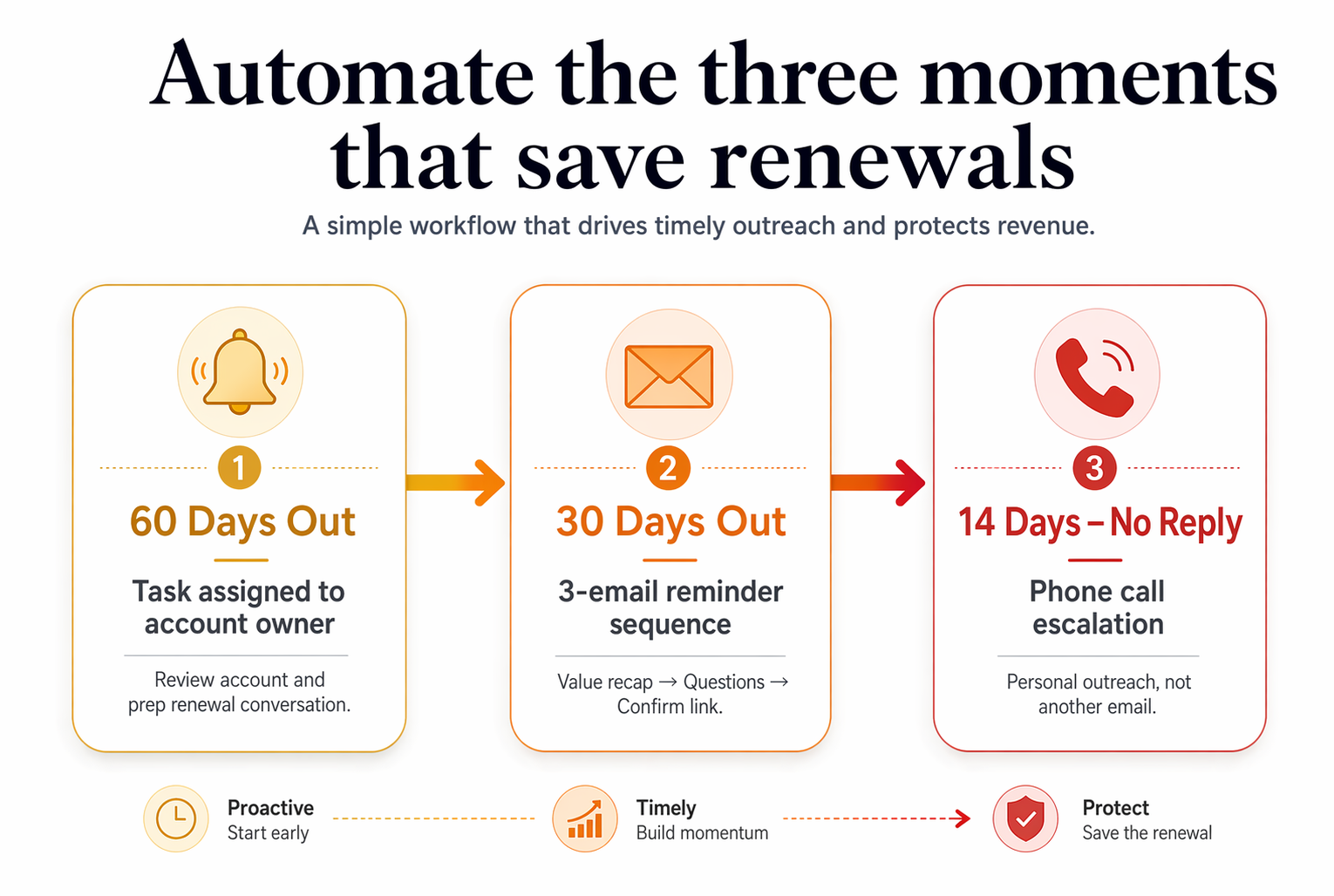
A pipeline without automation is just a spreadsheet with extra steps. Here's where a CRM renewal pipeline earns its keep — three automations that fire without anyone remembering to click anything.
The 60-day heads-up. When a contact's renewal date hits 60 days out, automatically move them to "Renewal approaching" and assign a task to their account owner. This is a date-based trigger — set it once, and every client gets flagged at the right time. No calendar reminders, no sticky notes, no "I thought you were handling that."
The 30-day reminder sequence. If the deal is still in "Renewal approaching" after 30 days, fire a 3-email sequence to the client. Email one: "Your renewal is coming up — here's what you've accomplished this term." Email two: "Any questions before we continue?" Email three: "Let's get this sorted — here's the link to confirm." Space them 5 days apart.
The "gone quiet" escalation. If a deal sits in "Renewal contacted" for more than 14 days with no reply, escalate to the account owner with a phone task. Not another email — a call. According to Shno's 2026 retention research, a 5% improvement in retention can increase profits by 25 to 95%. One phone call at the right moment is often the difference between a renewal and a lost client.
If your automations are already in good shape, these three additions take about an hour to build. If they're not, run the audit first. Stacking new automations on top of broken ones just adds noise.
How to build this in GoHighLevel, HubSpot, or ActiveCampaign
The framework is the same in any CRM. But here's where to actually click in the three platforms we see most often.
Whichever platform you're on, the key is the same: a separate pipeline, date-based automation, and someone who owns the renewal number. The system only works if there's a human checking it weekly.
- GoHighLevel: Open Opportunities and create a new pipeline called "Renewals." Add the five stages. Use Workflows to trigger stage moves based on a custom date field for the next renewal date. GoHighLevel's Starter plan at $97/month includes unlimited pipelines and full automation — no upgrade required. The built-in Stripe integration also handles recurring billing, so you can track the payment and the relationship in one place.
- HubSpot: Create a second deal pipeline under Settings → Objects → Deals → Pipelines. Add your five stages. Automated stage moves and date-based triggers require the Sales Hub Professional tier at $800/month. If you're on Starter, you can build the pipeline but you'll need to move deals manually — which defeats the purpose. Factor this cost into your decision before you commit.
- ActiveCampaign: Build a new pipeline in the Deals section. ActiveCampaign's Plus plan at $49/month for 1,000 contacts includes CRM pipelines and automation — enough for the full renewal setup. Use date-based automations to move deals between stages and trigger email sequences. Their deal scoring feature can also flag at-risk renewals before the 60-day window even opens.
Check your renewal numbers every Monday
A CRM renewal pipeline you never look at is just decoration. Set a recurring 15-minute review every Monday morning.
Three numbers tell you everything. First: how many deals are in "Renewal approaching" right now? That's your workload for the next 60 days. If it's zero, either you have no upcoming renewals or your date fields aren't populated — and you need to figure out which one fast.
Second: what's your renewal rate for the last 90 days? Divide renewed deals by total deals that hit "Renewal approaching." If you're below 80%, something in your outreach or service delivery needs attention.
Third: what's the top reason in your "At risk / not renewed" stage? If it's "no response," your outreach timing or channel might be wrong. If it's "price," you've got a positioning problem. If it's "competitor," you need to know which one and what they're offering.
Retainer-based agencies that track these numbers keep clients for an average of 56 months, according to Focus Digital's research. Project-based firms that don't track renewals average just 24 months. Same type of work, completely different systems.
The revenue you've already earned is the easiest revenue to keep. A CRM renewal pipeline gives you the system to keep it.