Your CRM is ignoring your best customers (fix it today)
You spent months building your pipeline. Lead capture, nurture emails, follow-up sequences, pipeline stages — the whole acquisition machine. Then someone buys, and your CRM goes quiet. No check-in. No renewal reminder. No "how's it going?" email at day 30. The customer who just handed you money gets less attention than the stranger who downloaded a free PDF last Tuesday. That's not a gap in your strategy. It's the most expensive mistake your CRM is making right now. According to Semrush's retention research, acquiring a new customer costs 5 to 25 times more than keeping an existing one. And a 5% bump in CRM customer retention can lift profits by 25 to 95%. Your CRM already has everything it needs to fix this. You just haven't told it to.
Why your CRM forgets customers after they pay
Most CRM setups are built around one goal: get the sale. Every automation fires before the deal closes. Lead tags, welcome sequences, pipeline moves, task assignments — all pre-purchase. The moment a deal moves to "Closed Won," the automation stops and the contact enters the quietest part of your database.
This isn't a CRM limitation. It's a setup habit. The default templates in HubSpot, GoHighLevel, and ActiveCampaign all lean toward acquisition workflows because that's what people build first. Nobody thinks "I should set up a 90-day check-in sequence" while they're still figuring out how to capture their first lead.
The result is predictable. Your best customers — the ones already paying you — get the least attention from the system you're paying to manage relationships. Meanwhile, you keep pouring money into finding new people to replace the ones who quietly left.
According to Firework's retention data, 65% of a company's revenue comes from existing customers. If your CRM isn't working that side of the business, it's ignoring the majority of your income.
The math that makes CRM customer retention your best investment
Forget the vague "retention matters" advice. Let's do specific math.
Say you run a coaching or consulting business. You close 10 new clients a month at $1,000 each. Your acquisition cost — ads, content, sales time — runs about $200 per client. That's $2,000 a month just to fill the pipeline.
Now say 3 of those 10 clients don't come back for a second engagement. You didn't lose $3,000. You lost $3,000 plus the $600 you spent acquiring them, plus whatever they would have spent over the next year. If even one of those three re-engages at $2,000, a single retention email just paid for itself ten times over.
The numbers from Sprinklr's 2025 retention report back this up: the probability of selling to an existing customer is 60–70%. For a new prospect, it's 5–20%. Your CRM is already connected to the group most likely to buy again. You just need to ask them.
And existing customers don't just buy again — they buy more. Research compiled by Firework found that repeat customers spend 67% more than new ones. They already trust you. They already know how you work. The friction that makes new sales hard is gone.
This is why CRM customer retention isn't a nice-to-have. It's the highest-ROI work your CRM can do — and most small businesses haven't built a single automation for it.
Four post-sale automations worth building this week
You don't need a complicated retention program. You need four automations that cover the moments when customers are most likely to drift away. Each one takes about 15 minutes to build in any modern CRM.
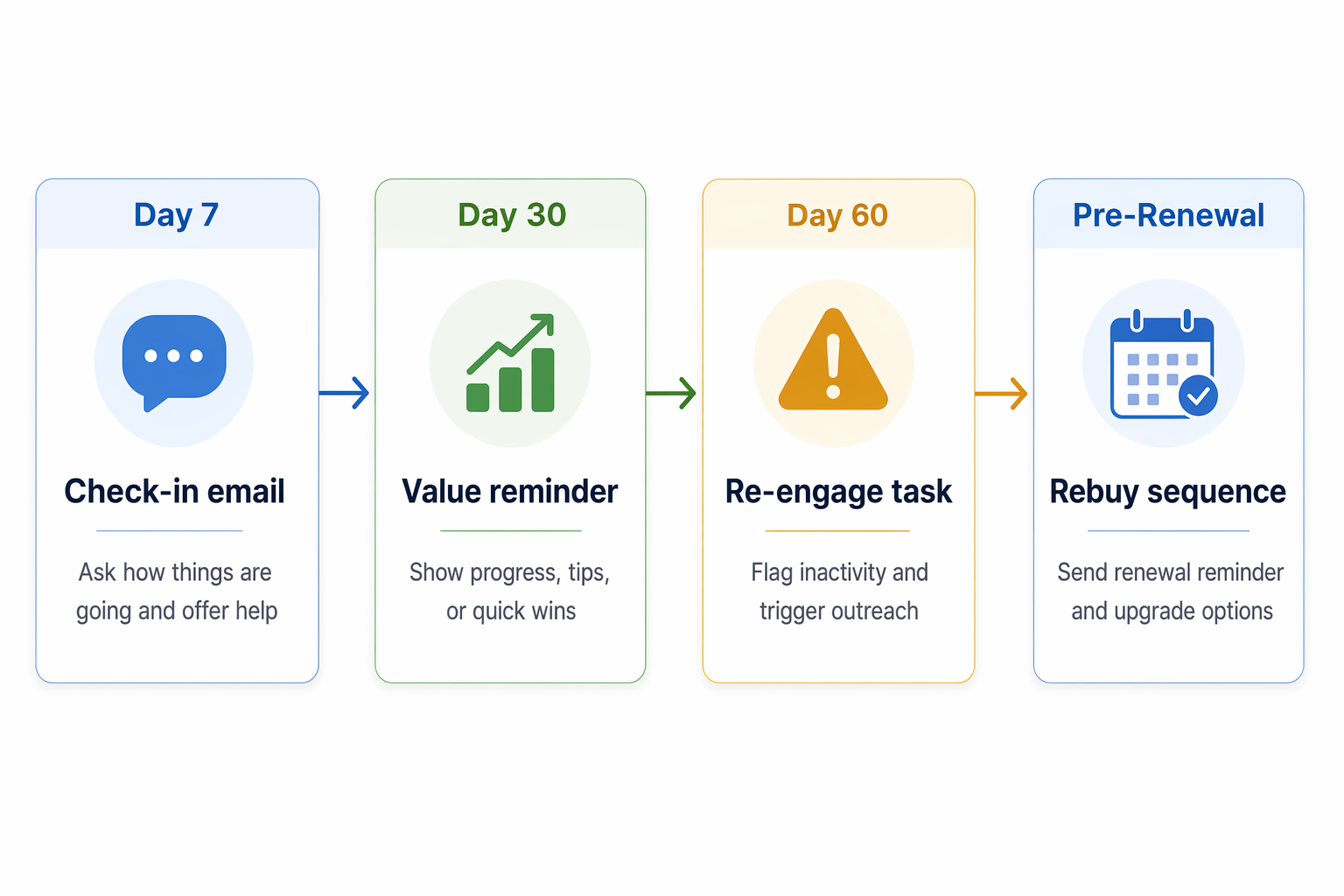
- The day-7 check-in: One week after purchase, send a personal email. Not a survey. Not an upsell. Just "How's it going? Hit reply if anything feels off." This catches problems before they become cancellations. The best version looks like it came from a real person, because it should.
- The day-30 value reminder: A month in, send a short email that reminds them what they've accomplished or received. "You've completed 3 of 5 modules" or "Your first campaign went out to 847 contacts." Concrete results beat generic "we appreciate you" copy every time.
- The day-60 re-engagement trigger: If a customer hasn't logged in, opened an email, or interacted in 60 days, fire an internal task to your team. Don't automate the outreach here — have a real person reach out. A phone call at this stage saves accounts that no email can.
- The renewal or rebuy sequence: 30 days before a subscription renews or a typical rebuy window opens, start a 3-email sequence. Email one: remind them what they're getting. Email two: share a result from a similar client. Email three: direct ask with a clear next step.
How to spot at-risk customers before they leave
Customers don't leave out of nowhere. They leave after a slow fade that your CRM can detect if you know what to watch.
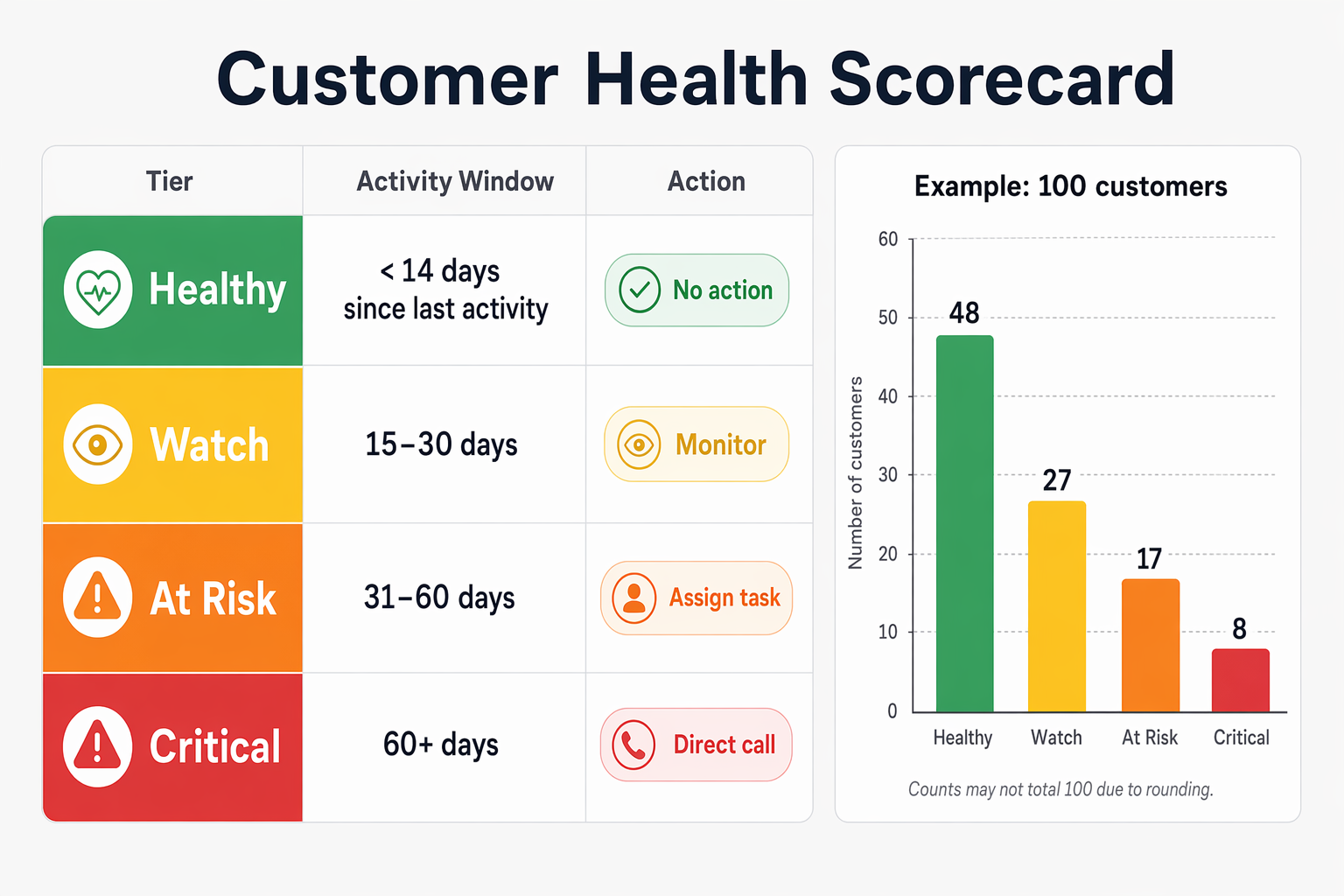
The simplest signal is engagement drop. If a customer used to open every email and now hasn't opened one in 45 days, something changed. If they booked monthly calls and stopped scheduling, that's a flag. Your CRM tracks this data already — you just need a saved view or report that surfaces it.
Build a "customer health" view in your CRM. Filter for customers (not leads) and sort by last activity date. Anyone whose last touchpoint is more than 30 days old goes on a watch list. Anyone past 60 days gets a direct outreach task assigned to their account owner.
According to SchedulingKit's 2026 CRM data, businesses that use CRM for retention see customer retention rates increase by an average of 27%. That's not from adding features. It's from paying attention to signals your CRM already collects.
Setting this up in HubSpot, GoHighLevel, or ActiveCampaign
The framework is the same in any CRM. But here's where to click in the three platforms we see most often.
All three can handle CRM customer retention workflows. The difference is where the features live and what you're paying for. If you're still picking a CRM, factor retention capabilities into the decision — not just lead generation.
- HubSpot: Post-sale workflows live in the same Automation > Workflows section as your lead nurture sequences. Use deal stage changes ("Closed Won") as the enrollment trigger. Customer health dashboards require the Service Hub Professional tier at $450/month, which adds ticketing, feedback surveys, and customer portal features. If you're on Starter, you can still build the four core automations using Marketing Hub workflows — you just won't get the built-in health scoring.
- GoHighLevel: Build a new workflow triggered by opportunity status change or a tag applied at purchase. GoHighLevel's flat pricing — every plan starts at $97/month with unlimited contacts — means there's no feature gate on post-sale automation. Use the built-in calendar, SMS, and email to run check-ins and renewal sequences from the same platform.
- ActiveCampaign: Create an automation triggered by a deal moving to "Won" or a purchase tag. ActiveCampaign's Plus plan at $49/month includes CRM with deal pipelines and contact scoring — enough to build every retention workflow described here. Their conditional content feature lets you personalize check-in emails based on what the customer bought.
A quarterly retention review keeps this working
Retention workflows break the same way acquisition workflows do. Tags change, team members leave, email content goes stale. The same quarterly audit process that keeps your lead-gen automations healthy applies here.
Every 90 days, pull three numbers from your CRM. First: how many customers from last quarter are still active? That's your retention rate. Second: how many hit the 60-day silence trigger? That's your at-risk rate. Third: how many re-engaged after a check-in email or call? That's your save rate.
Those three numbers tell you whether your CRM customer retention system is working or just sitting there. If your at-risk rate is climbing, your post-sale experience needs attention. If your save rate is high, your outreach timing is right.
The businesses we work with that track these quarterly see patterns fast. One coaching practice found that clients who completed onboarding in the first 10 days had an 85% renewal rate — versus 40% for those who didn't. They added a single automation to nudge slow starters and cut churn by a third.
Your CRM already stores the data that predicts who's about to leave. The only question is whether you've asked it to look.