CRM follow-up tasks: stop letting deals die after first contact
You responded to the lead in five minutes. Great. But 80% of deals need five or more follow-ups to close, according to Martal Group's 2026 follow-up research. Here's the ugly part: XtendedView's 2026 sales data found that 44% of reps give up after a single attempt. The leads don't go cold because they're uninterested — they go cold because nobody followed up. Your CRM already has task management. You just haven't wired it to do the nagging for you. This guide shows you how to build CRM follow-up tasks that fire on schedule, surface overdue deals before they rot, and keep your pipeline honest.
Why deals die between follow-up two and follow-up five
The first follow-up is easy. You're excited, the lead is fresh, and maybe your CRM already automates it. But deals don't close on excitement. They close on persistence.
According to Pipeline CRM's 2026 Performance Benchmark, top-performing sales teams average 50.7 touchpoints per closed deal. The industry average? Just 13.7. That gap isn't talent — it's systems. The top teams aren't more motivated. They have CRM follow-up tasks that tell them exactly what to do next, every single morning.
The math is simple. If you need five follow-ups to close and you're only doing two, you're abandoning 60% of your potential wins. Not because the leads said no — because you never got to the conversation where they'd say yes.
The fix isn't willpower. Reps don't skip follow-ups because they're lazy. They skip them because there are 40 other things screaming for attention, and a contact who didn't reply last Tuesday feels like a dead end. Your CRM needs to override that feeling with a task that says: "Call Sarah. Third attempt. $4,200 deal. Follow up on the proposal she opened twice."
What a working CRM follow-up task system looks like
A good follow-up system has three layers: creation, escalation, and visibility. Miss any one of these and tasks pile up until everyone ignores them.
Creation means every deal automatically generates its next follow-up task the moment the previous one completes. You should never need to manually create a "call them back" task. When a rep logs a call with no answer, the CRM should instantly create a task for attempt two — scheduled for 48 hours later, assigned to the same rep, tagged with the deal value.
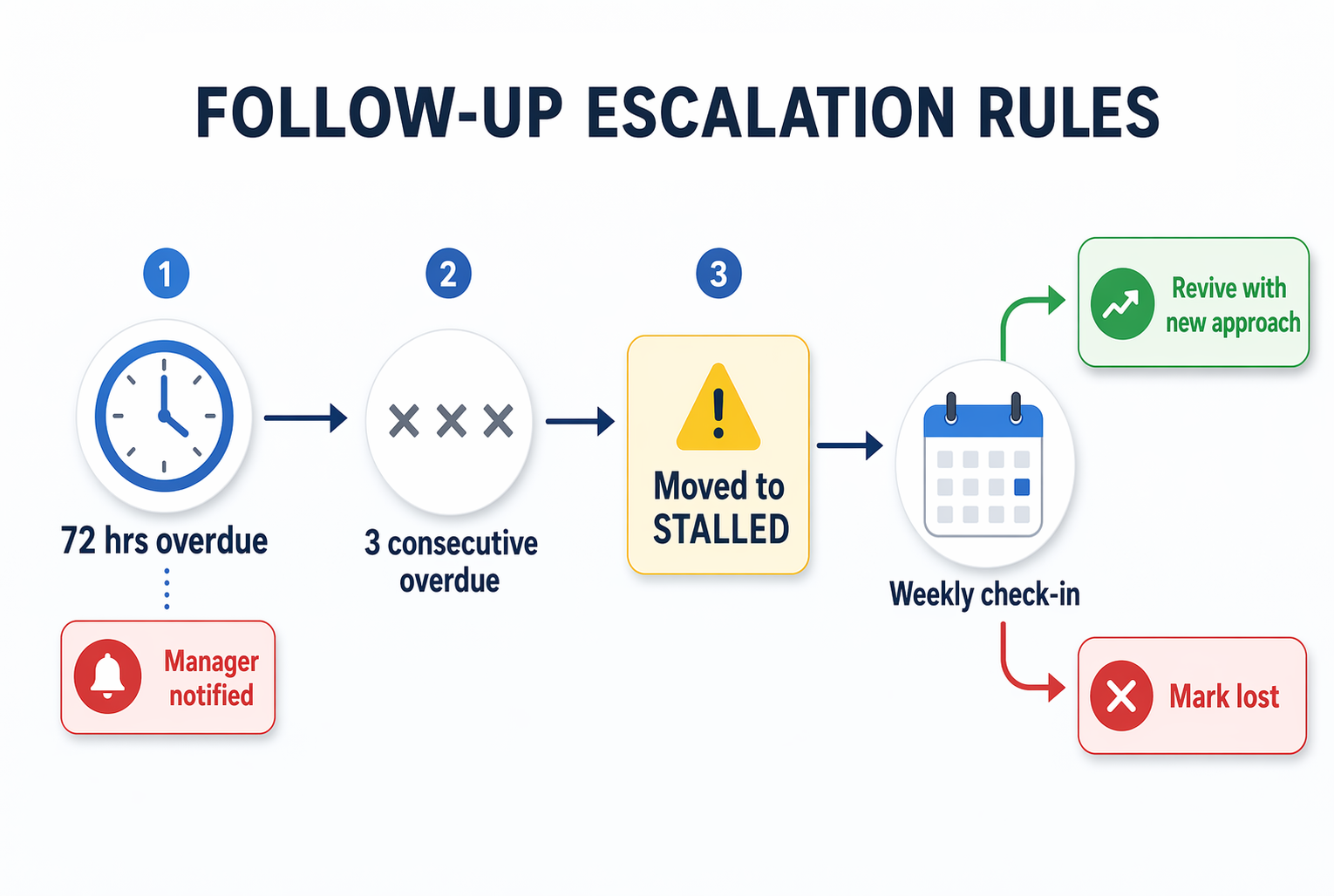
Escalation means overdue tasks don't just sit there. If a follow-up is 72 hours late, the CRM should notify a manager or reassign it. Stale tasks are invisible pipeline leaks. They look like active deals in your forecast but nobody's actually working them.
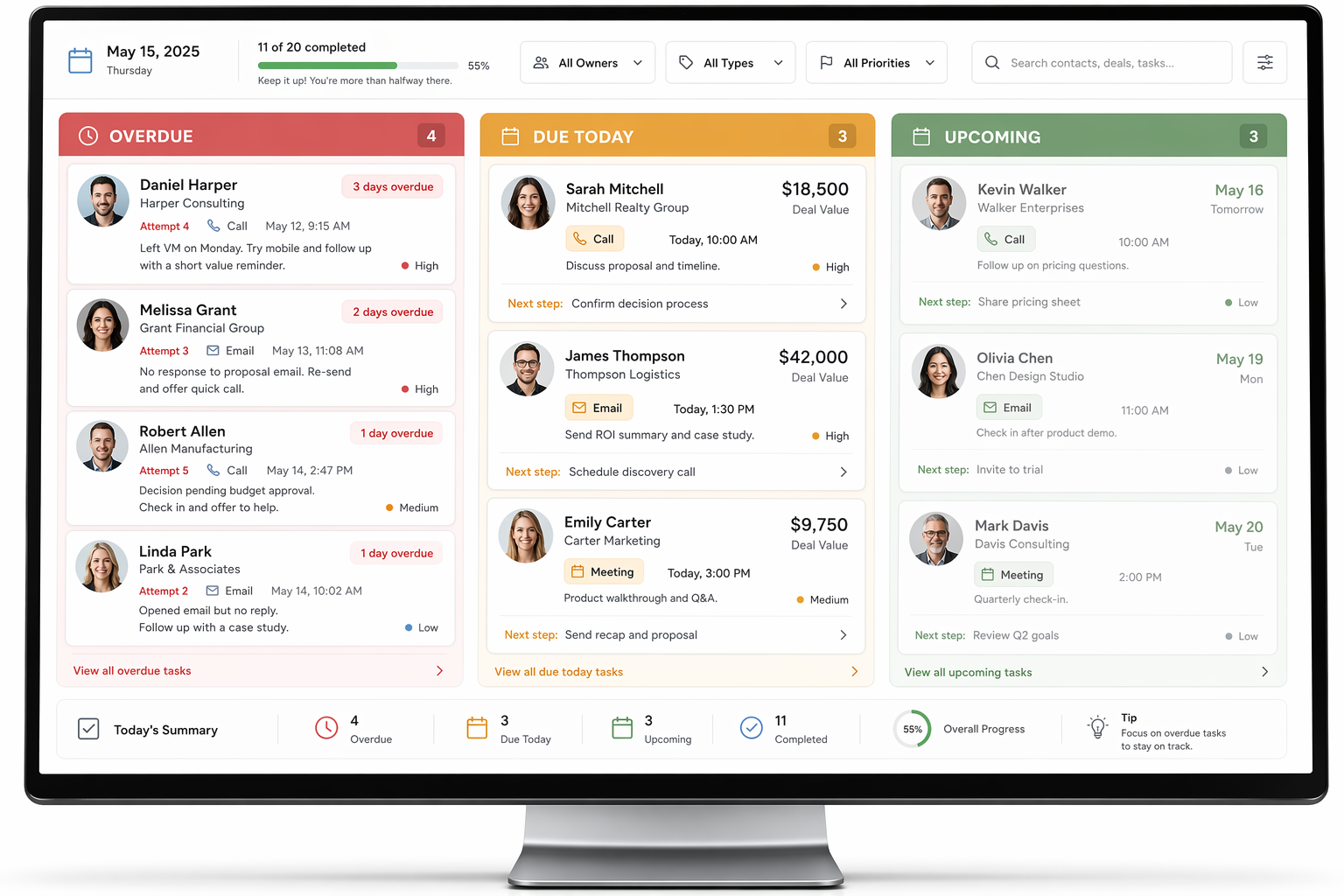
Visibility means a single dashboard — sorted by urgency — where reps start their day. Not buried in a calendar. Not mixed into email. One screen: what's overdue, what's due today, what's coming tomorrow. That's the daily workflow.
How to set up follow-up tasks in GoHighLevel, HubSpot, and ActiveCampaign
The principle is identical across platforms: trigger a task when a deal reaches a stage, auto-schedule the next task when the current one completes, and surface overdue items daily. Here's where to click.
In GoHighLevel, you'll build this inside Workflows. Create a workflow triggered by "Pipeline Stage Changed" or "Task Completed." Add a "Create Task" action with a dynamic due date (e.g., +2 days). GoHighLevel includes unlimited automation on all plans starting at $97/month, so there's no feature gate. The limitation is that GHL's task view is basic — you'll want to pair it with the Opportunities tab filtered by "next action overdue" to see what's slipping.
In HubSpot, go to Automation → Workflows and trigger on "Deal stage is [X]." Add a "Create Task" action, assign it to the deal owner, and set relative due dates. HubSpot's task queue is excellent — reps can work through it sequentially without opening each contact. The catch: workflow automation requires Sales Hub Professional at $100/seat/month. For a five-person team, that's $500/month just for this capability.
In ActiveCampaign, use Automations triggered by deal stage changes. The "Add Task" action lets you set assignees and due dates relative to the trigger. Their Sales plan starts at $19/month per user with CRM and task features included. ActiveCampaign's advantage is the visual automation builder — you can see every branch where a follow-up might stall.
The overdue task problem and how to fix it before it kills your forecast
Here's what happens in practice: you set up follow-up tasks, reps ignore the hard ones, and within two months you've got 200 overdue tasks that nobody will ever complete. The system becomes noise. Reps stop trusting it.
According to Whatfix's CRM case study data, teams that implemented task reminders and overdue nudges resolved 76% of stale deals within three months. The ones who didn't? Those deals sat in the pipeline forever — inflating forecasts and hiding the real close rate.
The fix is a three-rule system. Rule one: any task overdue by more than 72 hours triggers a notification to the manager, not just the rep. Rule two: any deal with three consecutive overdue tasks gets auto-moved to a "Stalled" stage so it stops polluting your forecast. Rule three: once a week, review the Stalled stage and either revive the deal with a fresh approach or mark it lost. No deal lives in limbo forever.
This sounds harsh but it's actually kinder to your team. Reps feel less guilt when there's a clear system. The deal gets a proper next step or a proper burial — both are better than pretending someone will "get to it eventually."
How many follow-up tasks should each deal stage have?
Not every stage needs the same follow-up cadence. Early-stage deals need more frequent, lighter touches. Late-stage deals need fewer but more targeted actions.
Here's a framework that works for most service businesses and consultancies:
- New lead (pre-qualification): 3 attempts in 7 days. Call, email, call. If no response after three, auto-move to a nurture sequence and free up the task queue.
- Qualified (proposal stage): 2 follow-ups per week until you get a yes, no, or explicit "not now." Each task should reference something specific — the proposal section they viewed, the question they asked, the deadline they mentioned.
- Negotiation: 1 follow-up every 3-4 days. These deals are active — you don't want to be annoying. But you do want a task reminding you to check in if they go quiet for 5+ days.
- Post-close (onboarding): 3 check-in tasks in the first 30 days. Day 1 welcome, day 7 progress check, day 30 satisfaction pulse. This bridges the gap into your client onboarding workflow.
Measure what matters: the two reports that keep follow-ups honest
You don't need a dozen dashboards. Two reports tell you everything about whether your CRM follow-up tasks are working.
Report one: tasks completed vs. tasks created, by rep, by week. If a rep creates 30 tasks per week but completes only 12, you either have a workload problem or a discipline problem. Both need a conversation. Pipeline CRM's benchmark data found that top-performing teams create 3.26x more deals — but they also complete their tasks at a 90%+ rate. Volume without execution is just noise.
Report two: average days between follow-ups for closed-won deals vs. closed-lost deals. This tells you your actual winning cadence. If your closed-won deals averaged 2.3 days between touches and your closed-lost deals averaged 6.8 days, you know exactly where the line is. Set your task automation to stay on the winning side of that number.
Every CRM we mentioned — GoHighLevel, HubSpot, ActiveCampaign — can produce both reports with custom filters. If yours can't, it's a sign your CRM is too basic for your sales volume. Check our guide to choosing a CRM if you're hitting that wall.