Build a CRM client onboarding workflow that stops early churn
You closed the deal. Confetti moment. Then what? Most small businesses have a detailed sales pipeline with five stages, automated follow-ups, and a Slack notification when a deal moves. But the moment someone signs, the CRM goes silent. No welcome email for two days. No kickoff call scheduled. The client's sitting there wondering if they made a mistake. According to UserGuiding's 2026 onboarding research, 63% of customers say the onboarding experience is a deciding factor in whether they stick around. And VWO's retention data shows poor onboarding causes up to 23% of all customer churn. Your CRM already has the tools to fix this. You just haven't built the post-sale side yet. This guide walks you through setting up a CRM client onboarding workflow that moves new clients from "just signed" to "getting results" without dropping them into a black hole first.
Why new clients churn before they even start
The riskiest moment in any client relationship isn't month six. It's week one. Your new client just spent money, told their team about the decision, and is waiting for something to happen. Every hour of silence after signing erodes their confidence.
Think about it from their side. They compared three options, sat through your pitch, negotiated the price, and finally said yes. Now they're staring at their inbox wondering when someone will tell them what comes next.
According to Cloud Coach's implementation research, 68% of users abandon a product due to poor onboarding. That number isn't just for software companies — it applies to any service where the buyer doesn't feel immediate progress.
The fix isn't hiring an onboarding coordinator. It's building a CRM client onboarding workflow that triggers the moment a deal closes. The same system that nurtured the lead can welcome the client — you just need to extend the pipeline one stage further.
What a CRM client onboarding workflow actually looks like
A client onboarding workflow is a sequence of automated actions, tasks, and messages that fire after a deal moves to "Closed Won" or whatever you call your final sales stage. It replaces the sticky note that says "send welcome email" with a system that runs whether you remember or not.
The core structure has five moving parts. You don't need all of them on day one, but you need at least the first three to stop losing people in the handoff.
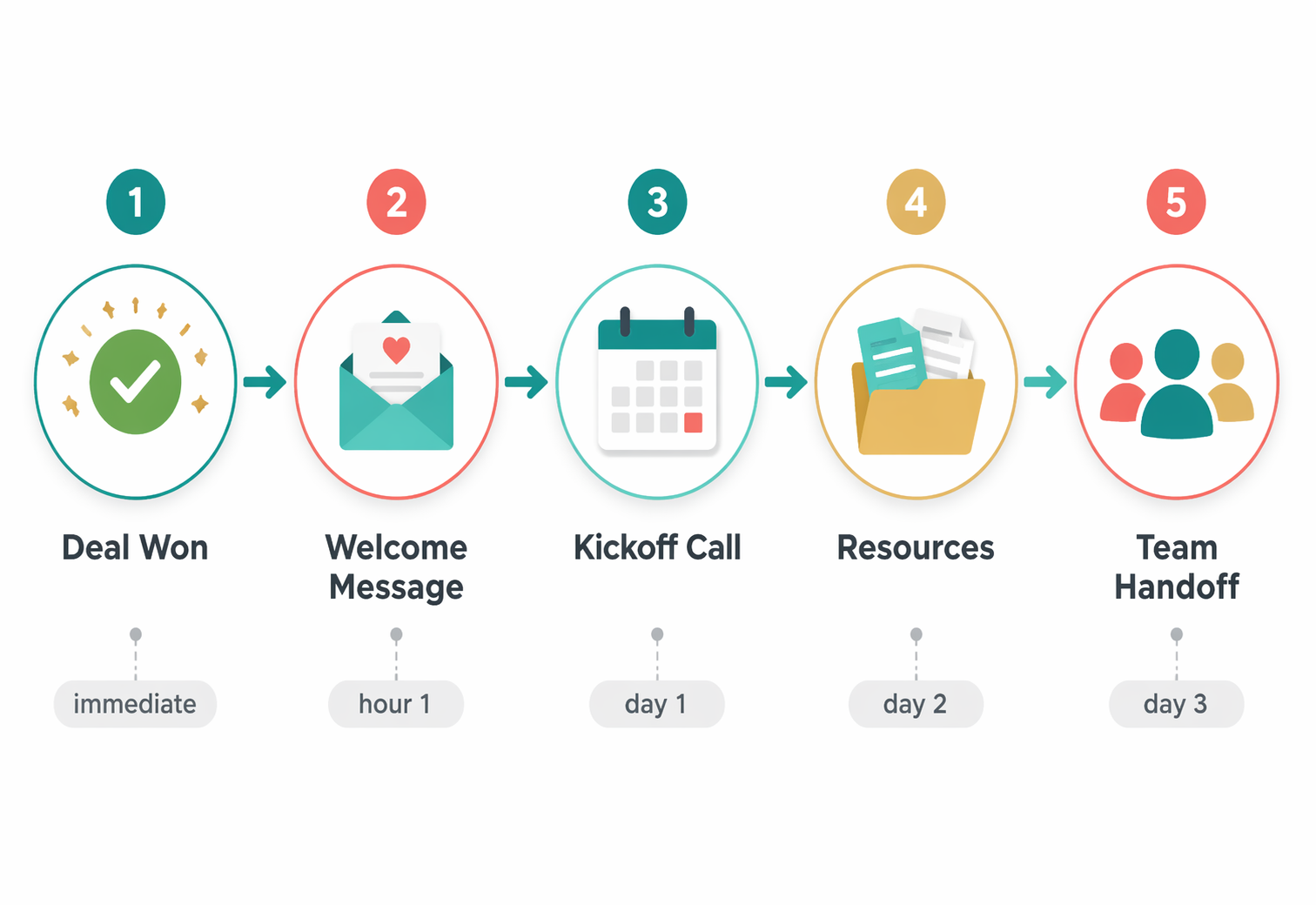
- Trigger: deal moves to "Won" or tag applied (this starts everything)
- Welcome message: email or SMS within 5 minutes — confirms the purchase, sets expectations, gives one clear next step
- Kickoff scheduling: sends a calendar link for the onboarding call within the first 24 hours
- Resource delivery: portal access, intake form, or document request — whatever the client needs to bring to the kickoff
- Internal handoff: assigns the account owner, creates tasks, notifies your team in Slack or email
How to set this up in GoHighLevel, HubSpot, or Zoho
The mechanics differ by platform, but the logic is the same everywhere. You're creating a workflow triggered by a pipeline stage change, then chaining messages, tasks, and waits.
In GoHighLevel ($97/mo, unlimited users), you'll build this inside Workflows. Create a trigger on "Pipeline Stage Changed" → Onboarding. Add an immediate email action with your welcome template. Add a 1-hour wait, then send the calendar booking link via SMS. Add internal notification actions to assign the account owner. GoHighLevel's flat pricing means your whole team can see and act on onboarding tasks without per-seat math.
In HubSpot (Service Hub Pro, roughly $90-150/user/month according to HubSpot's pricing page), you'll use a deal-based workflow. Set enrollment to "Deal stage is Closed Won." Add a "Send email" action for the welcome, a "Create task" for the kickoff call, and a "Rotate owner" if you hand off from sales to delivery. HubSpot's ticket pipelines let you track onboarding progress separately from the sales pipeline.
In Zoho CRM (Professional tier at roughly $23/user/month), use Blueprint to define onboarding stages as transitions. Each transition can trigger emails, assign tasks, and update fields automatically. The per-user pricing keeps costs predictable as you grow.
Whichever platform you're on, start with the welcome email and kickoff scheduler. Those two actions alone eliminate the worst part of a bad onboarding: the silence after signing.
The five messages every client onboarding sequence needs
Don't overthink the content. You need five messages over the first 10 days. Each one does exactly one job.
- Message 1 (immediate): "You're in. Here's what happens next." Confirms the purchase, sets the timeline, gives one action (book kickoff call).
- Message 2 (hour 1-4): Resource delivery. Portal login, intake form link, or document upload instructions. Keep it short — one link, one ask.
- Message 3 (day 2): Account manager intro. A quick personal note from whoever will work with them. Two sentences, a photo, and a direct reply option.
- Message 4 (day 5): Progress check. "Have you had a chance to [complete the intake form / review the portal]?" This catches anyone who stalled.
- Message 5 (day 10): Value confirmation. Share what you've done so far or what's coming next week. Reinforce that they made the right call.
Measure whether your onboarding workflow is actually working
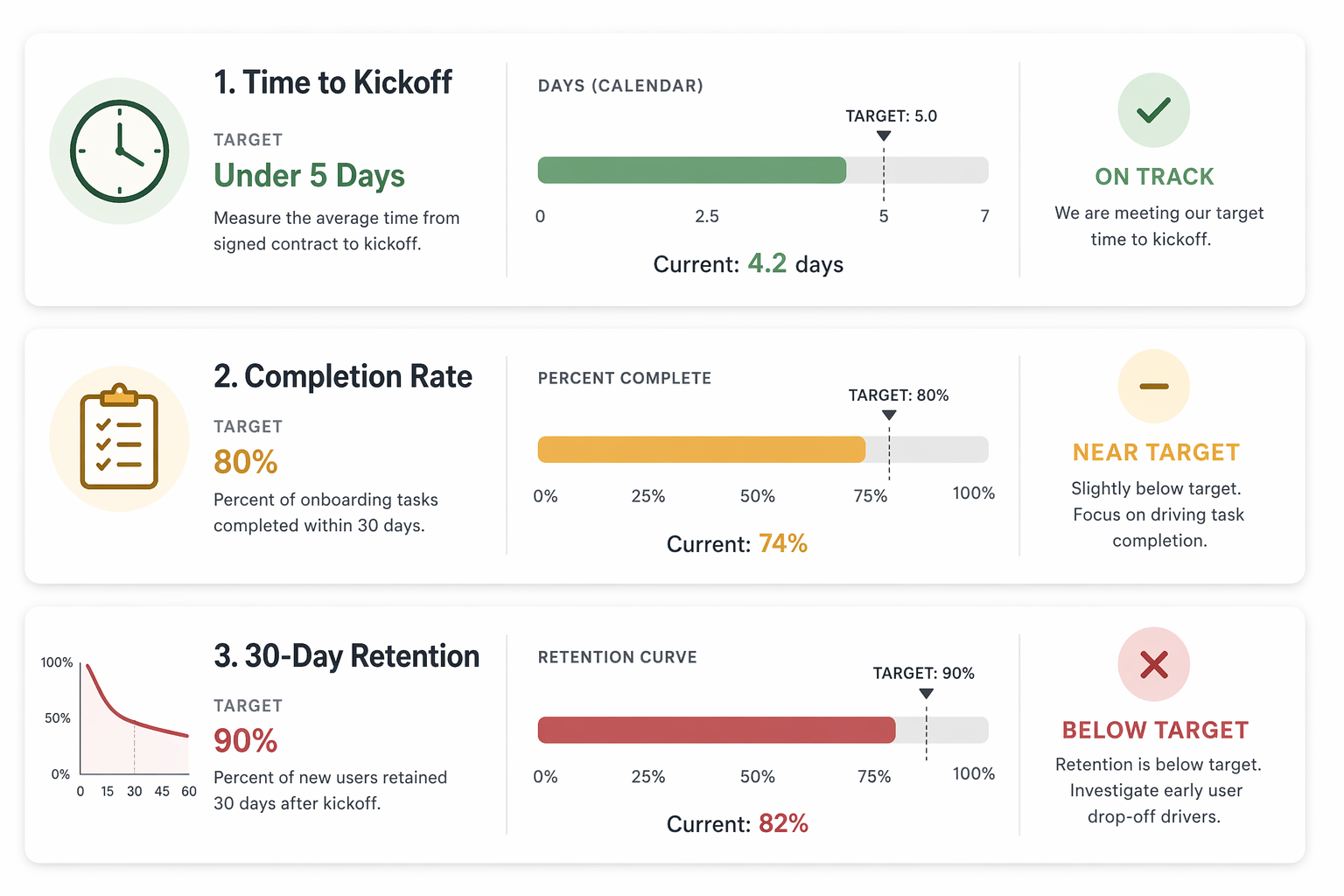
A workflow that fires without measurement is just noise with good intentions. You need three numbers to know if your CRM client onboarding is doing its job.
First: time to kickoff. How many hours pass between "deal closed" and "kickoff call completed"? If it's more than 5 business days, your workflow has a gap somewhere. Track this with a date field on the deal or contact record — one for close date, one for kickoff date. The delta is your speed-to-value metric.
Second: onboarding completion rate. What percentage of new clients finish every step in your onboarding sequence? If you send five messages and an intake form, how many people actually complete the form before the kickoff? Low completion means your asks are too complex or too spread out.
Third: 30-day retention. Of the clients who completed onboarding, how many are still active at day 30? Compare this against clients who dropped off mid-onboarding. The gap tells you how much revenue your workflow is saving.
According to MarketingScoop's onboarding research, companies that automate their onboarding workflow see up to 40% faster time-to-value. That's not an abstract metric — it's the difference between a client seeing results in week one versus still waiting for a kickoff call in week three.
Don't let a good close die in the handoff
You've already built the hard part — the pipeline that turns strangers into buyers. The CRM client onboarding workflow is easier to build, faster to set up, and protects revenue you've already earned instead of chasing revenue you don't have yet.
Start with two automations today: the instant welcome email and the kickoff scheduler. Those take 20 minutes to build in any CRM. Then add the remaining messages over the next week. By this time next month, every new client will hit your system and immediately know what happens next, who's responsible, and when they'll see results.
If you haven't audited your existing automations recently, do that first. A broken welcome email is worse than no welcome email — it tells the client your systems don't work. And if your pipeline stages don't include a post-sale phase yet, add one. The onboarding workflow needs a trigger, and that trigger is a stage change.
The companies that grow without constantly replacing lost clients aren't better at marketing. They're better at what happens after the sale. Your CRM can handle both sides. You just need to tell it what to do.