CRM adoption: stop paying for a tool your team won't open
You bought a CRM six months ago. You spent a weekend setting it up. Your team used it for about two weeks, then quietly went back to spreadsheets, sticky notes, and memory. Now you're paying $97 a month for a tool that holds half your contacts and none of your team's trust. You're not alone. According to Wave Connect's 2026 CRM research, 55% of CRM implementations fail to meet their objectives — and poor user adoption is the top reason. The software isn't broken. Your team just doesn't see why it's worth the effort. CRM adoption isn't a training problem. It's a design problem — and you can fix it in 30 days if you build the system around how your team already works instead of asking them to change everything at once.
Most CRM failures aren't about the software
Sales teams don't hate CRMs. They hate entering data that doesn't help them close anything. When the CRM feels like a reporting tool for management instead of a selling tool for reps, nobody's going to use it voluntarily.
According to CRM.org's 2026 statistics, 22% of sales professionals still aren't clear on what a CRM actually does for them. That's not ignorance — it's a sign the tool was introduced without explaining what's in it for the person doing the typing.
The pattern looks the same in almost every small business we've worked with. The owner picks a CRM, imports contacts, builds a few automations, and sends the team a login link. The team clicks around for a day, doesn't see how it helps their specific job, and goes back to whatever they were doing before.
Here's the uncomfortable truth: if your team isn't using the CRM, it's usually not a training gap. It's because you set it up for your needs — tracking, reporting, visibility — and not for theirs. A rep needs to find a phone number in two clicks, log a note without switching tabs, and see their deals without running a report. If the CRM can't do those things faster than their current method, they'll skip it every time.
There's a second cost most owners miss. When half your team uses the CRM and half doesn't, your data is only half-complete. Pipeline reports become guesswork because half the deals aren't in the system. Targeted emails fall flat because half the contacts are missing engagement history. Partial adoption is almost worse than no adoption — it gives you confidence in data that's incomplete.
According to enable.services' 2026 research, only 37% of sales reps feel their company fully uses its CRM. Two-thirds of the people who should be in the system every day aren't — or they're doing the bare minimum to keep their manager from asking.
Strip it down before you roll it out
The biggest CRM adoption killer is complexity. A CRM with 47 custom fields, 12 pipeline stages, and three layers of tags looks impressive in a demo. For a rep who needs to log a call and move to the next one, it's a wall.
Before you invite your team, strip the interface down. Hide every field, tab, and view that doesn't directly support what your team does in a typical day. You can always turn features on later. You can't undo a first impression of a cluttered, confusing dashboard.
Start with three to five required fields per contact: name, company, phone, email, and deal stage. That's it. If your team can add a contact in under 30 seconds, they will. If it takes two minutes of scrolling through fields they don't understand, they won't.
Next, connect the two tools your team already lives in: email and calendar. HubSpot, GoHighLevel, and ActiveCampaign all sync with Gmail, Outlook, and Google Calendar out of the box. When emails and meetings log automatically, half the manual data entry disappears. That single integration does more for CRM adoption than any training session you could run.
If you've already picked a CRM that matches your business model, simplification is easier because the tool already fits your workflow. If you chose a CRM based on a feature checklist instead of how you actually sell, this is where it shows.
A 30-day CRM adoption plan that turns skeptics into users
Don't launch the CRM to everyone on the same day. A phased rollout over four weeks beats the Monday morning "everyone log in now" email — every time.
Here's the plan we use with clients. It works whether you've got a team of three or thirty.
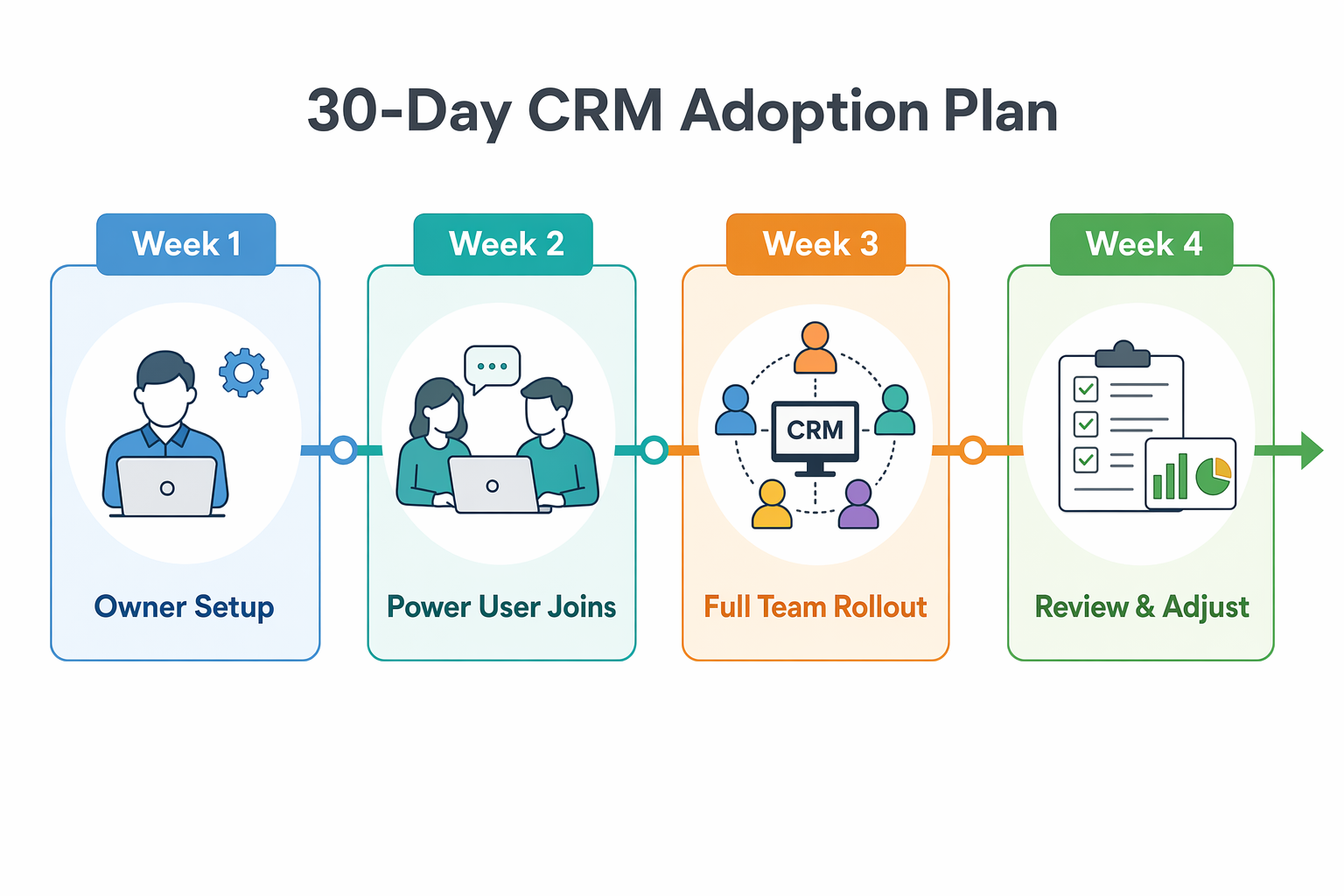
- Week 1 — Owner setup: You or your ops person set up the CRM alone. Import contacts, configure the pipeline to match your actual deal stages, connect email and calendar, and test everything end to end. Don't invite anyone else yet. Your job this week is to remove every obstacle before your team sees the tool for the first time.
- Week 2 — One power user: Pick your most tech-comfortable team member and give them access. Walk them through the three things they'll do daily — log calls, update deals, check their pipeline — and let them use it for a full week. Their feedback catches problems you missed. Their buy-in makes them your internal champion when the rest of the team joins.
- Week 3 — Full team rollout: Run one 15-minute demo. Not an hour-long training. Show the three daily actions: log a call, update a deal stage, check the pipeline. Answer questions, then let people start using it. Pair each new user with your power user for quick questions instead of formal support tickets.
- Week 4 — Review and adjust: Check who's logging in and who isn't. Ask the non-users what's blocking them. Sometimes it's a missing integration. Sometimes it's a confusing field layout. Fix it now while habits are still forming — waiting two months makes the problem permanent.
Five daily habits that make CRM adoption stick
Getting your team to log in once isn't the win. Getting them to log in every day is. Adoption is a set of habits your team builds over the first 30 to 60 days. If the CRM isn't part of the daily routine by week four, it probably won't be by week twelve.
These five habits work for any CRM and any team size. None of them take more than five minutes.

- Start every meeting with the CRM open. Team standup? Pull up the pipeline on a shared screen. One-on-one with a rep? Start with their deals. When the CRM is the first thing everyone sees, it becomes the source of truth — not the thing people update after the meeting is over.
- Log the note before you hang up. Reps who wait until end of day to log calls forget half the details. One sentence right after the conversation keeps the CRM accurate. Mobile apps make this dead simple — according to Affinco's 2026 CRM data, 70% of businesses now use mobile CRM, and it's one of the strongest predictors of daily adoption.
- Do a five-minute pipeline review every Friday. Each rep scans their deals. Anything stale gets updated or archived. This prevents the CRM graveyard — dead deals sitting at stages they left three months ago, making your pipeline look bigger than it actually is.
- Assign one person to own data quality. Not full-time — just 15 minutes a week checking new entries for duplicates, missing fields, or junk contacts. If you've already done a CRM data cleanup, this keeps your database honest going forward.
- Celebrate a win that came from CRM data. When someone closes a deal because they spotted a lead score spike or caught a contact who re-engaged after months of silence, say it out loud. "The CRM flagged this lead and we called them same day." That story sells adoption better than any training deck ever will.
When someone still won't use it, check these three things
You've simplified the setup and done the phased rollout. Most of your team is in the CRM daily. But one person still isn't. Before you call it stubbornness, figure out which problem you're actually dealing with.
It's usually one of three things.
- The tool doesn't fit their role. A field sales rep needs mobile-first CRM with offline access. A support person needs a ticket queue, not a pipeline view. If the CRM layout doesn't match their job, no amount of coaching fixes the gap. Customize their view or find an integration that bridges it.
- The expectations aren't specific enough. "Use the CRM" means nothing actionable. "Log every call within five minutes and update deal stages by Friday end of day" — that's something a person can actually do. Vague expectations create vague compliance.
- The habit hasn't formed yet. Some people need more runway. Pair them with your power user for another two weeks of daily check-ins — not to police them, but to answer the small friction questions that make someone give up silently.
Make CRM adoption a standing agenda item for 90 days
If all three blockers above are addressed and someone still isn't using the CRM, ask yourself a harder question: did you pick the right tool? Sometimes the best adoption fix is a simpler CRM. A system your team actually uses beats a powerful one that collects dust.
The payoff for getting this right is real. According to Demand Sage's 2026 CRM statistics, businesses with strong CRM usage see 17% more lead conversions and 21% higher productivity. But those numbers only show up when people actually log in.
Keep CRM adoption on your weekly meeting agenda for at least the first 90 days. Five minutes at the end of each team meeting — "what's working, what's annoying, what's missing" — keeps the feedback loop alive. Small fixes compound. A CRM that gets slightly easier to use every week is a completely different tool three months later.
The businesses we work with that treat adoption as a 90-day project — not a one-day launch — don't just get better data. They get a team that trusts the system enough to rely on it. And that's when the CRM starts paying for itself.