Mobile CRM: which app features actually close deals
Your CRM is useless if it only works when you're at your desk. That's not opinion — it's math. According to Kixie's 2025 CRM research, 65% of sales reps using a mobile CRM hit their quota. Only 22% of reps without mobile access do the same. That's a 3x gap. If your team closes deals in the field, on calls between meetings, or from a coffee shop, the mobile CRM app isn't a nice-to-have. It's the difference between logging the conversation while it's fresh and forgetting it by the time you're back at your laptop. Here's what your mobile CRM actually needs to do — and where the big platforms fall short.
Why the mobile CRM gap is a 3x quota difference
The numbers aren't subtle. Reps who can update deals, log calls, and check pipeline from their phone close at triple the rate of those stuck waiting for a desktop session. CRM.org's 2026 analysis adds that businesses using mobile CRM are 150% more likely to exceed sales goals overall.
Why? Speed to lead. A rep who logs a meeting note in the parking lot captures details that disappear an hour later. A rep who moves a deal stage from the Uber home keeps the pipeline honest. A rep who sees a lead notification and calls back in three minutes wins against the one who checks tomorrow morning.
The mobile CRM market hit $31.36 billion in 2025 and is projected to reach $36.24 billion in 2026, according to The Business Research Company. That 15.6% growth isn't coming from enterprises. It's driven by small and mid-size field teams who figured out that the phone in their pocket is a better sales tool than the laptop in their bag.
Yet most small businesses treat the CRM mobile app as an afterthought — something they download once and never configure. That's leaving money on the table.
Five mobile CRM features worth fighting for
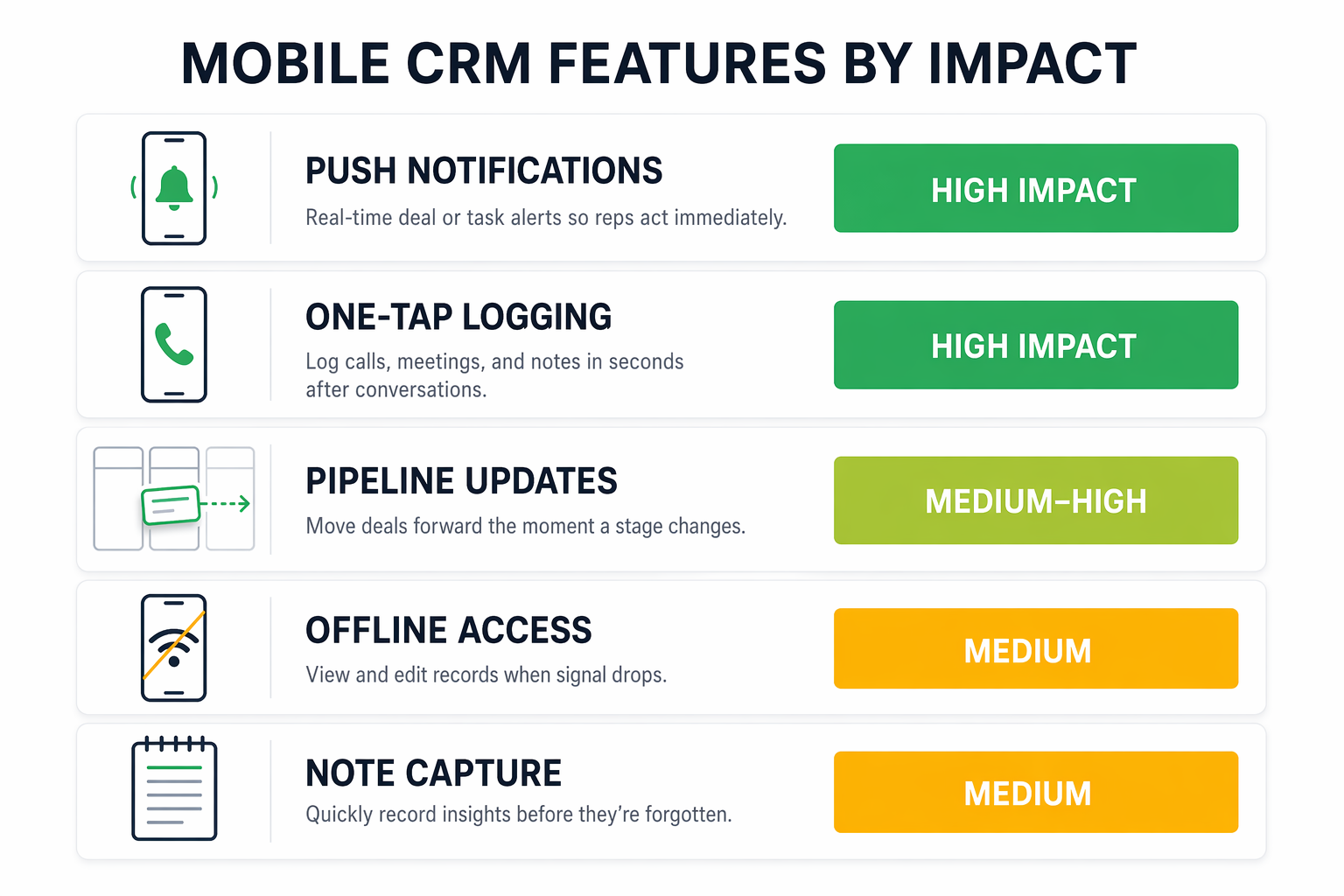
Not every mobile feature matters equally. Here are the five that directly affect whether your team uses the CRM at all — and whether it helps them sell.
Push notifications for new leads are the single highest-value mobile feature. If a lead fills out your form and your rep doesn't know for an hour, you've already lost to the competitor who called in five minutes. Every major platform offers this, but you have to configure the routing rules so the right person gets the alert.
One-tap call and SMS logging means your rep can call a prospect, hang up, and the CRM already has the record. No manual entry, no "I'll log it later" promises that never happen. This is where CRM adoption lives or dies on mobile — if logging a call takes more than one tap, people stop doing it.
Mobile pipeline updates let reps drag a deal from "proposal sent" to "negotiation" while they're still in the client's office. This keeps your forecast accurate in real time instead of batching updates every Friday afternoon.
Offline access is critical for anyone who sells in places with bad signal — construction sites, rural areas, basements, trade show floors with overloaded WiFi. If your app crashes without a connection, your team reverts to notes on napkins.
Meeting and note capture — voice memos, quick text notes, photo attachments — turns the phone into a field journal. The best mobile CRMs let you attach a photo of a whiteboard or a voice note and link it directly to a contact record.
How HubSpot, GoHighLevel, and Salesforce compare on mobile
All three platforms have mobile apps. The experience varies dramatically depending on what you need.
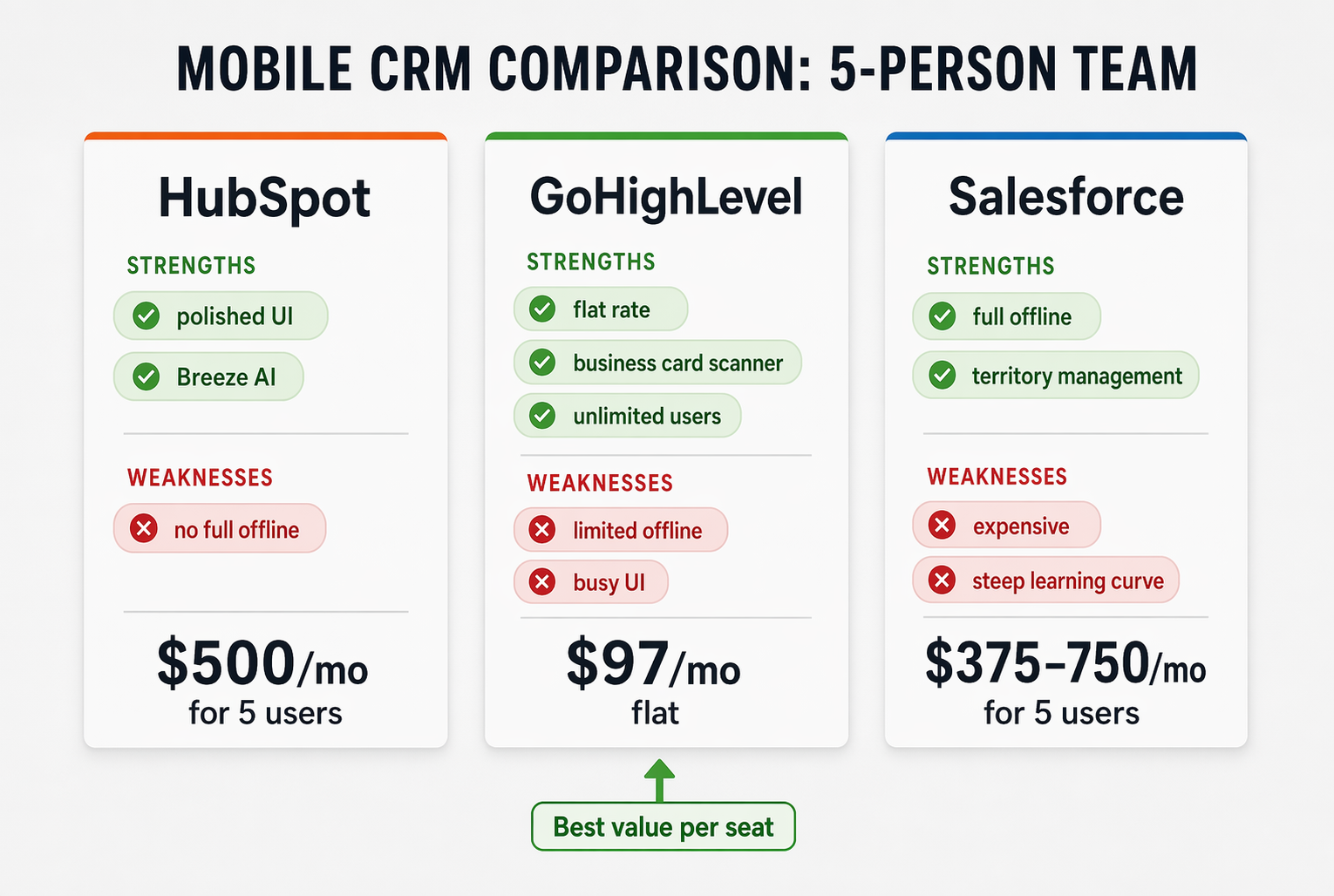
HubSpot's mobile app is the most polished for everyday use. Clean UI, fast search, and solid call/email logging. The 2025 update added Breeze AI for mobile — a copilot that summarizes conversations and suggests follow-ups right on your phone. The catch: advanced mobile analytics (Sales Insights) are currently Android-only, and the features that make the mobile app truly powerful require the Professional tier at $100/user/month.
GoHighLevel's app covers CRM, SMS, calls, and pipeline in one interface. The 2025 LevelUp release added an AI-powered business card scanner — snap a photo at a networking event and the contact lands in your CRM with parsed fields. At $97/month flat for unlimited users, the per-seat math never gets scary. The tradeoff: the mobile UI is busier than HubSpot's, and offline support is limited. If your team works in areas with spotty signal, this matters.
Salesforce has the strongest offline mode of any major CRM — full read and write access without a connection, with automatic sync when you're back online. Territory management, custom objects, and deep reporting also work on mobile. The price reflects it: the features most field teams need start at $75–$150/user/month, according to Tooltester's 2026 comparison. For a five-person team, that's $375–$750/month before implementation.
The short version: GoHighLevel wins on price for growing teams. HubSpot wins on daily usability. Salesforce wins on offline power and enterprise depth. Pick based on where your team actually sells, not which demo looked prettiest.
The offline access problem nobody mentions in demos
Every CRM vendor will tell you their mobile app works great. Ask them what happens when the WiFi drops mid-meeting and you'll get a different answer.
Salesforce is the only platform among the big three with true offline read-and-write capability. You can pull up a contact, edit a deal, log a call, and save notes with no signal at all. It syncs when connectivity returns. This matters if your sales team visits job sites, rural clients, or trade show halls where cell service dies.
HubSpot's offline mode is partial — you can view cached data but can't create or edit records without a connection. If your rep loses signal while updating a deal, that change might not save.
GoHighLevel has minimal offline support. The app essentially requires an active connection for most actions. For teams selling from a fixed office or urban environments with reliable signal, this isn't a problem. For field teams in mixed-signal areas, it's a real gap.
Before you commit to a platform, have your team test the mobile app in their actual work environments for a week. Drive the route they drive. Visit the buildings they visit. If the app chokes where they sell, the feature list doesn't matter.
Set up your mobile CRM in one afternoon
Most teams download the app and hope for the best. Spend two hours on a proper setup and the adoption rate jumps dramatically. Here's the sequence.
First, configure notification routing. Decide which events trigger a push notification and who gets them. New lead from the website? Push to the assigned rep immediately. Deal moved to "closed-won"? Maybe that's an email, not a buzz in your pocket at dinner. Start strict and loosen later — notification fatigue kills adoption faster than anything else.
Second, set up one-tap actions for the three things your reps do most. For most teams that's: log a call, send a follow-up text, and update a deal stage. If any of those takes more than two taps, your team will stop doing it within a week.
Third, create a mobile-specific pipeline view. Your desktop CRM probably shows 8 stages with detailed columns. Your mobile view should show 3-4 stages with the deal name and next action. Strip it down until it's useful at a glance on a 6-inch screen.
Fourth, run a one-week trial with your team. Ask each rep to do everything from their phone for five business days. Track what breaks, what's annoying, and what they skip. Fix those three things before you declare the mobile rollout "done."
- Day 1: Install, log in, configure notifications
- Day 2: Set up one-tap call logging and SMS templates
- Day 3: Customize mobile pipeline view (3-4 stages max)
- Day 4-5: Full mobile-only usage — no desktop CRM allowed
- End of week: Debrief, fix friction points, lock in settings
Your mobile CRM is only as good as your habits
The technology works. 80% of CRM users already access their platform from a mobile device, according to Digital Socius. The gap isn't access — it's discipline.
The teams that get the 3x quota benefit from mobile CRM share one trait: they treat the phone as the primary CRM interface, not a backup. They log calls from the car. They update deals between meetings. They check new lead notifications before checking social media. The CRM lives where they live — in their pocket.
If your team has a CRM they only touch at a desk, you're leaving the biggest productivity gain on the table. The tool is already in their hand. You just need to make it work the way they actually work.
Start with the five features that matter, test your platform's offline limits, and give your team one honest week on mobile. The quota numbers speak for themselves.