CRM calendar integration: stop booking meetings into a void
Someone books a discovery call on your website. The meeting lands on your Google Calendar. And then... nothing. No contact record created. No deal opened. No prep email sent. You show up to the call, scramble to find the person's name, and wing it. This is what happens when your scheduling tool and your CRM don't talk to each other. A working CRM calendar integration fixes this gap. Every booking creates a contact, moves a deal, sends a confirmation, and gives you context before you pick up the phone. According to ExpertBeacon's 2025 scheduling data, businesses with online scheduling tied to their CRM see a 26% increase in new customers compared to manual booking. That's not because the calendar is magic — it's because the follow-up is automatic.
A booked meeting that skips your CRM is a lost lead
Here's the scenario we see constantly: a consultant uses Calendly or Cal.com for bookings. Meetings show up on their calendar. But the CRM — where pipelines, tags, and automations live — has no idea those meetings happened.
That means no automated confirmation sequence. No pre-call questionnaire triggered. No deal created in the pipeline. No follow-up task if the prospect ghosts. The meeting exists in calendar-land and nowhere else.
This matters because 94% of consumers say they'd switch to a provider with easier scheduling. They're already expecting a smooth booking experience. If the experience after booking is silence followed by a disorganized call, you've wasted the goodwill that got them to click "confirm" in the first place.
The fix isn't complicated. It's connecting two systems that already exist in your stack. But most small teams never set it up because it feels like a "nice to have." It's not. It's the difference between a pipeline that fills itself and one you have to manually babysit.
What a connected CRM calendar integration actually does
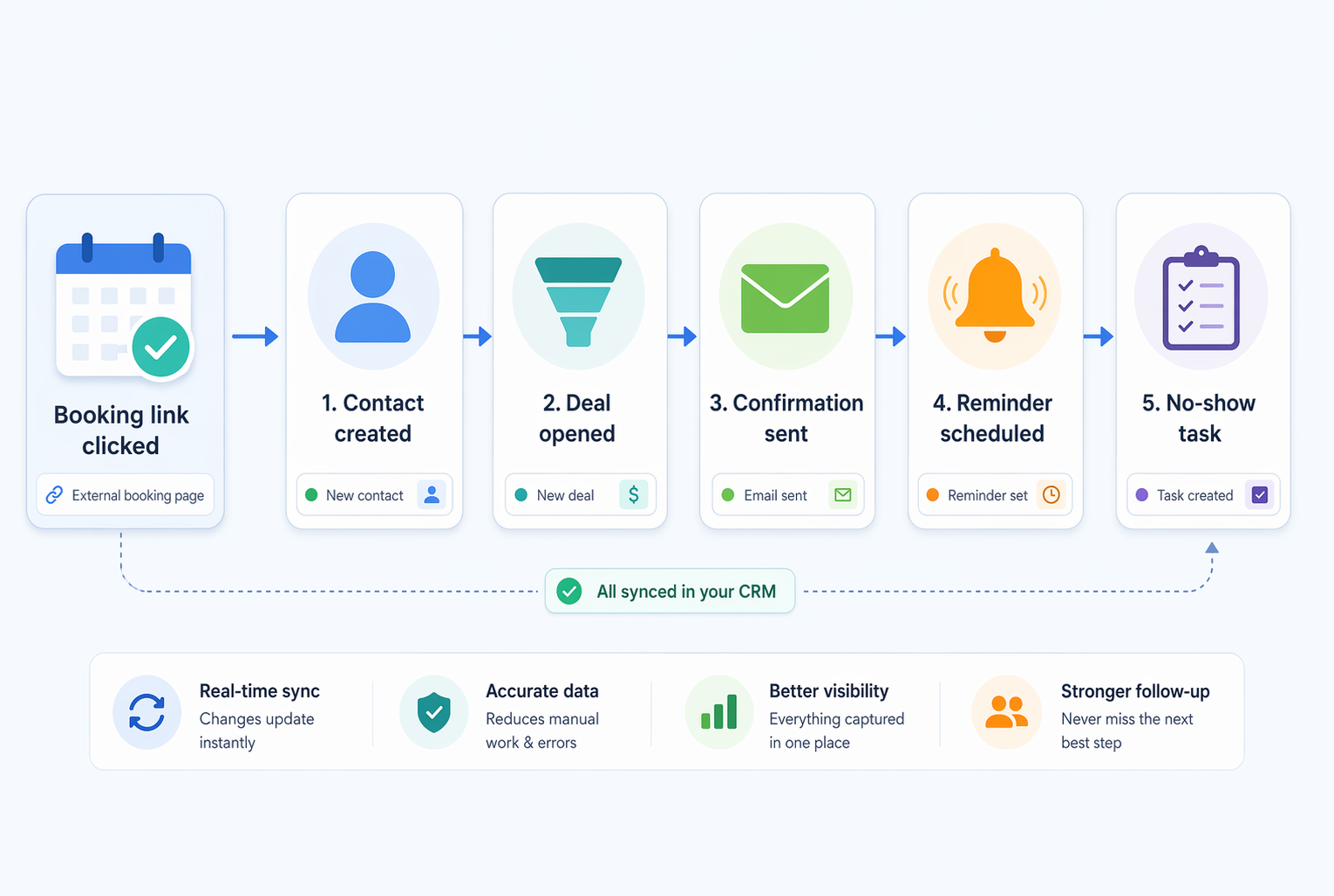
When scheduling and CRM talk to each other, a single booking triggers a chain of useful actions. Here's what that looks like in practice:
A prospect clicks your booking link. They fill in their name, email, and maybe a short question about what they need help with. The meeting hits your calendar. Simultaneously, a contact record appears in your CRM with that form data attached. A deal opens in your pipeline at "Discovery booked." A confirmation email fires with prep instructions. Twenty-four hours before the call, an SMS reminder goes out. If they no-show, a follow-up task gets assigned to you automatically.
None of that requires you to touch anything. You just show up to the call with full context — who they are, what they asked, and where they sit in your pipeline.
Compare that to the manual version: check your calendar, search your inbox for their booking confirmation, copy their email into your CRM, remember to send a reminder, hope they show up, and create a deal after the call if you don't forget.
One version takes six manual steps. The other takes zero. The booked meeting is the trigger, and the CRM handles everything downstream.
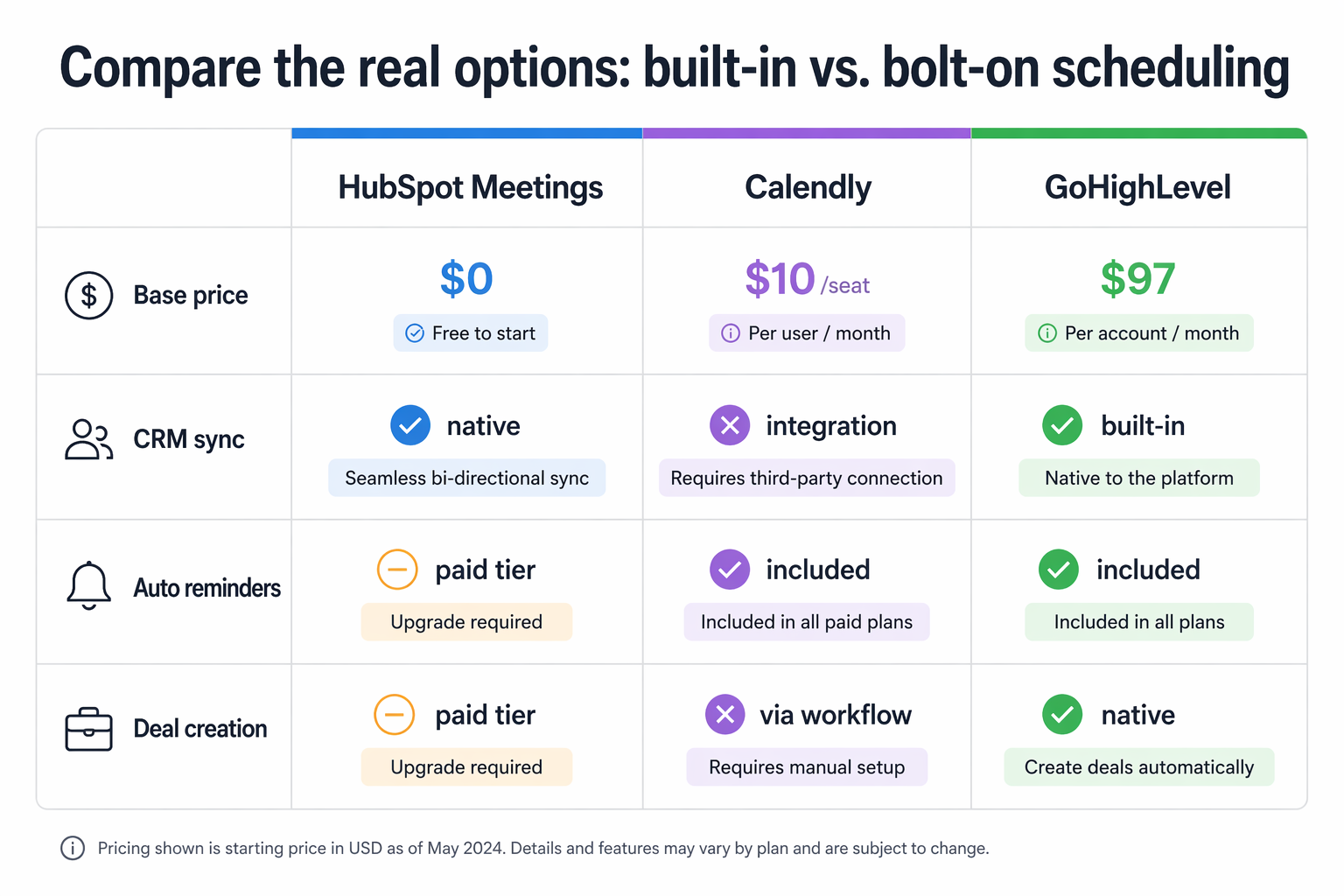
Compare the real options: built-in vs. bolt-on scheduling
You have three paths. Use your CRM's built-in scheduler. Bolt on a dedicated tool like Calendly. Or go all-in-one with a platform that bakes scheduling into the stack. Each has real tradeoffs.
HubSpot Meetings is free with the HubSpot CRM. It syncs with Google Calendar and Office 365, creates contacts automatically, and logs meetings on the timeline. For basic one-on-one booking, it works fine at $0. But workflow automation on booked meetings — round-robin routing, deal creation, reminder sequences — requires HubSpot's Professional tier at $800/month. That's a steep jump for a small team that just wants "booking triggers follow-up."
Calendly is the most popular bolt-on option. Their Standard plan at $10/seat/month connects to HubSpot and includes workflow automations and reminders. The Teams plan at $16/seat/month adds Salesforce integration and round-robin routing. It's flexible, polished, and works with almost any CRM — but it's another subscription and another login.
GoHighLevel builds scheduling directly into the CRM. Calendar booking, reminders, pipeline automation, and follow-up sequences all live in one place at $97/month on the Starter plan. No integration to configure. No sync to break. The tradeoff is that GoHighLevel's scheduler is less polished than Calendly's — fewer customization options, rougher UI on the booking page.
For most consultants and coaches, the right answer depends on what CRM you're already using. If you're on HubSpot Free, adding Calendly Standard gives you full automation for $10/month instead of jumping to $800. If you're on GoHighLevel, use the built-in calendar — it's already there and it already talks to your pipeline.
No-shows cost more than the missed meeting
The average no-show rate across service businesses is 23%, according to SchedulingKit's 2026 industry data. For professional services specifically, it sits around 18%. Either way, roughly one in five booked calls just... doesn't happen.
That's not just 20 minutes of dead air. It's prep time wasted. Pipeline deals stalled. Revenue delayed. If you book 20 discovery calls a month and 4 no-show, at a $2,000 average project value and a 30% close rate, you're looking at $2,400/month in lost opportunity.
CRM-connected scheduling attacks this directly. Automated reminders — email 24 hours before, SMS 1 hour before — reduce no-shows by roughly 30%. That drops your 4 no-shows to about 3. Across a year, that one extra kept appointment per month adds up to 12 more conversations. At the same close rate and deal size, that's $7,200 recovered annually from a reminder that took you five minutes to set up once.
The key is that these reminders fire from within your CRM, not from a disconnected calendar app. That way the reminder includes personalized context: "Hi Sarah, looking forward to our call tomorrow about your onboarding workflow." It looks intentional, not robotic.
If they still no-show, a CRM-triggered follow-up task means you reach out within the hour instead of noticing three days later. Speed matters here — our speed-to-lead research shows the first five minutes determine most outcomes.
Set this up in an afternoon
This isn't a multi-week project. Here's the implementation path for each of the three common setups:
- HubSpot + Calendly: Install the Calendly integration from HubSpot's App Marketplace. Map Calendly form fields to HubSpot contact properties. Create a HubSpot workflow triggered by "Meeting booked" to open a deal and send a prep email. Total setup: about 45 minutes.
- GoHighLevel (built-in): Open Calendars, create a calendar for your booking type, set your availability, and customize the booking form. Then build a workflow: trigger is "Appointment booked," actions are "Create opportunity," "Send confirmation email," and "Send SMS reminder 1 hour before." Total setup: about 30 minutes.
- HubSpot Free (no Calendly): Use HubSpot Meetings directly. It creates contacts and logs meetings automatically. You won't get automated follow-up sequences without upgrading, but you'll at least have every booking in your CRM. Add a Zapier or Make connection if you need automation without the $800 upgrade.
Three mistakes that break the connection after setup
Most teams set this up once and assume it works forever. It doesn't. Here are the three breaks we see most often:
First: OAuth token expiration. Calendly's connection to your CRM uses an authorization token that can expire. If it does, bookings keep landing on your calendar but stop creating CRM contacts. Check your integration status monthly — or set a quarterly automation audit to catch it.
Second: form field mismatch. You add a new question to your booking form but don't map it to a CRM property. The data gets collected and then vanishes. Every time you change your booking form, update the field mapping in your integration settings.
Third: calendar permission changes. When a team member leaves or changes their Google account password, the calendar sync can break silently. The booking page still works, but availability shows stale data — leading to double-bookings or phantom open slots.
All three are preventable with a five-minute monthly check: verify the integration shows "connected," push a test booking through, and confirm the contact appears in your CRM with all fields populated. That one habit keeps the entire chain alive.