CRM vs spreadsheet: when your business actually needs the switch
Here's the uncomfortable math: according to Businesscoot's 2025 market research, roughly 65% of businesses with fewer than 20 employees still track contacts in a spreadsheet. And honestly? For some of them, that's fine. A spreadsheet works until it doesn't. The problem is that most people don't notice the exact moment it stops working — they just notice the symptoms. Leads go cold because nobody followed up. A client gets two different quotes from two different people. Revenue stalls and you can't tell whether it's a pipeline problem or a conversion problem because the data lives in six tabs. If any of that sounds familiar, this is your sign. Let's figure out whether you actually need a CRM vs spreadsheet, or whether you just need a better spreadsheet.
A spreadsheet isn't a CRM — but it plays one until you hit 100 contacts
Let's be clear: a spreadsheet is fine when you're just starting out. If you have fewer than 100 contacts, one person handling sales, and a simple enough process that you can hold your pipeline in your head — a Google Sheet costs nothing and does the job.
The spreadsheet starts failing at a specific point. It's not a contact count. It's when you can no longer answer basic questions without digging. "When did I last talk to this person?" "How many deals are stuck in proposal stage?" "Which leads haven't heard from us in 30 days?" If answering those takes more than 10 seconds, your spreadsheet has become a filing cabinet, not a sales tool.
According to Digital Socius' CRM statistics, 91% of companies with 10 or more employees now use a CRM. The businesses still running on spreadsheets are overwhelmingly small teams — under 20 people — where the pain hasn't hit hard enough yet to justify learning something new.
Five signs you've outgrown your spreadsheet
You don't need all five. Two or three means you're already losing money to your current setup.
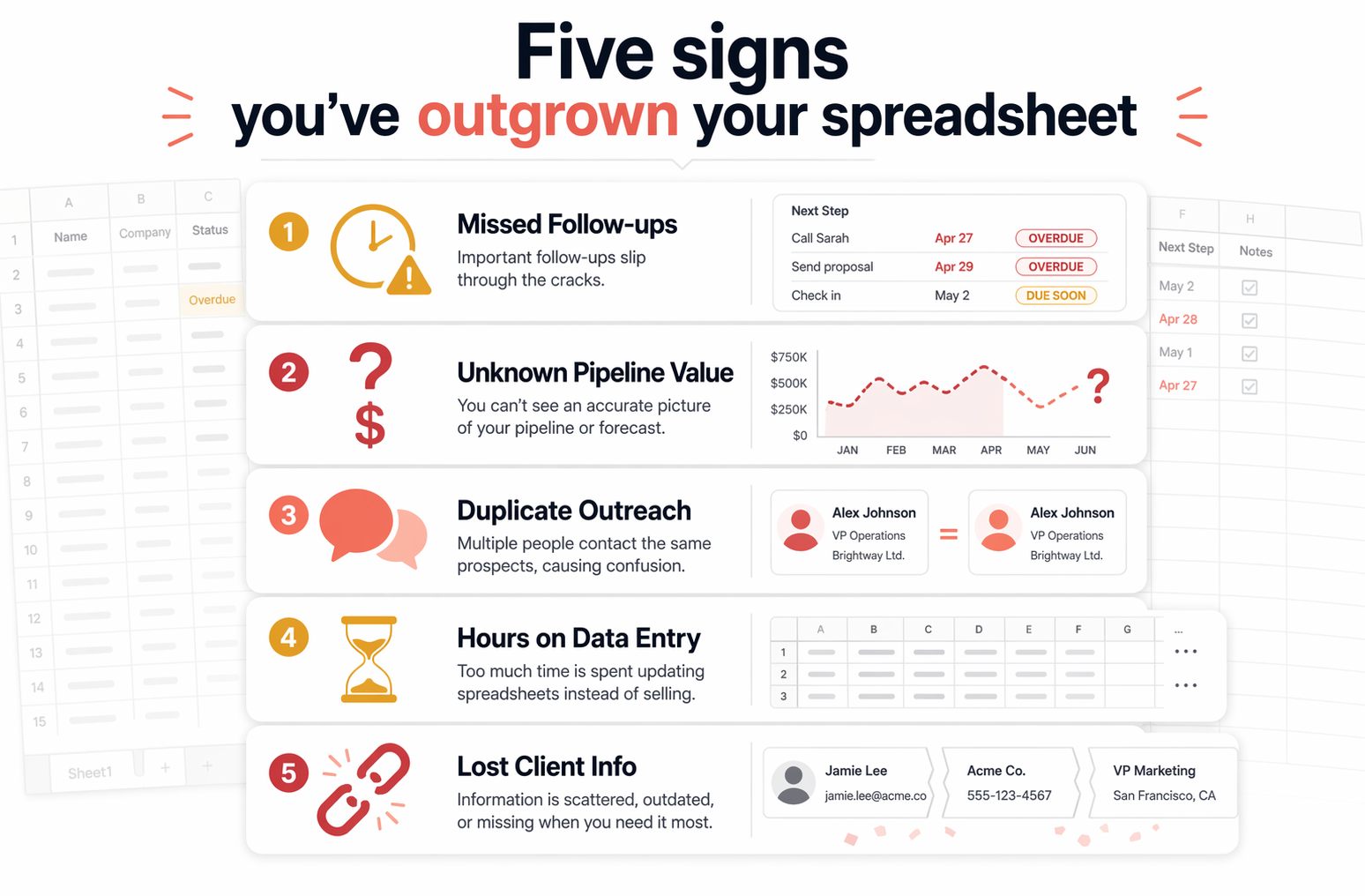
- Leads go cold because nobody owns the follow-up. You added a contact three weeks ago. Nobody called. Nobody emailed. You only noticed when they bought from a competitor. A CRM assigns ownership and sends reminders. A spreadsheet just sits there.
- You can't answer "what's our pipeline worth?" without 20 minutes of counting. If you need to filter, sort, and manually add up deal values to get a forecast, you're wasting time that a CRM gives you in one click.
- Two people contacted the same lead with different messages. The moment a second person touches your sales process, a shared spreadsheet becomes a liability. CRMs show interaction history. Spreadsheets don't.
- You're spending more than two hours a week on data entry. According to AccessNewsWire's 2025 research on spreadsheet-to-CRM migration, businesses reclaim roughly 15 hours per rep per week after switching to a CRM. Even half that number pays for the software.
- You lost a client because information fell through the cracks. Not because you gave bad service — because nobody remembered the renewal date, the last conversation, or the upsell they asked about three months ago.
What a CRM actually gives you that a spreadsheet can't
A CRM isn't a fancier spreadsheet. It's a different tool for a different job. The core differences come down to three things: automation, visibility, and accountability.
Automation means you don't have to remember to follow up. Set a rule — "if no activity in 7 days, send a nudge email" — and it happens without you thinking about it. A spreadsheet can't send an email. A spreadsheet can't create a task. A spreadsheet is passive.
Visibility means you can see your pipeline, conversion rates, and deal velocity without building formulas. Every modern CRM shows this on the default dashboard. In a spreadsheet, you'd need pivot tables, conditional formatting, and a strong coffee to get the same picture.
Accountability means every interaction is logged to a person. Who called this lead? When? What did they say? A CRM timestamps everything automatically. In a spreadsheet, someone has to manually type it — and they usually don't.
According to Salesforce's SMB research, companies that adopt CRM see a 29% average increase in sales revenue. That's not because CRM is magic — it's because nothing slips through the cracks anymore.
Free CRM plans that actually work for small teams
Cost is the biggest reason small businesses stick with spreadsheets. Fair enough. But the "CRM is expensive" objection died a few years ago. Here's what you can get for $0 in 2026:
Any of these replaces your spreadsheet in an afternoon. You don't need to pick the perfect one. You need one that handles your first 30 days — lead capture, follow-up reminders, and a pipeline view. You can always switch later with a migration checklist if you outgrow it.
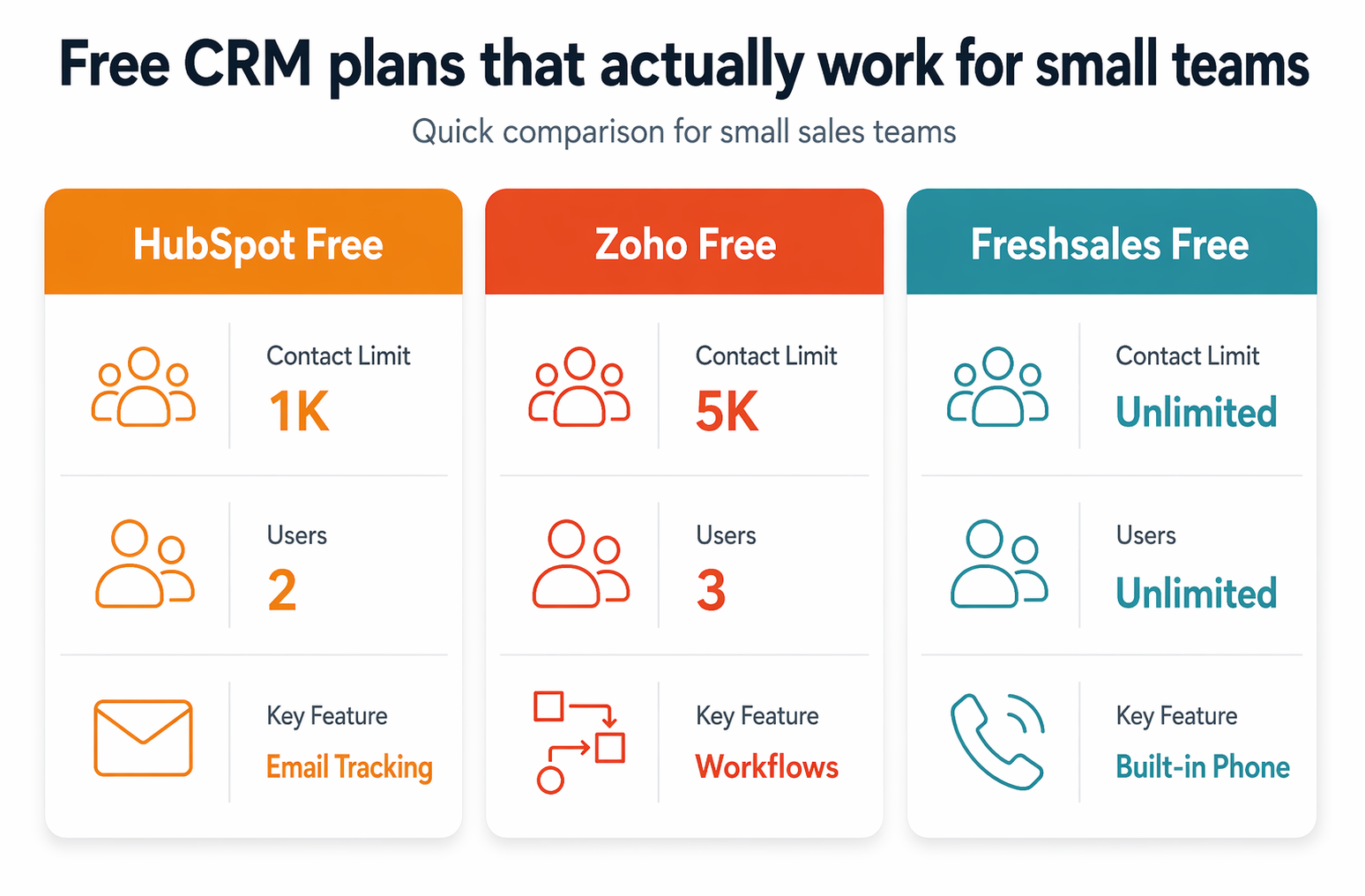
- HubSpot Free — up to 1,000 contacts, 2 users, 1 pipeline, email tracking, meeting scheduler, and basic forms. The catch: HubSpot branding on everything and no automation workflows. Upgrade to Starter at $20/seat/month to remove branding and add sequences.
- Zoho CRM Free — up to 3 users, 5,000 records, 5 basic workflow rules, email templates, and web forms. More feature-rich than HubSpot's free plan for actual CRM tasks, but the interface takes more time to learn. Standard plan starts at $14/user/month billed annually.
- Freshsales Free — unlimited users (in practice), built-in phone and email, AI-powered lead scoring even on the free tier, and a solid mobile app. Best option if your sales process is phone-heavy.
How to switch without losing a single contact
The actual migration takes less time than you think. Most people put it off imagining a weekend-long data project. In reality, if your spreadsheet is halfway organized, you're looking at 30 to 60 minutes.
Step one: export your spreadsheet as a CSV. Every CRM on earth accepts CSV imports. Step two: map your columns to the CRM's fields — name, email, phone, company, deal stage. Step three: import, review for duplicates, and you're live.
Here's the part most guides skip: don't import everything. If your spreadsheet has 400 contacts and 250 of them haven't heard from you in a year, don't bring the dead weight. Import active leads and current clients. Start clean.
If you want a more detailed walkthrough, we wrote a full guide on cleaning your CRM data before and after migration. The same principles apply when you're moving from a spreadsheet — arguably they matter more because spreadsheet data is usually messier.
When you should actually stay on a spreadsheet
Not everyone needs to switch. A CRM adds value when it saves you time, prevents lost deals, or gives you visibility you didn't have. If none of those apply yet, you're spending effort solving a problem you don't have.
Stay on your spreadsheet if: you have fewer than 50 active contacts, you're the only person selling, your sales cycle is short enough that nothing goes cold, and you're not losing track of follow-ups. That probably describes your first few months in business.
The moment one of those conditions changes — a second person starts selling, contacts cross 100, or you realize you forgot to follow up with someone who was ready to buy — that's your trigger. Don't wait for the pain to compound. The longer you wait, the messier your data gets, and the harder the eventual migration becomes.
The average CRM ROI is $8.71 for every dollar spent, according to Salesforce. But that number assumes you have enough activity to benefit from the system. If you're doing five deals a month, a spreadsheet is fine. If you're doing twenty, you're already losing money without one.