CRM payment integration: stop billing from a separate app
You close a deal in your CRM, open a second tab, and retype the same client info into Stripe or QuickBooks to send an invoice. When the payment lands, you switch back and manually update the deal stage. When it doesn't land, you check two dashboards to figure out who owes what. This is how most small businesses bill their clients, and it's completely unnecessary. CRM payment integration connects your invoicing to the same system where your contacts and deals already live — so payments update records, fire automations, and feed your reports without anyone toggling between apps. According to InvoiceQuickly's 2026 invoicing data, businesses without invoice automation spend $12.88 processing a single invoice and take 17.4 days to complete the billing cycle. Your CRM can cut both numbers dramatically. You just haven't told it to yet.
The real cost of billing outside your CRM
Most small businesses don't track how much their invoicing actually costs. It feels like five minutes here and there. But those minutes add up to a second job nobody applied for.
According to MarketingScoop's SMB invoicing report, small businesses spend an average of 14.4 hours per month on manual invoice processing. That's nearly two full workdays every month — typing, chasing, and reconciling payments your CRM could handle automatically.
The late-payment side is worse. The same research found that 56% of U.S. small businesses regularly carry unpaid invoices, with an average outstanding balance of $17,500. A third write off more than $10,000 per year in bad debt — money they earned but never collected.
The leakage compounds beyond invoices. According to Mobileforce's quote-to-cash analysis, organizations lose an average of 9.2% of annual revenue to disconnected billing and contract workflows. For a business doing $500,000 a year, that's $46,000 walking out — not because the service was bad, but because billing wasn't connected to sales.
You can't automate what your CRM can't see. If payment data sits in Stripe and deals sit in HubSpot, the gap between "sold" and "paid" requires a human to bridge it every single time. That's the gap CRM payment integration closes.
What CRM payment integration actually looks like
CRM payment integration isn't "accept credit cards on your website." That's payment processing. Integration means payment events talk to your CRM records — automatically, in real time.
When it's wired correctly, three things happen without anyone touching a keyboard:
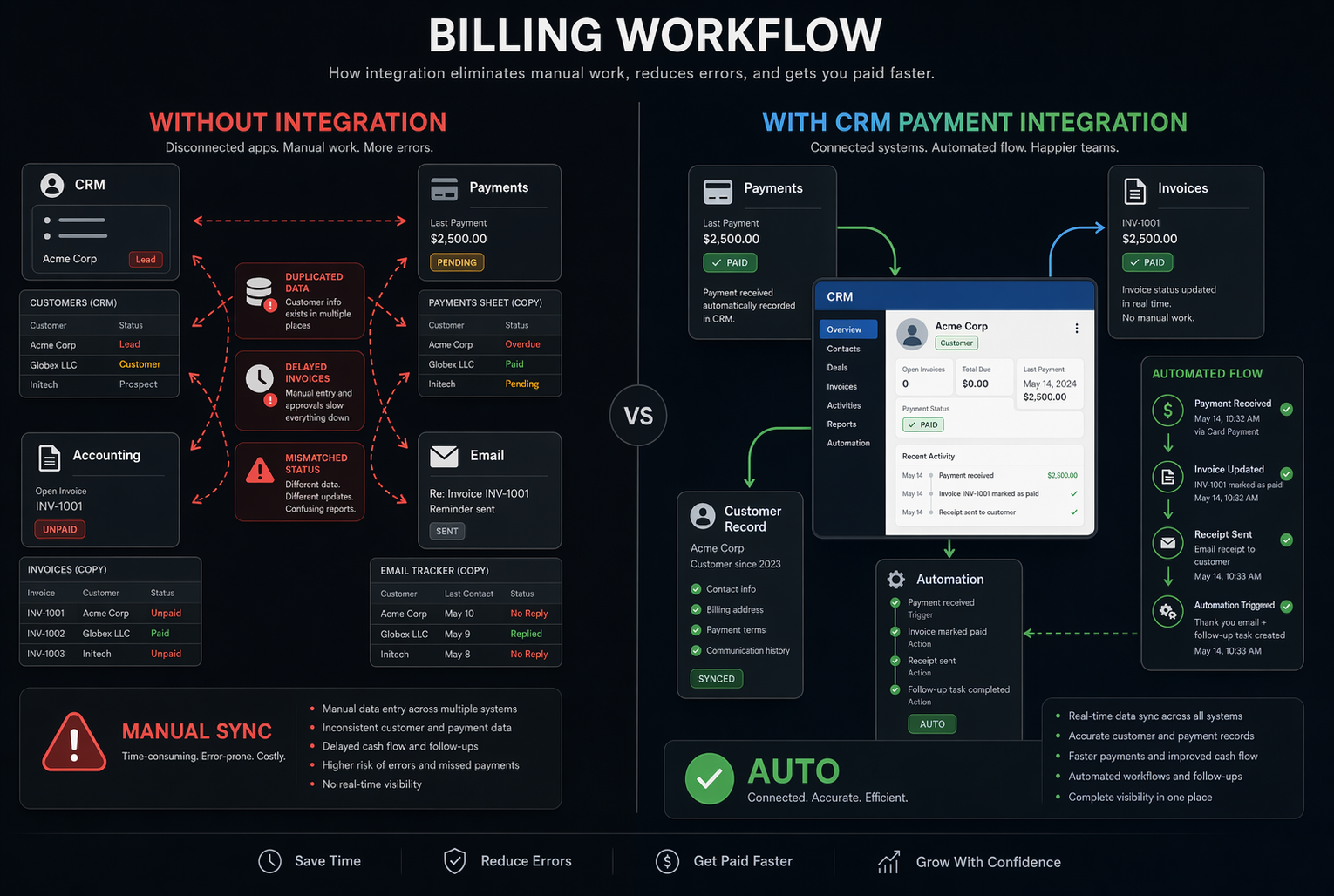
- Payment status updates your deal. A deal moves from "Invoice Sent" to "Paid" the moment money hits your account. No manual stage changes.
- Failed or late payments trigger alerts. Your team gets a task or notification when a card declines or an invoice goes 14 days overdue — before the client ghosts.
- Revenue ties to contacts and pipelines. You can report on collected revenue, not just projected revenue. Your forecast reflects what actually happened — not what you hoped would happen.
What HubSpot, GoHighLevel, and Stripe actually charge
Let's compare the three CRM payment setups we see most with small businesses, coaches, and agencies.
- HubSpot Commerce Hub charges 2.9% + $0.30 per card transaction and 0.5% (capped at $5) for ACH, according to ShuttleGlobal's 2026 fee breakdown. You can create payment links, embed them in emails and quotes, and set up recurring billing. Payment data writes directly to deals and contacts. The catch: workflow automation around payments requires the Professional tier at $800/month. On Starter, you can collect money but can't trigger automations when it arrives.
- GoHighLevel uses Stripe as its payment processor, per netpartners.marketing's payment guide. You pay Stripe's standard 2.9% + $0.30 plus GoHighLevel's plan — starting at $97/month with unlimited contacts. Payment-triggered automations work at every tier. You can send invoices, accept recurring billing, and fire onboarding sequences the moment a payment clears. One downside: refunds go through Stripe's dashboard, not GoHighLevel's.
- Standalone Stripe + Zapier: if your CRM doesn't have native payment features, you can bridge the gap with Zapier. A successful Stripe charge fires a Zap that updates a deal, applies a tag, or creates a task. This works, but it adds 1–5 minutes of delay, costs $20–$70/month for Zapier on top of Stripe's fees, and breaks when credentials expire or field names change. It's a bridge, not a long-term fix.
What you can automate once payments live in your CRM
Collecting payments through your CRM isn't just about cutting data entry. It opens five automations that are impossible when billing lives in a separate app.
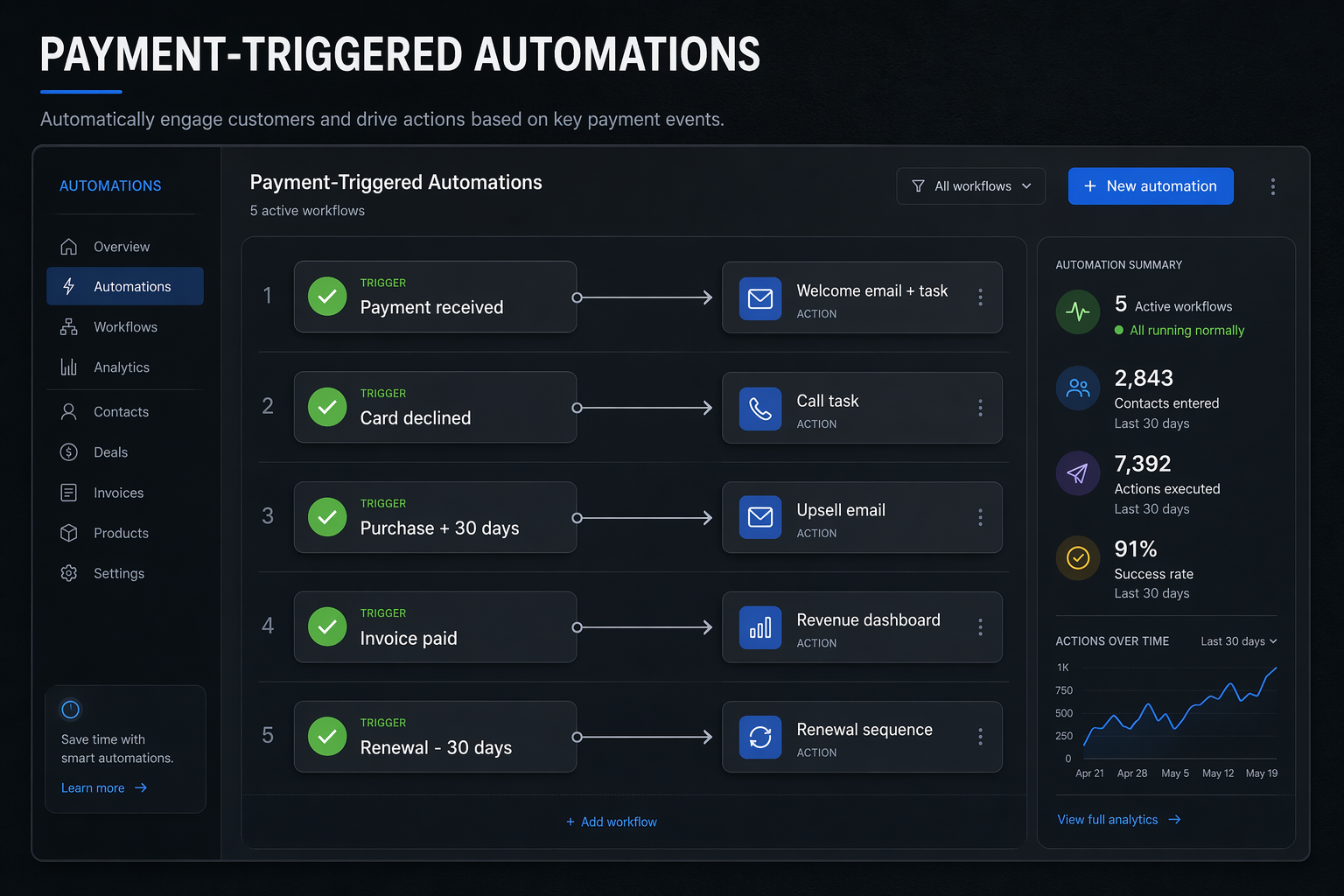
- Instant onboarding: the moment a client pays, fire a welcome email, create a project task, and assign the account to the right team member. No waiting for someone to spot the Stripe notification.
- Failed payment recovery: when a card declines, a task lands in your CRM within the hour. One coaching practice we work with recovered $4,200 in a single quarter by adding a same-day outreach task to their decline workflow.
- Timed upsell sequences: tag contacts who've paid for your base package. Thirty days later, send them a targeted offer for your premium tier. The timing runs automatically, and it's based on a real purchase — not a guess.
- Revenue-accurate forecasting: see collected revenue alongside your pipeline. When your CRM knows what's been paid versus invoiced versus overdue, your forecasts stop lying to you. If you've already built CRM sales forecasting, adding live payment data makes those numbers trustworthy.
- Renewal triggers: for subscription or retainer businesses, start renewal sequences 30 days before expiration. Payment data tells you whether the last charge went through before you ask for the next one.
Set up CRM payment integration without breaking your billing
You don't need to migrate everything overnight. Most businesses can move to CRM payment integration in phases without disrupting active subscriptions or confusing clients.
Start with new deals. Leave your current invoicing setup running for existing clients. Route every new deal through your CRM's payment flow instead. This lets you test payment links, invoice templates, and automation triggers with real money before you touch anything legacy.
Migrate at renewal. When an existing subscription or retainer comes up for renewal, move it into the CRM payment system. The client sees the same payment experience. You get the data in the right place going forward.
Retire the old tool last. Once your final legacy subscription has renewed through the CRM, cancel the standalone billing app. Don't keep paying for two systems a day longer than you need to.
Watch for these during the switch:
- Test your payment link first. Push a $1 test charge and confirm the deal updates, tags apply, and automations fire correctly.
- Check your tax setup. CRM payment tools handle sales tax differently than QuickBooks or Xero. Verify your rates before you send a real invoice.
- Confirm receipt emails. Make sure your CRM sends automatic payment confirmations. Clients expect them, and your accountant needs them.
- Give your bookkeeper a heads-up. Changing where payments land changes their reconciliation workflow. A five-minute call now saves a month-end fire drill.